T-RackS 6 runs on Apple Silicon and 64‑bit Intel Macs with macOS 10.15 Catalina or newer, opening as an Audio Units, VST 3, or AAX plug‑in inside a DAW, or as a standalone Mastering Console outside one. That dual personality shapes where it fits in a session — across individual tracks, on buses, and across the stereo bus for final mastering — without hopping between different tools.
- Track inserts: Pull in ONE for broad, fast dial-in of sheen or warmth, or EQual for clean, precise cuts and boosts on a vocal or snare track.
- Drum bus & groups: Dyna‑Mu adds the gluey, variable‑mu style compression that pulls a group together before it hits the master fader.
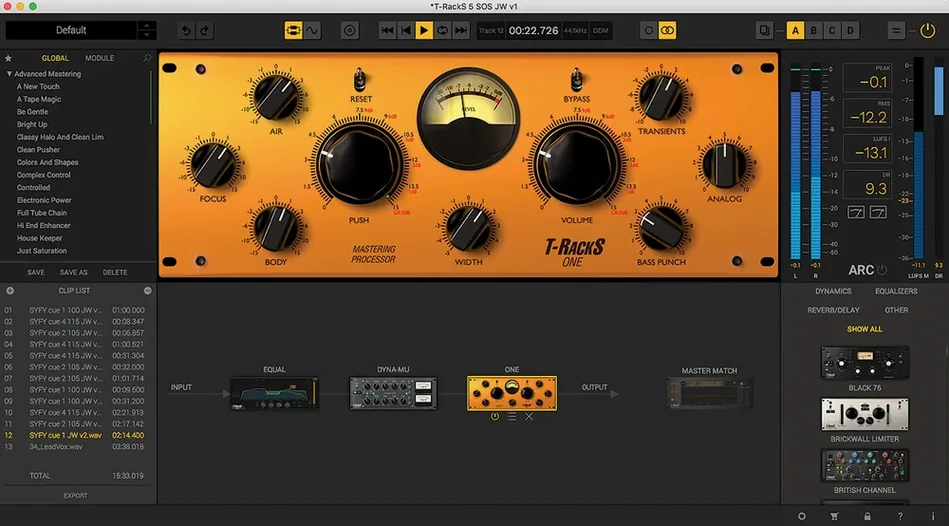
- Master bus: Chain the new processors with older favorites, using the Module Manager to reorder units for gain staging or parallel experiments.
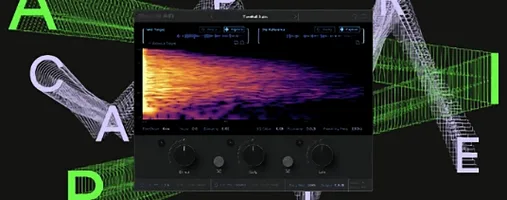
- Reference matching: Master Match X listens to a reference track and maps its spectral balance and perceived loudness onto your mix — helpful when you know the tone you want but not which knob to reach for.
- Album finishing: The standalone console sequences tracks, trims fades, and embeds metadata, so a four‑song EP goes out as a coherent release, not four disconnected exports.
Twenty‑four‑bit or 32‑bit floating‑point sessions at up to 192 kHz are fair game, and the nine included processors cover ground from character EQ to broad mix‑bus leveling. If you already track and edit in a DAW, T‑RackS 6 sits on the same machine, on the same buses, sharing the same session — no round‑tripping, no extra hardware.
Mastering a three-song EP, start to finish
I keep a folder of reference tracks — songs I know sound right on car speakers, earbuds, and a friend’s living-room system. For a recent three-song indie-pop EP, I pulled T-RackS 6 into the standalone Mastering Console and built the same chain across all three mixes, tweaking each one individually.
The workflow looked like this:
- Load and listen. Drag all three mixes into the console. Hit play on the first track without any processing. Make notes — too much low-mid mud, snare transient pokes out, vocal gets lost in the chorus.
- Reference match first. Open Master Match X on the first insert and feed it the reference track. Let it map the curve, then dial the Intensity back to about 65%. Full strength can over-sculpt; I treat it as a starting point, not a preset to trust blindly.
- EQ cleanup. Insert EQual after Master Match. A gentle high-pass at 30 Hz, a narrow dip around 350 Hz to clear the mud, and a broad 2 dB lift at 10 kHz for air. EQual’s analyzer overlay helps confirm what my ears already suspect.
- Glue compression. Dyna-Mu sits third in the chain. Slow attack, fast release, 1–2 dB of gain reduction on the loudest sections. It rounds the transients without flattening the choruses.
- Loudness and limiting. ONE goes last, handling final peak control and a subtle top-end lift. I push it until the loudest section kisses the ceiling, then back off half a dB.
- Copy chain, adjust per track. Save the chain as a preset, load it on track two, and adjust EQual cuts to match that mix’s tone. Track three needs a slightly faster Dyna-Mu release — easy tweak.
- Album assembly. Set track gaps to two seconds, trim any stray noise at the heads and tails, type in the metadata, and export all three as 24-bit WAVs in one pass.
Having the chain, the sequencing, and the export all inside one window means I’m not bouncing between three different applications just to finish a short release.
Console opens in three seconds on Apple Silicon
On an Apple Silicon Mac, the standalone console opens in under three seconds — about the same as launching a lightweight DAW session. Plug-in scanning in Logic Pro picks up all nine processors immediately, no rescan needed after the initial install.
CPU use stays reasonable for the kind of work T-RackS is built for. A chain of four modules — Master Match X, EQual, Dyna-Mu, and ONE — hovers around 8–12% on a single stereo track on an M-series chip. Oversampling pushes that higher, but I rarely find oversampling necessary on a master bus unless I’m doing extreme high-frequency boosts. The 32-bit floating-point path means I’m not worrying about clipping between modules, even when I push one processor hard into the next.
Memory footprint is modest. The standalone console sits around 200 MB of RAM with a five-module chain loaded. No sluggish GUI redraws, no lag when dragging modules to reorder them in the chain. The Module Manager’s drag-and-drop is snappy even with all sixteen slots filled.
Stability-wise, I’ve run sessions with T-RackS plug-ins across twelve or more tracks — individual EQual instances on vocals, Dyna-Mu on the drum bus, ONE on the master — without a single AU validation hiccup. The VST 3 and AAX versions behave the same way in Ableton Live and Pro Tools. No crashes during offline bounce, no dropped audio when switching sampling rates mid-session. It’s the kind of quiet reliability that doesn’t make headlines but keeps a session moving.
Why a match curve is a suggestion, not a finish line
Most early missteps with T-RackS 6 come from treating it as a preset machine. I see people load Master Match X, hit “Match,” and export without listening to what the curve actually did. A reference match is a suggestion — it doesn’t know that your snare is three decibels too hot or that the vocal has a 2 kHz resonance from a budget condenser. Use it, then adjust.
Another common slip: stacking modules in the wrong order. Slapping a limiter before EQ means you’re amplifying frequencies that should’ve been cut earlier. The Module Manager lets you drag processors around freely — take advantage of that. A sensible default is EQ first, then dynamics, then limiting, but parallel chains and creative routing reward experimentation.
Beginners also overlook the dithering options. Exporting a 24-bit file from a 32-bit session without dither isn’t the end of the world, but if you’re delivering 16-bit masters, pick one of the four dither types and listen to the noise shaping. It’s a small step that signals you’ve finished the job properly.
Finally, don’t ignore the gain staging between modules. Just because the internal path is 32-bit floating-point doesn’t mean every processor sounds best when it’s slammed. Keep an eye on the input and output meters between stages — a hot signal into Dyna-Mu behaves very differently from a moderate one.
Save whole chains, not just single processor settings
A handful of details in T-RackS 6 make daily work smoother, and they’re easy to skip if you dive straight into the big processors:
- Module Manager presets. You can save not just individual processor settings but entire chains — module order, parallel routing, everything. I keep one for “quick vocal polish” and another for “drum bus glue.” Switching between them is two clicks.
- Parallel slots. The chain supports up to sixteen slots in series or parallel. Splitting a signal into parallel compression — one dry, one crushed — takes seconds with the routing view. No extra buses in the DAW needed.
- Album metadata. The standalone console embeds track titles, artist name, and ISRC codes during export. If you’re sending files to a distributor, that data is already in the WAV headers. One less utility to open.
- Multi-format export. Export the same album as 24-bit WAV for archival, 16-bit WAV with dither for CD plant reference, and a high-quality MP3 for client preview — all in one pass, no re-rendering.
- Keyboard shortcuts. Space bar starts and stops playback in the standalone console. Arrow keys nudge track selection. Small things, but they spare you from reaching for the mouse every thirty seconds during a long mastering session.
- Scaleable interface. The redesigned GUI scales cleanly on Retina displays and external monitors. The metering stays crisp at any size, which matters when you’re squinting at gain reduction numbers late at night.
If you’re grabbing a t-racks 6 download for the first time, spend an afternoon building
- macOS 10.15 Catalina or later
- Apple Silicon or 64‑bit Intel processor
- 64‑bit operating system
Questions from the stall
Does T‑RackS 6 work natively on Apple Silicon Macs?
Yes, it supports Apple Silicon and 64‑bit Intel Macs running macOS 10.15 Catalina or later.
Can I use T‑RackS 6 without a DAW?
Yes, it includes a standalone Mastering Console for album assembly, sequencing, and metadata embedding outside your DAW.
What new processors come with version 6?
Version 6 adds four processors: Master Match X, Dyna‑Mu, EQual, and ONE, bringing the collection to nine total.
Notes from other shops 0
Sign in or open a shop account to leave a note.
No notes yet. If you've used this on a shop Mac, tell me how it went.