If you’ve ever shaped a kick in Nicky Romero’s original plugin, KICK 1.1.1 will feel like a familiar workshop with sharper tools. The core idea is still splitting the drum into two parts — a synthesized sub oscillator and a sampled click layer — so you can treat the weight and the attack independently. The update from Sonic Academy keeps that split-screen thinking but opens up the sub section beyond a simple sine wave, giving you alternate waveforms to carve out low end that sits differently in a mix.
Shape sub thump and transient snap in separate layers
- Sub oscillator with waveform choice — pick from multiple shapes to dial in the fundamental thump, from round and warm to something with more harmonic edge.
- Sampled click layer — blend in the beater attack and transient snap so the drum cuts through a busy arrangement.
- Over 230 factory presets — starting points that cover electronic, acoustic-style, and heavily processed kicks, all editable down to the last detail.
Split layers let sub glue with bass while click cuts through
Because the sub and click live on separate layers inside the plugin, you can push the low thud to glue with a bass line without losing the crack that hits on small speakers. The 64-bit Intel build runs inside your Mac DAW, and the English interface keeps every control in plain sight — no menu diving between the two sound engines.
Don't just load a preset — shape click against your sub
Loading a preset and calling it done is the big one. KICK gives you that split architecture for a reason — a click that punches through on headphones can disappear on a club system if you don't shape it against the sub. I watch people crank the sub level without touching the waveform selector, then wonder why their kick fights the bassline instead of sitting under it. The alternate waveforms aren't just decoration; swapping from a pure sine to something with a little harmonic content changes how the low end carves out space in a mix without needing more volume.
Another trap is stacking distortion and compression in the wrong order. The three distortion algorithms hit differently depending on what's feeding them, and slapping the limiter before the drive stage chokes the transients you're trying to bring forward. Beginners also tend to ignore the click layer's own shaping areas — three separate bands that can tighten or spread the attack — and jump straight to the EQ instead. Fix it at the source first, then polish.
Solo the sub oscillator and flip waveforms on one note
Spend your first hour auditioning presets with the sub oscillator solo'd. Flip through the waveforms while holding a single note and listen to how each one interacts with your monitoring — what feels right on nearfields might be completely wrong on a subwoofer. Tuck that knowledge away before you touch a single effect.
Next, pick three presets you like and rebuild them from scratch. Zero out the click layer on one, zero the sub on another, and build the third from an init patch. You'll learn more about the click-shaping bands in twenty minutes of rebuilding than you will in a week of tweaking presets. Pay attention to how the low-frequency oscillator interacts with the sub pitch envelope — subtle modulation here creates movement that stops a static kick from sounding like a sample loop.
Tip: route KICK to its own output channel in your DAW on day one. Being able to process the sub and click together through external effects later is useful, but hearing the raw output in isolation while you learn the plugin teaches your ears what's actually coming out of it.
A kick for a synthwave track, start to finish
Let's say you need a kick that hits with that gated-reverb punch but still has a round low end for a bassline that's driving eighth notes underneath. Start by loading a blank state — no preset, everything flat.
In the sub section, pick the waveform with a slight harmonic bump above the fundamental rather than the clean sine. Set the pitch envelope so the sub drops quickly over about 120 milliseconds — enough to give it a knock but not so long it bends into the bass part. Tune the fundamental to the root of your track, or a fifth above if the bassline already hogs the tonic. Keep the sub level conservative; the body will come later from the click shaping.
Move to the click layer. Pick a sample with a hard beater transient and just enough noise tail to feel like a real drum hit, not a digital tick. Use the three click-shaping bands to roll off some of the high-end fizz above 8 kHz — synthwave kicks sit darker than modern EDM — and boost the band around 2 kHz by a couple of decibels to get the snap poking through a dense synth pad. Blend the click and sub faders until the attack feels sharp but the weight still comes from below 100 Hz.
Now the effects chain. Add a touch of drive with the gentler distortion algorithm — just enough to warm the transient, not enough to fuzz it. Follow with the compressor set to a medium attack and fast release, knocking off two to three decibels of gain reduction, which glues the click and sub together. The EQ comes last: a narrow cut around 200 Hz if the body sounds boxy, and a gentle high-shelf boost at 10 kHz for air if the click layer lost too much sparkle during shaping. Finally, nudge the limiter just enough to catch peaks without flattening the dynamic front of the drum.
Bounce it and listen against the bassline with the rest of the arrangement playing. If the kick still disappears, go back and widen the click's stereo presence slightly with the plugin's built-in tools rather than pushing the sub louder — the low end should stay mono, but the attack can spread a little without losing focus.
A more streamlined two-layer flow than Kick 2's deeper editing
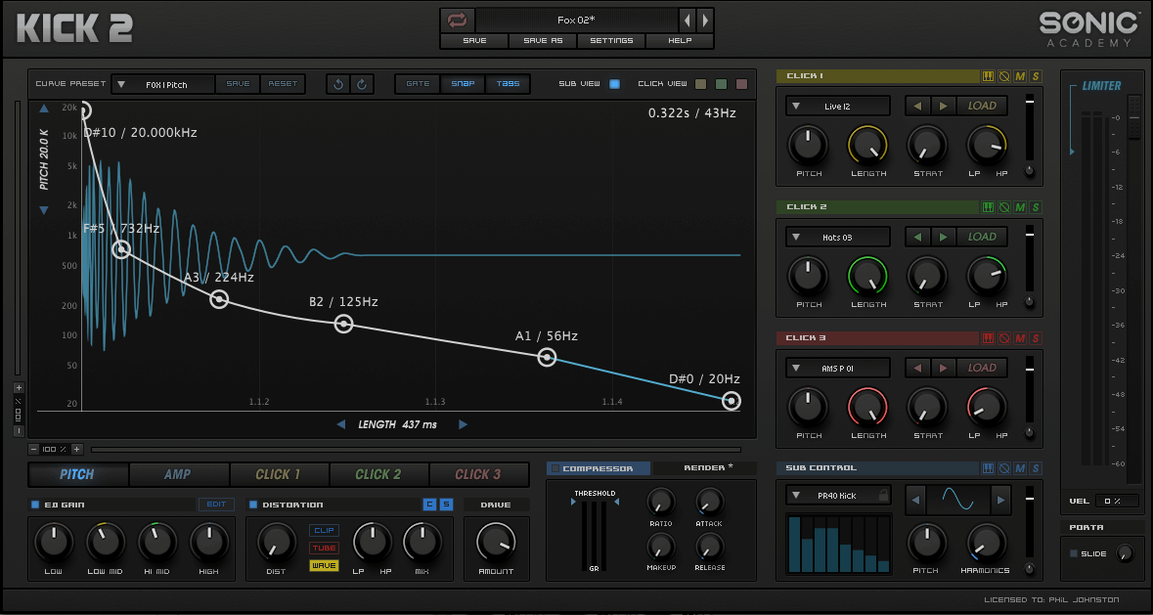
Next to something like Kick 2 by the same developer, KICK 1.1.1 feels more streamlined. Where Kick 2 added more click-editing zones and deeper modulation routing, this version keeps the workflow direct — two main layers, three click bands, one LFO. If you've looked at a kick 2 torrent and wondered whether the extra complexity is worth it, that depends on how much time you want to spend inside a single drum plugin. For quick, musical results with fewer decisions, the earlier architecture here wins.
Compared with a full drum synthesizer like Punchbox or a sample-replacement tool like Kick 3, KICK sits in the middle ground. It doesn't try to be a complete drum designer with multiple engines and layered samples — it focuses on the kick as a two-part instrument and gives you just enough effects to finish the sound without leaving the window. Someone chasing a kick 3 vst torrent for its multi-sample layering and advanced transient importing might find KICK limiting, but someone who wants a kick done in five minutes with character and control will click with it faster. The trade-off is breadth versus speed, and for electronic producers who build tracks around the kick rather than slotting one in at the end, the narrow focus is a strength.
A fine-tuning update from Sonic Academy quietly lands in Kick 3 1.1.8, tidying up a handful of loose internal threads.
- macOS 10.13 or later
- Apple Silicon or Intel 64-bit Mac
Questions from the stall
How is KICK 1.1.1 different from the original Kick by Nicky Romero?
This is the updated version by Sonic Academy, now called Kick 2 on the official page. It adds more sub-bass waveforms and a larger preset library while keeping the same dual-layer approach.
Does the plugin only use a sine wave for the sub?
No, it supports additional waveforms beyond a sine wave, so you can shape the low-end character with more harmonic variety.
How many presets come with the plugin?
It includes over 230 factory presets, giving you a wide range of starting points for different genres and mix requirements.
Notes from other shops 0
Sign in or open a shop account to leave a note.
No notes yet. If you've used this on a shop Mac, tell me how it went.