You've got a bassline and a kick fighting for the same low-end space. Instead of setting up a traditional sidechain compressor with bus routing, you drop Submerge onto the bass track. You set it to react to the kick's audio signal, dial in the depth, and the bass ducks cleanly out of the way on every hit.
Three trigger modes that drive the ducking
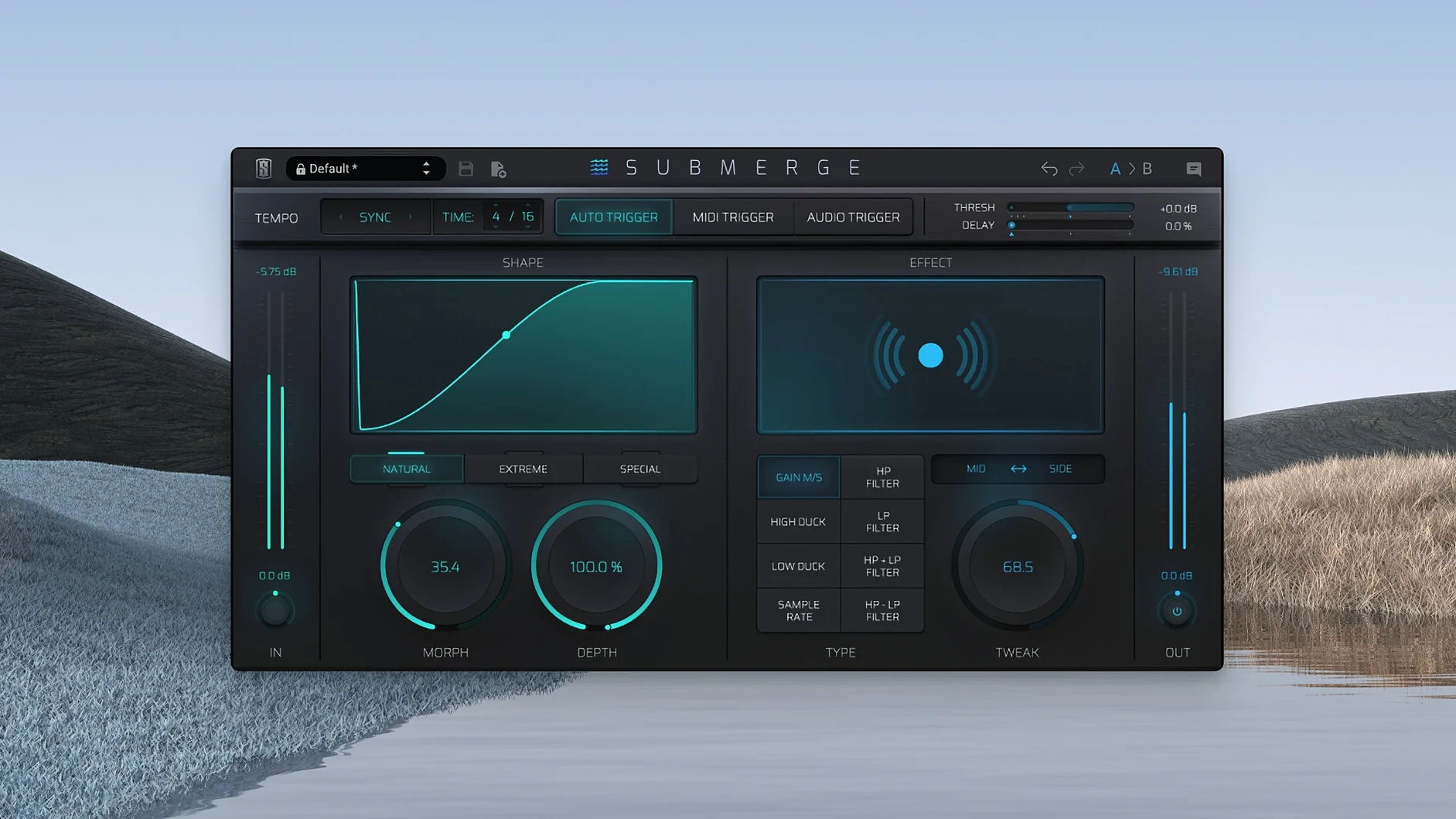
A handful of controls do the heavy lifting. The three trigger modes give you different ways to drive the effect. Auto mode reads the incoming audio and ducks based on its own transients. Audio trigger mode listens to an external signal — your kick drum, for instance. MIDI trigger mode responds to MIDI notes, so you can write ducking patterns by hand.
Once triggered, Submerge's curve types decide the character of the volume dip. Natural gives a smooth, musical ducking release. Extreme pushes harder into pumping territory. Custom lets you draw your own shape for precise control over how the signal breathes.
Going deeper with tone and space
It's not just about volume. The high-pass and low-pass filters let you duck only a specific frequency band, so the bass cuts away while the mids stay present. Mid/Side processing adds another layer — duck the center while leaving the stereo edges untouched, or the reverse. For a plug-in that removes routing headaches, Submerge gives you a surprising amount of control over what moves and what stays put.
Light CPU load and instant redraws on Apple Silicon
Submerge loads quickly and sits light. On an Apple Silicon Mac running a medium-sized mix session, I haven't seen it budge the CPU meter in any meaningful way. The interface redraws are instant, even when you're dragging the custom curve points around while playback is running. No audio dropouts on insert, no sluggish plugin scans — it behaves like a utility that was coded to stay out of the way.
Stability has been uneventful in the best sense. Across Logic Pro and Ableton Live, the plug-in hasn't caused a single crash or hung note in daily use. The three trigger modes switch cleanly without pops or timing glitches, and MIDI trigger mode follows note input tightly, even with fast sixteenth-note patterns. If you're working on a deadline and don't have time for finicky plugins, that kind of predictability matters.
Memory usage is modest. Compared to a full-featured compressor running an external sidechain, Submerge uses noticeably less RAM — it's doing one focused job rather than modeling analog circuitry. For producers working on laptops or older Apple Silicon machines, that leaves more headroom for virtual instruments and convolution reverbs.
One-knob tempo-synced ducking for electronic producers
Electronic music producers get the most obvious win. Submerge turns the classic sidechain pump into a one-knob decision — drop it on a pad or bass track, set it to auto mode, and the tempo-synced ducking locks in immediately. The sample-rate reduction effect doubles as a lo-fi texture tool, which fits neatly into genres where gritty movement is part of the aesthetic.
Mix engineers working on dense pop or rock mixes will reach for the audio trigger mode and Mid/Side processing. Ducking the low end of a stereo synth while leaving the sides intact keeps the track wide without sacrificing kick clarity — something that takes multiple routing steps with stock plugins. Sound designers can push things further with extreme curves and inverted shapes, turning a utility effect into a rhythmic modulation tool. If you've ever searched for a slate digital mac torrent looking for creative mixing tools, Submerge is the kind of plug-in that justifies the hunt — it does one thing with a lot of nuance.
Trigger-based shaping versus LFO-driven volume curves
Next to Xfer LFO Tool, Submerge takes a different approach. LFO Tool is fundamentally an LFO-driven volume shaper with filter capabilities — powerful, but you're drawing modulation curves that run freely or sync to tempo. Submerge is trigger-based at heart, reacting to audio or MIDI events. If you want precise, repeating shapes independent of the input signal, LFO Tool gives you that. If you want the ducking to follow the kick's actual dynamics, Submerge feels more natural.
Wavesfactory Trackspacer does spectral ducking — it carves out frequencies from one track based on what another track is playing, using an internal sidechain. Submerge doesn't do spectral analysis; it ducks broadband or filtered bands. Trackspacer is brilliant for clearing space transparently, but Submerge is more about shaping the feel of the movement. The two complement each other more than they compete.
Against Kickstart 2 by Nicky Romero Cableguys, Submerge offers more routing flexibility. Kickstart 2 works with a library of pre-drawn volume shapes, and while it now includes audio triggering, its heart is still the preset curve browser. Submerge's custom curve editor plus the three trigger modes give you finer real-time control. If you've come across a slate digital crack mac while looking for sidechain options, the difference you'll notice is that Submerge rewards tweaking in context — the Morph and Tweak knobs let you adjust the groove without leaving the plugin window.
- macOS 11 or later
- Apple Silicon native
Questions from the stall
What trigger modes does Submerge have?
It has three: auto, which reacts to the incoming signal; audio, which responds to an external side-chain input; and MIDI, which follows incoming MIDI notes.
Can I filter which frequencies get ducked?
Yes, the built-in high-pass and low-pass filters let you target a specific frequency band, so only that range ducks while the rest of the signal remains unchanged.
Does Submerge support stereo processing?
It does. Its Mid/Side processing mode means you can apply ducking to the center channel, the side channel, or both independently.
Notes from other shops 0
Sign in or open a shop account to leave a note.
No notes yet. If you've used this on a shop Mac, tell me how it went.