This version keeps the same solid processing on modern Macs.
Compatibility check — macOS 11 (Big Sur) or later, runs natively on Apple Silicon
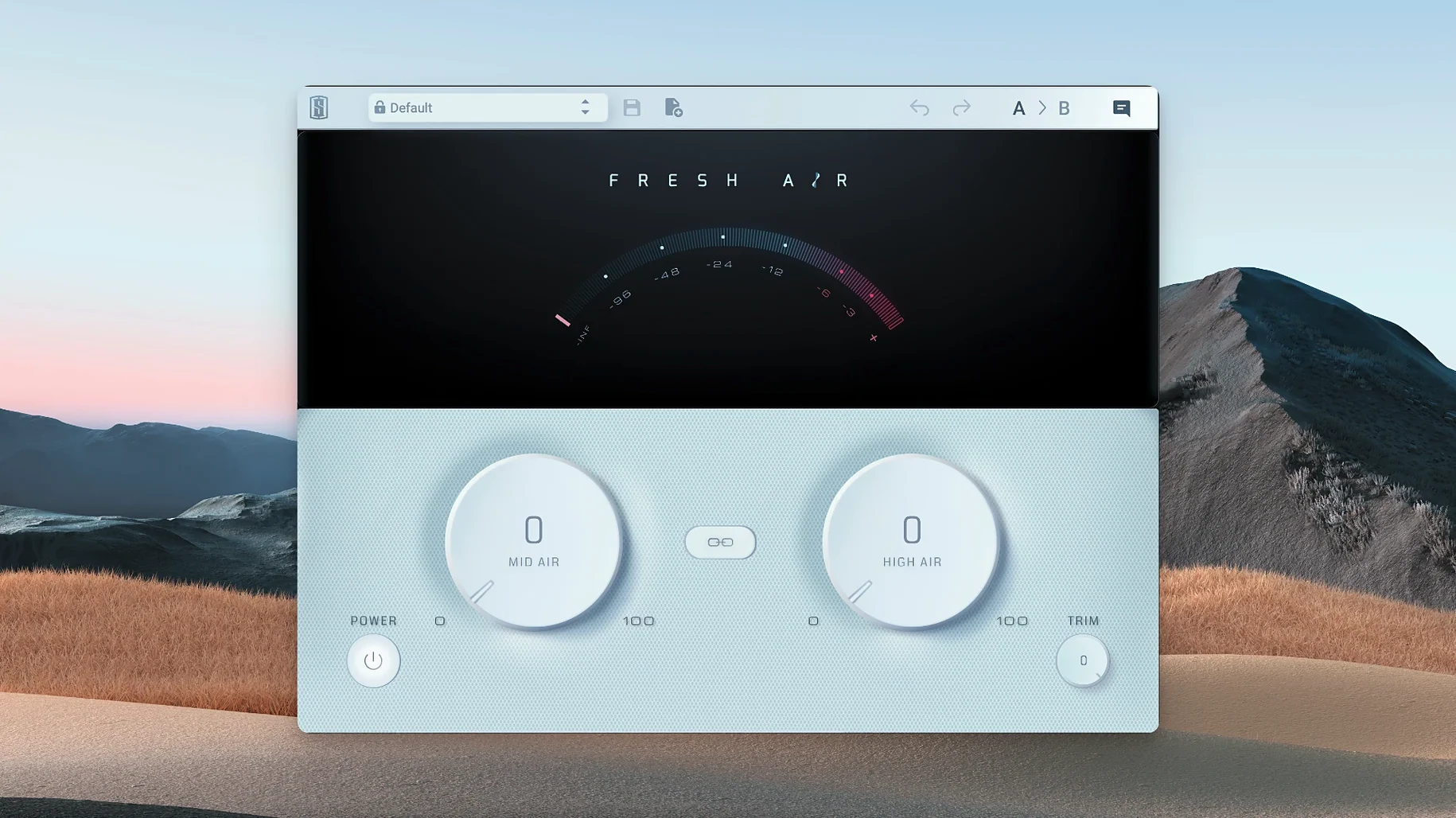
What it does — adds brightness and air to individual tracks or a full mix bus without the brittle edge some exciters bring
High Air control — lifts upper frequencies for a sense of openness and shine
Trim — adjusts output level so the added presence doesn't throw your gain staging off
Under the hood — modeled on vintage exciter circuits paired with dynamics processing to keep things smooth
Vocal and podcast editors reach for it track after track
Fresh Air isn't one of those plugins that sits in every folder unused. Certain Mac users tend to lean on it track after track once they hear what it does.
Vocal producers and podcast editors. A voice that sounds a little flat or recorded through a budget mic wakes up fast with a modest Mid Air push. Spoken word in particular benefits because you're not trying to re-EQ the whole signal — you're just lifting presence in a way that still sounds like the same person talking, only clearer.
Home studio mixers working in untreated rooms. When your monitoring situation makes you second-guess high-end decisions, Fresh Air's two-knob approach cuts down on overthinking. You're not building a six-band EQ curve you'll regret in the morning. You're nudging Mid Air or High Air and moving on. That simplicity is worth a lot when you don't have a tuned control room.
Electronic producers who build dense arrangements. Synth layers, sampled drums, and stacked pads can turn into a wall of midrange. A tiny High Air bump on the drum bus or a lead synth pulls elements forward without carving out space with aggressive EQ cuts. The dynamics processing inside Fresh Air means you're not just cranking a static shelf — the processing backs off when the signal already has enough top end, so things don't get scratchy as the arrangement gets busier.
Master bus tweakers who want subtle lift. I wouldn't call it a mastering tool, but plenty of people sneak it onto the mix bus at the end of a session just to see if the whole track opens up. A linked Mid and High Air move of maybe 5–10% can make a dense mix feel like someone opened a window. The Trim knob earns its place here — those small boosts add up in level, and pulling the output back keeps the comparison honest.
Unlink the knobs to learn what each control really does
The default state with both knobs at zero is blank canvas territory, which is fine. But a couple of habits make the plugin more useful from the first minute.
Unlink the controls until you know what each one does. The Link button is handy for broad sweetening, but Mid Air and High Air operate in different frequency ranges and feel quite different on source material. Spend ten minutes with just Mid Air on a snare or a vocal. Then do the same with only High Air on an overhead or an acoustic guitar. You'll develop a sense of which knob solves which problem, and linking becomes a deliberate choice instead of a default.
Set Trim by ear, not by the meter. Fresh Air's processing can make things sound louder without a dramatic meter jump, so the safest approach is to match perceived loudness rather than peak level. Boost the Air knobs until the tone feels right, then pull Trim down until the track sits where it did in the mix before you inserted the plugin. If you skip this step, everything you just processed sounds "better" simply because it's louder, and you'll chase your tail in the next mixing session.
Try it pre-fader on a reverb or delay return. Not everyone thinks to do this. Insert Fresh Air on an aux track, before the reverb or delay plugin, and push High Air a little. The effect is a cleaner, more open sense of space — the reverb tail gets a bit of sparkle without brightening the dry signal at all. Useful on vocals and snare when you want the ambience to breathe but the direct sound to stay focused.
The processing core stays untouched in this maintenance update
Version 1.0.9 is a maintenance release that keeps things where they should be on current Macs. Slate Digital didn't overhaul the sound or add features — the processing core is the same one people have been using since the plugin landed.
What matters for everyday use is that native Apple Silicon support is baked in, so if you're on an M1, M2, M3, or M4 machine, you're not running through Rosetta and paying the CPU penalty. That's less about a single instance — one Fresh Air barely registers — and more about peace of mind when you have it across a dozen tracks in a session that's already heavy on virtual instruments. The plugin stays light, and the latency stays negligible, which matters when you're tracking through it or automating bypass on and off during playback.
The interface hasn't changed. Two knobs, a Link button, a Trim control. That stability means a session from two years ago opens and sounds identical, no surprises from an updated algorithm or a redesigned gain structure. If you value recall consistency, version 1.0.9 delivers exactly that.
Solo it, then back off when the full mix turns harsh
No plugin is frictionless, and Fresh Air has a few quirks that come up often enough to be worth knowing about before they trip you.
"It sounds great on its own, but the mix gets harsh." This is almost always an accumulation problem. Four or five tracks with independent High Air boosts can sum into something brittle even though each individual channel sounds lovely. The fix is simple: pick the one or two elements that actually need the top-end lift and bypass Fresh Air everywhere else. If you want that airy sheen across the whole arrangement, try it on a group bus or the mix bus instead of per-track, so you're making one decision instead of eight small ones that add up in ways you didn't intend.
"The plugin doesn't show up in my DAW after installing." This one appears in forums regularly. Fresh Air is a 64-bit plugin, and on Apple Silicon Macs you need to make sure your DAW is running natively or that you've installed the correct component format — AU, VST3, or AAX — for your host. A quick rescan of plugins inside your DAW's preferences usually sorts it. If the plugin still doesn't appear, check that the .component or .vst3 file landed in the standard system folder and wasn't accidentally moved during a cleanup session.
"The Trim knob doesn't seem to do much." The Trim control adjusts output gain, not input gain, so its effect is subtle unless you've pushed the Air knobs hard enough to raise the overall level noticeably. If Trim feels inactive, bypass the plugin and compare the level — you might find Fresh Air is adding less gain than you think, and the Trim is already doing its job transparently. People sometimes expect a pad or a gain-reduction behavior, but Trim is just a clean output fader; it won't compensate for a signal that's already clipping before it hits the plugin.
"High Air makes cymbals and hi-hats sound phasey." The dynamics processing inside Fresh Air can interact with transient-heavy material in ways that feel slightly smeared on very fast attacks. On drum overheads or bright percussion, try using Mid Air instead of High Air — the lower frequency range often gives you the presence boost without the same interaction. Or dial High Air back to a small value and let the effect sit underneath the dry signal blend if your DAW offers wet/dry mixing on inserts.
Tip: Try a small High Air boost on a dull vocal bus before reaching for a broad EQ shelf.
- macOS 11 or newer
- Apple Silicon native support
- Interface languages: English
Questions from the stall
Does Fresh Air work on Apple Silicon Macs?
Yes, it runs natively on Apple Silicon and requires macOS 11 or later.
Can I use Fresh Air on a full mix?
Slate Digital says it works well on both individual tracks and the mix bus, adding top-end air without harshness.
Notes from other shops 0
Sign in or open a shop account to leave a note.
No notes yet. If you've used this on a shop Mac, tell me how it went.