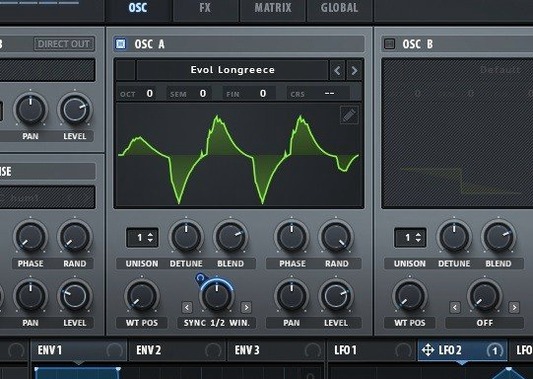
You open Serum 2 after setting it up, load a simple sawtooth preset, and hold a key. It sounds fine. But you didn't get a wavetable synth just for simple sawtooth presets. The real fun starts when you drag the little marker across the wavetable display and hear the sound shift between completely different waveforms in real time. That single gesture is the core of this instrument — a moving, evolving tone that a basic subtractive synth can't touch.
Next, head to the unison section on the main oscillator. Crank the voice count up toward 16 and then slowly adjust the Warp knob. Each unison voice can take on a slightly different character, so a single note can bloom into a wide, textured stack that still feels musical. If you want to push that further, look for Unison WT Pos, which assigns a distinct waveform from the wavetable to each unison voice. A pad sound suddenly becomes an ensemble.
After that, try the filter section's less obvious trick: sample-rate reduction. It's a filter process, not a separate bitcrusher, so you can sweep it with an envelope or LFO. Map an LFO to the sample-rate parameter and hear a smooth lead gain a crunchy, digital edge that moves with the notes. The modulation system here is deep, but this one routing shows you how easy it is to make a static sound feel alive.
First Days With Serum 2: A Few Practical Things
When you first install a synth this deep, it's tempting to spend three hours twisting knobs and call it a day. That's fine — but a couple of habits early on will save you from the "where did that sound go" frustration later.
Save versions of your patches as you go. Serum's modulation system encourages experimentation, and it's easy to take a sound somewhere interesting and then overshoot it. Use the save icon in the preset browser often, and give each stage a clear name. You don't need a naming scheme — just something you'll recognize when you scroll past it at 2 a.m.
Learn the right-click shortcuts immediately. Right-click any knob or control and you'll see options for assigning mod sources, removing modulation, or setting exact values. Holding Option while dragging a control gives you fine adjustments. Holding Command resets a parameter to its default. These three moves keep you working at the speed of your ideas rather than fighting the mouse.
Spend one session just on the wavetable editor. Import a short vocal sample, a field recording, or even a snippet of a bassline from another track. Watch how Serum converts it into a wavetable. The import dialog gives you control over the number of frames and the analysis method — try different settings on the same source audio and you'll get very different results. This is where Serum stops being a preset machine and becomes your instrument.
Drag-and-drop LFOs right onto a knob
Some features sit in plain sight but get overlooked because the interface is so dense. A few worth knowing:
- Drag-and-drop modulation assignment. You don't need to use the mod matrix panel for everything. Grab an LFO or envelope source from the mod section and drop it directly onto a knob you want to control. The routing appears automatically. It's the fastest way to try out an idea.
- Oscillator copy and paste. If you've dialed in a wavetable position, unison setup, and warp setting you like on Osc A, you can copy the whole oscillator state and paste it onto Osc B with a right-click on the oscillator tab. Great for layering variations of the same source.
- Filter keyboard tracking lives in a small knob. It's labeled
Notenext to the cutoff. Pushing it positive makes higher notes brighter; negative does the opposite. Easy to miss, essential for basses that need to stay controlled across octaves. - Chaos modulators aren't random. The Chaos 1 and Chaos 2 sources in the mod section produce smoothed, wandering modulation that's different every time you press a key but never jumps abruptly. Map one subtly to oscillator position or filter cutoff and your sustained notes won't sit still.
Presets load in under two seconds, even on Intel
Serum 2 loads quickly — even on an older Intel Mac, the plugin window appears within a second or two of inserting it. Preset browsing is responsive, and the wavetable visualizations update without stutter. On Apple Silicon machines, the performance headroom is generous. You can run multiple instances with heavy unison counts and still keep the buffer size low enough for live playing.
Memory use is what you'd expect from a wavetable synth that supports custom import. A patch with large custom wavetables and long reverb tails will consume more RAM than a simple init preset, but Serum manages it predictably. There's no creeping memory leak across long sessions — something you notice when you leave a project open overnight and come back to find everything still responsive.
Stability under modulation load is where Serum really proves itself. You can assign four LFOs, three envelopes, and both chaos sources to various destinations, then start automating parameters from your DAW on top of that — and the audio engine doesn't crack or drop voices unexpectedly. The voice-stealing behavior when you do hit the limit is smooth rather than jarring, which matters when you're performing rather than just programming.
Building a 30-second drone that never repeats
Consider a sound designer working on a game score. She needs a drone that evolves over thirty seconds without repeating, something that feels organic but stays harmonically anchored so it doesn't clash with orchestral elements.
She starts with Osc A on a wavetable she made from a bowed cymbal recording. She sets the wavetable position to sweep slowly via an LFO with a very long cycle time — around twenty seconds. Then she assigns Chaos 1, at a low amount, to the same position, so the sweep doesn't feel mechanical. On Osc B, she loads a simple sine-derived table and tunes it a fifth up, with Unison Warp set just high enough that the voices spread slightly in character. The dual filters get a low-pass and a comb filter in parallel, with the comb's frequency tracking the note at 50% key follow.
She maps velocity to the comb filter mix so harder hits bring in a metallic shimmer, then maps the mod wheel to the global wavetable position of Osc A for manual control during the recording pass. In the DAW, she records a single held note and rides the mod wheel slowly. The result is thirty-five seconds of shifting, breathing texture that doesn't sound like a synth preset — because it isn't one anymore. That's the kind of work Serum 2 rewards once you move past the surface.
Version 2.1.5 is a tidy maintenance update with several workflow refinements and a handful of important fixes. Here's what's changed:
- Parameter lock restore on host state load. You can now have Serum automatically restore parameter locks when your DAW reloads a session — handy for keeping modulation assignments exactly where you left them.
- Show in Matrix command added. Right-click any modulated parameter and choose "Show in Matrix" to jump straight to its routing in the modulation matrix. A small thing that saves real clicking-around time.
- One-voice-per-note limit with sustain pedal. A new setting caps voices to one per note, even when the sustain pedal is held down — useful for tightening up mono lines without pedal blur.
- Effect rack scroll position remembered. Switching between effect slots or tabs no longer resets your scroll position. Your place in the rack stays put.
- Stereo output for Serum 2 effects with mono input. Effects in the Serum 2 rack now properly output stereo even when fed a mono signal, so spatial effects behave as expected.
- Scale tuning applies to Pitch Expression. Any custom tuning or scale setting now affects the Pitch Expression parameter, keeping microtonal and alternate-tuning work consistent.
- Envelope autozoom saved. The envelope display's auto-scaling preference is now preserved, so you don't have to set it again each session.
- Shift key for fine-tuning modulation and output levels. Hold Shift while adjusting modulation amounts or output levels for precise, small-increment control.
- New theme color options for active keys and oscillator ranges. You can now customize the colors that highlight active notes and oscillator display ranges — a welcome touch if you've tweaked Serum's theme to suit your studio lighting.
- Fixes: Arpeggiator notes no longer cut off when starting playback with tempo sync engaged. Serum 1 presets with chaotic LFOs now load correctly without switching out of free-running mode. Crashes when loading impulse responses shorter than 256 samples in the Convolve effect, and when loading a default.fxp file, are resolved. WAV files with 32-bit PCM now read without distortion. Expression and Mono Aftertouch values update properly at note start in mono legato mode.
- macOS 10.13 or later
- Apple Silicon or Intel 64-bit Mac
Questions from the stall
Does Serum 2 run on Apple Silicon Macs?
Yes, the plugin supports both ARM and x86 64-bit Macs running macOS 10.13 or later.
How many voices can I stack on one oscillator?
You can stack one oscillator to use up to 16 voices, and you can shape those voices differently using the Unison Warp and Unison WT Pos controls.
Notes from other shops 0
Sign in or open a shop account to leave a note.
No notes yet. If you've used this on a shop Mac, tell me how it went.