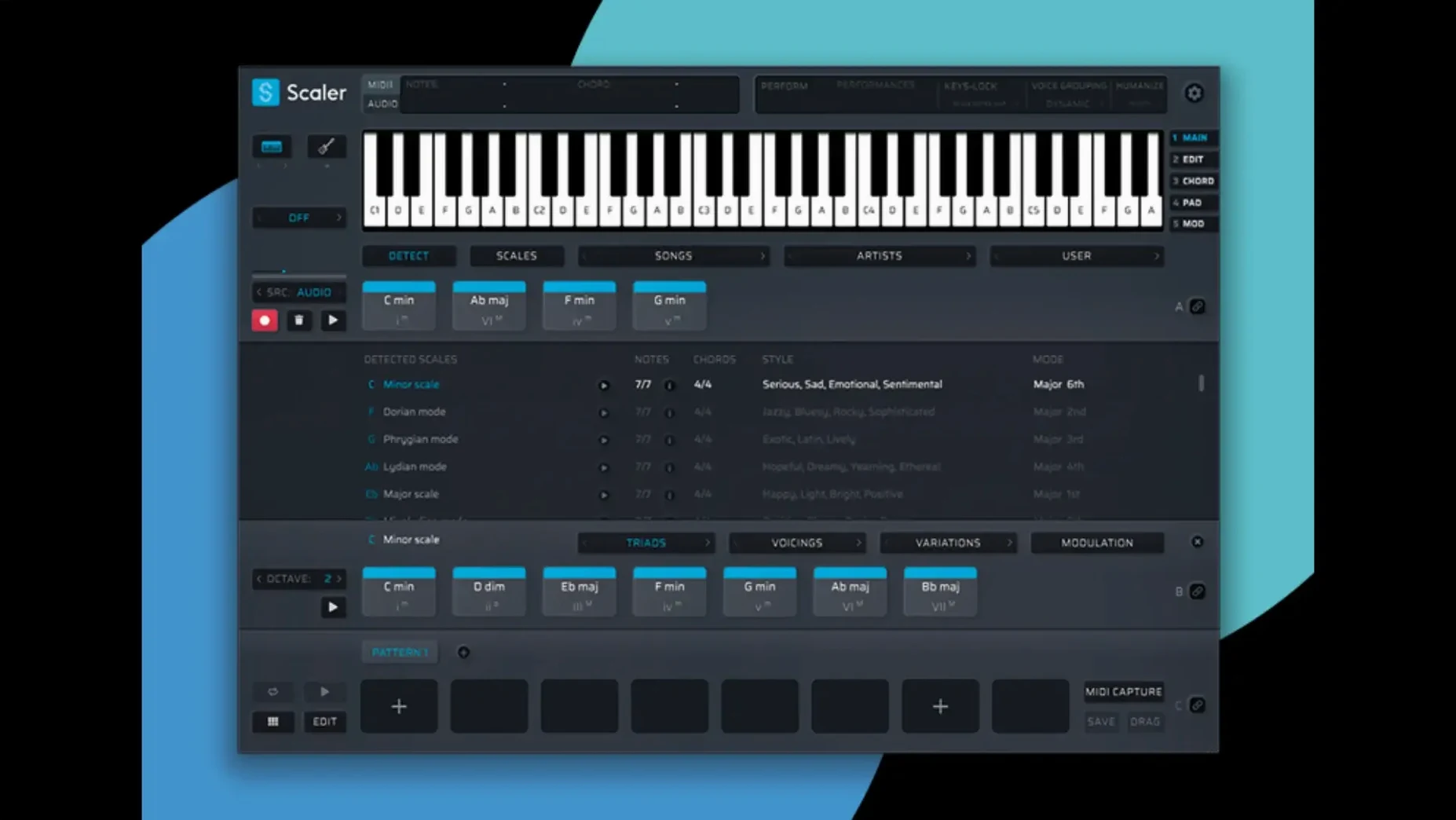
Scaler 3 is a music theory workstation that helps you build chord progressions, shape harmonies, and edit MIDI without leaving your creative flow. If you're on a Mac, the first question is whether it will actually run on your setup — and the short answer is yes, as long as you're on macOS 10.15 or later. It works on both Intel and Apple Silicon machines, and it's 64-bit only, so older 32-bit systems are out.
You can run it as a standalone app or load it inside your DAW using VST, VST3, AU, or AAX formats. That covers most major hosts on the Mac side, from Logic Pro to Ableton Live and Pro Tools. The current version, 3.3.2, tidied up a few rough edges in the MIDI Editor — missing notes and odd blank spaces before chords are no longer an issue, and exported MIDI sequences now automatically crop any dead air at the start.
What you get for the setup effort is a deep composition toolkit. Scaler 3 can suggest chord sets that fit a mood, detect what you've already played, and generate melodies, bass lines, or arpeggios locked to your chosen key. It's the kind of tool that bridges the gap between knowing what you want to hear and finding the notes to make it happen.
The interface is English-only, and installation is straightforward — mount the disk image and run the standard installer. If you're on a current Mac and tired of staring at an empty piano roll, this one slots in without fuss.
MIDI notes no longer disappear when dragging them
Before 3.3.2, the MIDI Editor had a few quirks that could trip you up mid-session. Notes would sometimes vanish from the display after dragging them around — the playback was fine, but the visual feedback went blank, which made editing feel like guesswork. Chord representations could also drift out of sync, showing a Cmaj7 as something else entirely in the piano roll view while the audio told a different story. That's the kind of thing that eats up ten minutes of troubleshooting when you're trying to finish a track.
The fix means the editor now stays faithful to what you hear. Drag a note, and it stays visible. Open a chord sequence, and the piano roll matches the chord labels. The other change — automatic cropping of empty space at the start of exported MIDI — sounds minor, but it saves a repetitive cleanup step. Before, you'd export a progression, drop it into your DAW, and find a bar of silence at the front. Now the MIDI starts where the notes start, no trimming required. If you're bouncing ideas between Scaler and your main session all day, those small corrections add up.
A chord-to-arrangement workflow in Scaler 3
Here's a practical path from a blank canvas to a rough arrangement, using the Multi-Lane Timeline as the backbone. It's the kind of workflow that suits someone who knows the vibe they want but doesn't want to hand-draw every note.
Start with the chord lane. Pick a key — say F minor — and browse the artist and genre presets until something clicks. The preset groupings are broad enough to cover classic soul changes, modern pop shifts, or darker cinematic movements. Once you've landed on a progression you like, drag it onto the chord lane of the Timeline. You now have a harmonic backbone that runs for as many bars as you need.
Add a bass lane. Create a new lane, set it to Bass, and let Scaler generate a line that follows your chord track. The generated bass won't just play roots — it weaves in passing tones and rhythmic variations that you can tighten up later by editing individual notes in the MIDI Editor. If a phrase feels too busy, a quick manual trim usually sorts it out.
Layer a melody lane. Add a Melody lane and pick a generation style. The melodies stay in key automatically, so you're free to cycle through options until something hooks your ear. What's useful here is that the melody responds to the chord changes beneath it — a C7 in the progression might pull the melody toward a Bb or an E, depending on the pattern you've chosen.
Host a soft synth on a lane. Scaler 3 lets you load VST or AU instruments directly onto chord and MIDI sections. Instead of routing MIDI out to your DAW just to audition sounds, you can slot in a piano or pad plugin right inside the app. That keeps the sound design and composition in one window, which speeds things up when you're still shaping the idea.
Bind lanes with Multi-Bind. If you want several lanes to follow the same chord changes when you swap progressions, Multi-Bind links them together. Change the chord lane from F minor to something in Dorian mode, and the bass and melody lanes shift with it. For experimenting with different harmonic directions, this is a genuine time-saver.
Export and finish. When the arrangement feels solid, export the MIDI. The 3.3.2 cropping fix means the file lands clean in your DAW, with no silent gap at the front. From there, you can refine the performance, swap instruments, and mix as usual.
Run standalone to free up plugin slots
A few Scaler 3 touches sit just under the surface. They're not headline features, but they make the daily grind smoother once you know about them.
- Standalone mode saves your plugin slots for mixing. Running Scaler as a standalone app means you can build progressions and test synth sounds without loading it as a plugin inside an already heavy session. When the idea is ready, you drag the MIDI across — no plugin instance eating CPU in your DAW until you actually need it.
- MIDI Editor zoom and scroll shortcuts. The editor responds to standard pinch-to-zoom gestures on a trackpad, and holding
Commandwhile scrolling lets you navigate long progressions quickly. It's the kind of thing you stumble into, but once you do, clicking tiny arrow buttons feels like the slow lane. - Key detection from incoming MIDI. If you've already noodled something on a keyboard, Scaler can listen to the notes and suggest a key. It's not always perfect with chromatic passages, but for diatonic ideas it's surprisingly accurate and spares you the mental math of counting sharps and flats.
- Arpeggio patterns lock to your chord shapes. The arpeggiator doesn't just run up and down triads — it follows the exact voicings in your chord lane. If you've spread a chord across two octaves, the arpeggio respects that shape, which gives the generated patterns a more organic feel right out of the gate.
If you've been looking around for a scaler 3 torrent or scaler 3 crack to try the latest build, version 3.3.2 is the one circulating with the MIDI Editor fixes baked in. Some people search for a scaler 3 free download or scaler 3 mac torrent to test it on Apple Silicon before committing — the ARM support means it runs natively without Rosetta overhead, so performance is snappy even with multiple plugin hosts loaded on the lanes.
Version 3.3.2 is a focused stability update:
- Fixed MIDI Editor display issues that could cause missing notes, incorrect chord representations, and unwanted blank space before chords.
- Exported MIDI now automatically crops empty space at the start of the sequence.
- macOS 10.15 or later
- Intel or Apple Silicon Mac
- 64-bit only
Questions from the stall
Does Scaler 3 work on Apple Silicon Macs?
Yes, it supports both Intel and Apple Silicon Macs running macOS 10.15 or later.
Can I use Scaler 3 as a standalone app, or is it plugin-only?
You can use it as a standalone application or as a plugin in VST, VST3, AU, and AAX formats.
Notes from other shops 0
Sign in or open a shop account to leave a note.
No notes yet. If you've used this on a shop Mac, tell me how it went.