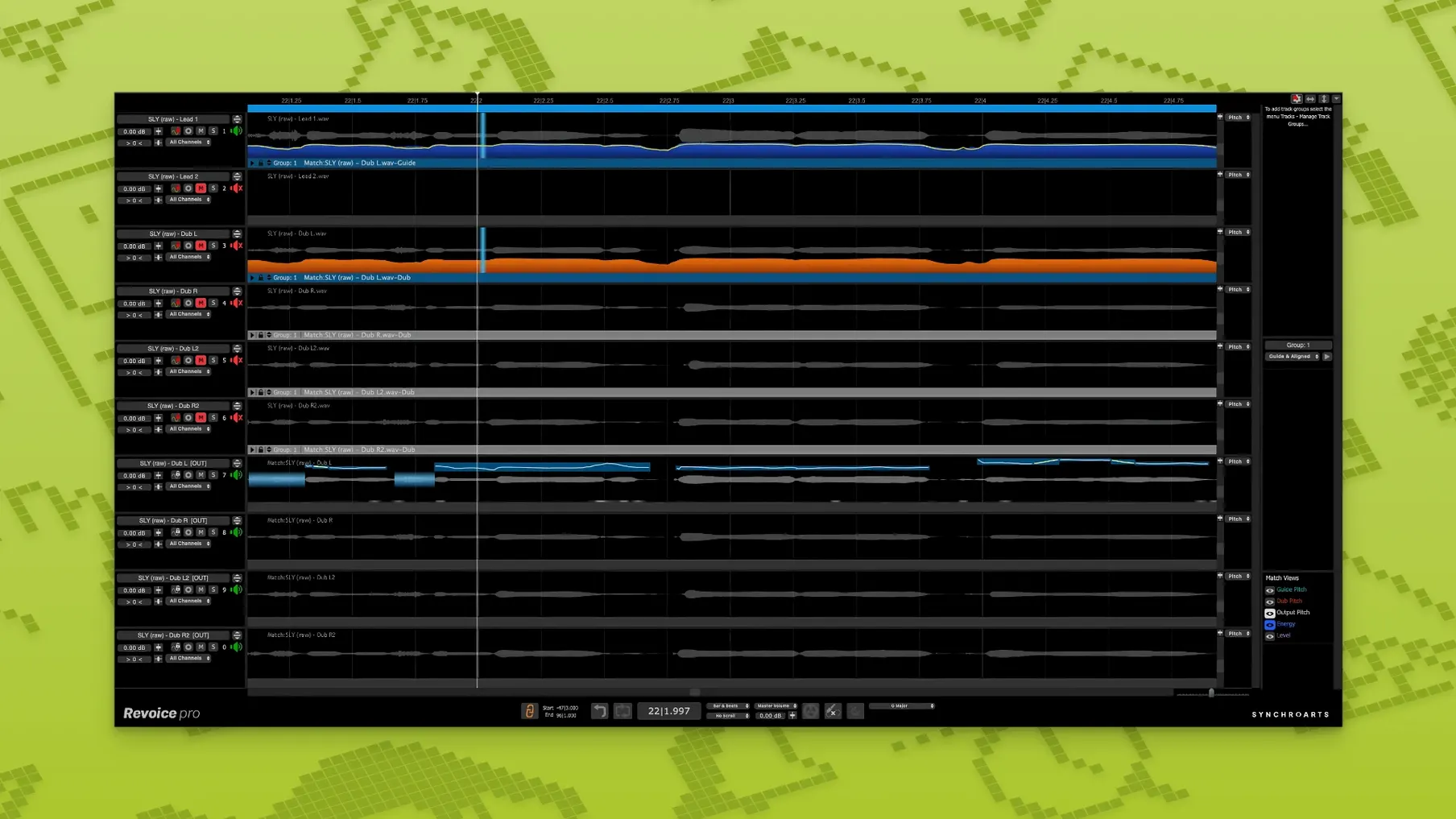
Producers and engineers working with stacked vocals, tight harmonies or dialogue replacement reach for Revoice Pro when manual editing gets too slow. It sits across tracks in your session, handling alignment between takes, pitch matching across doubles and natural-sounding doubling from a single performance.
| What it does | How it fits in |
|---|---|
| Time alignment | Works across two or more tracks; syncs takes with different start and end positions |
| Pitch correction | Matches the pitch of doubles and harmonies using SmartPitch, or freeform adjustment with the Shaper Tool |
| Vocal doubling | Creates a natural double from a single vocal, keeping timing and pitch variations intact |
It helps to think of it as a processing layer between your raw takes and your mix. You feed in a guide track and one or more dub tracks, then Revoice Pro handles the alignment and tuning before the signal hits your channel strip. The Shaper Tool gives you manual pitch adjustment when you need fine control, while SmartPitch and SmartAlign tackle the repetitive work across whole performances.
Standalone engine feels snappy on Apple Silicon
Revoice Pro isn't the kind of plug-in you stick on an insert and forget about. It's a standalone processing engine that talks to your DAW, and that architecture shows in daily use. On an Apple Silicon Mac, the current version loads quickly and handles a full song's worth of vocal stacks without the beachball treatment I'd grown used to in earlier releases. Memory sits around 400–600 MB with a moderate session open—not trivial, but expected for audio that lives outside the DAW's own buffer.
What I notice most is that it stays out of the way once transfers are done. You send audio across via the plug-in bridge, process it in Revoice Pro's timeline, then pull it back. That round trip adds a couple of seconds per pass, but the actual processing is fast. A three-minute lead vocal with four doubles takes under thirty seconds to align on a modern machine, and pitch matching across a harmony stack is similarly snappy. I've never had it crash mid-transfer, though I do save before sending large batches—old habits from the Intel days die hard.
CPU use spikes briefly during processing, then drops to near-idle. If you're running a heavy mix session alongside, it's worth freezing a few instrument tracks first, but that's standard practice with any offline processor. The real stability win is that a Revoice Pro hiccup doesn't take your DAW down with it, since the heavy lifting happens outside the host.
Beginner traps worth sidestepping
New users tend to make the same handful of mistakes, and they're all fixable once you know what's happening.
- Feeding it unedited guide tracks. If your guide vocal has breaths, lip smacks or chair squeaks, SmartAlign will try to match those to the dubs. Strip silence or trim your guide first, even roughly. The results improve immediately.
- Expecting it to fix timing and pitch in one pass without checking. Revoice Pro does a lot automatically, but a fast listen-through with the Shaper Tool open catches the occasional syllable that drifted. Ten minutes of spot-checking saves a recall later.
- Over-tightening doubles. The default alignment settings can make stacked vocals sound phasey and robotic. Back off the tightness parameter slightly and let the doubles breathe—natural width comes from small timing differences, not perfect lockstep.
- Ignoring the level-matching options. When dubs were recorded at different gain levels, SmartPitch can struggle to track pitch accurately. Match rough levels before processing, or use the built-in level adjustment in the APT process.
- Not naming tracks clearly before transfer. Everything comes back with the same labels you sent. Calling something "Audio 1_dup_3" in a sixteen-track harmony session is a recipe for confusion.
Tip: the first time you use SmartAlign on a new project, process one verse and listen critically before committing the whole song. The settings that work for a breathy ballad may not suit a fast rap double.
Cleaning five vocal tracks before alignment
Here's how a typical vocal-alignment job plays out. Yesterday I had a session with a lead vocal, two doubles and a high harmony—five tracks total, all recorded across two days with slightly different mic positions.
I started by cleaning the lead guide track in the DAW: trimmed silence between phrases, faded breaths that would confuse the alignment, and consolidated it into one contiguous region. Then I opened Revoice Pro, loaded the guide on Track A, and sent the four dubs to Tracks B through E using the plug-in bridge. The transfers took about twenty seconds for the full three-minute song.
With everything in place, I selected all four dub tracks and ran SmartAlign against the guide. I left tightness at the default 70%—this singer has a relaxed delivery, and I wanted the doubles to feel like a group, not a copy-paste job. While the alignment ran, I made coffee. When I came back, the waveforms lined up beautifully except for one phrase in the second chorus where the singer had rushed a hard consonant. I grabbed the Shaper Tool, zoomed into that syllable on the problem dub, and nudged the timing manually. Four clicks and it sat perfectly.
Next I tackled pitch on the harmony track. The singer had gone slightly flat on two sustained notes at the end of the bridge. SmartPitch matched those to the guide's pitch contour in one pass, keeping the natural vibrato intact—no Cher effect, no warbling artifacts. I pulled the processed audio back to the DAW, muted the original takes, and hit play. The stack sounded like five people who'd rehearsed together for weeks, not like software had touched it.
The whole job—cleaning, transferring, aligning, pitch-matching two notes, and pulling back—took under fifteen minutes. A year ago I'd have spent an hour with elastic audio and manual tuning for a worse result. That's where Revoice Pro earns its place: not in flashy features, but in turning a tedious editing afternoon into something you knock out between lunch and the next tracking session.
Version 5.1.30 brings a few tool-focused updates:
- Shaper Tool — now listed as a dedicated pitch-adjustment tool for manual tweaks.
- SmartPitch — refined for matching the pitch of doubles and harmonies across tracks.
- SmartAlign — improved track synchronization for takes with different start or end positions.
- macOS 10.14 or higher
- Intel or Apple Silicon processor
- AU, VST3 or AAX 64-bit host
Questions from the stall
Does Revoice Pro work with Apple Silicon Macs?
Yes, Revoice Pro 5 supports both Intel and Apple Silicon processors natively on macOS 10.14 or higher.
What plug-in formats does Revoice Pro use on Mac?
It runs in AU, VST3 and AAX 64-bit hosts — covering Logic Pro, Pro Tools, Studio One and most other major DAWs.
Notes from other shops 0
Sign in or open a shop account to leave a note.
No notes yet. If you've used this on a shop Mac, tell me how it went.