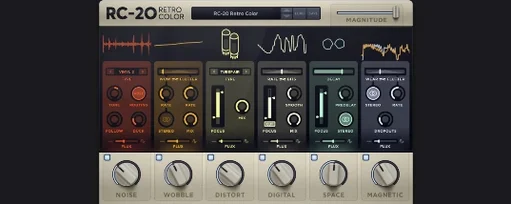
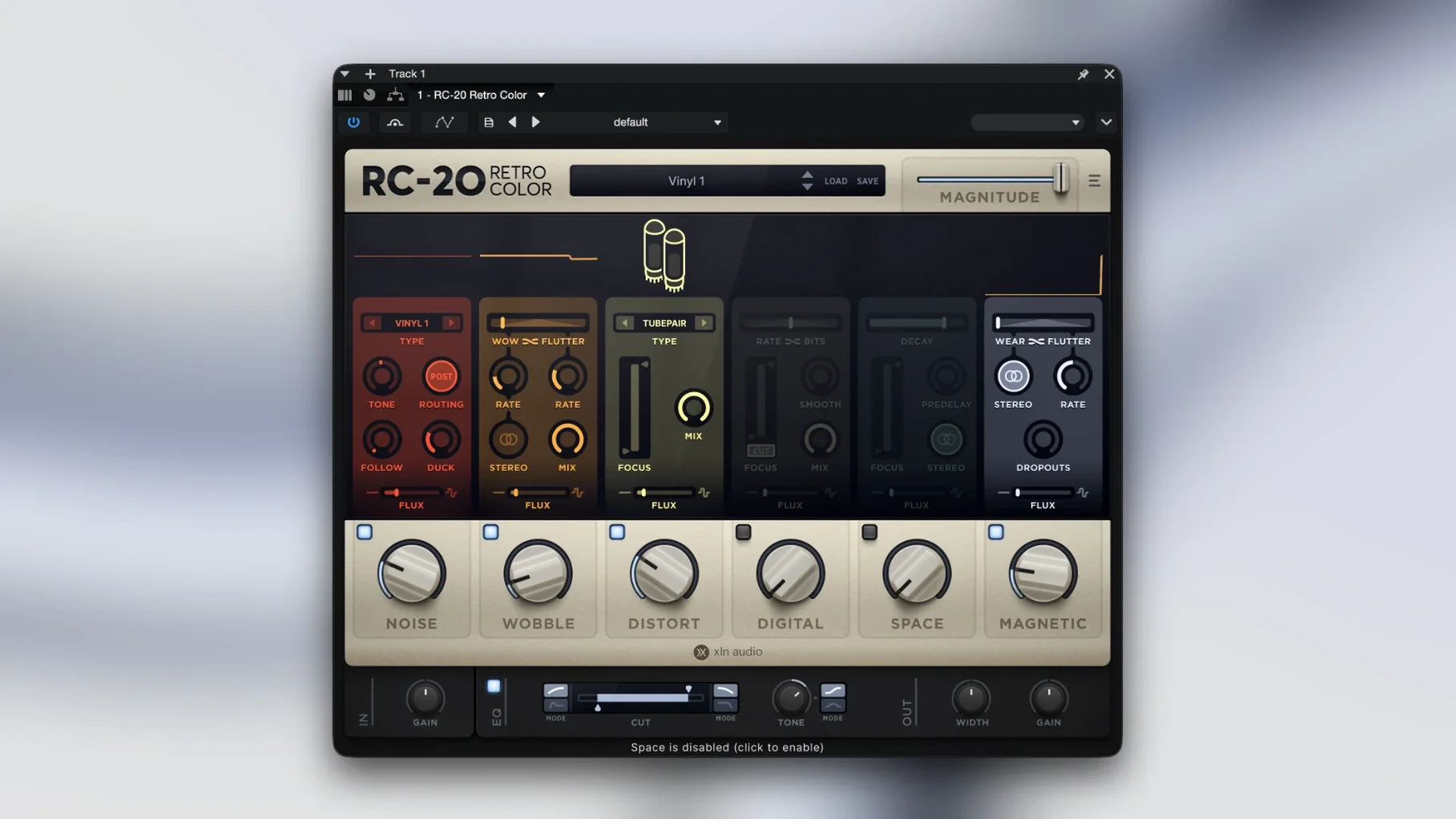
Bedroom producers, beatmakers, and sound designers reach for RC-20 Retro Color when a track feels too sterile. It’s a creative effect plugin built around six modules that mimic the chaos of aging hardware, worn-out tape, and shaky analog circuits — all running inside your DAW.
Dirtying synths, drums, and vocals with moving grit
- Dirtying up clean synth lines, drum loops, or vocal phrases with grit that moves over time.
- Layering subtle wobble and noise under a mix element instead of slapping on obvious distortion.
- Browsing the wide preset library to find a starting texture, then tweaking modules independently until the color sits right.
Flux engine means no two passes sound identical
- The Flux engine adds random variation, so the effect never plays back exactly the same way twice — great for organic drift, less ideal when you need a static repeat.
- Each module (noise, wobble, distortion, bit-crush, filtering, space) can work solo or stacked; turning everything on at once can swamp the source.
- It’s a 64-bit-only plugin for macOS 10.13 and up, with native Apple Silicon support.
Tip: Try the Flux slider at low depth on a piano or pad — just enough movement to break the digital stillness without calling attention to itself.
Interface stays snappy even with multiple instances
I’ve never seen RC-20 trip over itself in Logic or Ableton Live, even with several instances spread across a session. The interface stays responsive while you drag sliders, and patch changes happen instantly — no half-second freeze while the plugin recalculates. That immediacy matters when you’re chasing a texture and flipping through presets to see what sticks.
CPU load is moderate but not trivial. A single instance on a vocal or drum bus barely registers on any Apple Silicon machine. Stack four or five on separate tracks — each with the noise, wobble, and distortion modules active — and you’ll notice the meter climb, especially on older Intel Macs. On my M1 MacBook Air, six simultaneous instances with Flux engaged brought Live’s CPU meter to roughly 18%, which leaves plenty of room for other processing. Turning off modules you’re not actively shaping (the space reverb, for example) trims things back noticeably.
RAM usage is negligible — this isn’t a sampler loading multi-gigabyte libraries. It’s an effect processor that works in real time, and XLN Audio kept the memory footprint tight. I’ve yet to trigger a crash or a DAW timeout, and the plugin handles sleep/wake cycles on a laptop without losing its state.
One stability quirk worth knowing: the Flux engine randomizes continuously, which means offline bouncing can produce slightly different results on two passes if you forget to print the track. That’s by design, not a bug, but it trips up people expecting deterministic renders.
Apple Silicon support tightened up for native performance
Version 1.5.1 was a maintenance release, not a feature drop — and honestly, that’s good news for anyone who depends on the plugin in daily sessions. XLN Audio tightened up Apple Silicon support so the plugin no longer needs Rosetta 2 as a fallback, and they squashed a handful of graphical glitches that affected the wobble and noise module displays on high-resolution screens. The built-in manual link arrived around this release too, cutting out the step of hunting for a PDF in Finder when you want to check how the Flux depth interacts with the distortion algorithm.
There weren’t massive workflow overhauls. The six-module layout, the Flux engine behavior, and the preset browser all stayed familiar. That stability is part of the appeal — you can open a project from two years ago and RC-20 will sound exactly the same, on the same patch settings, without surprises.
Decimort 2 goes surgical on bit-crushing, RC-20 goes textural
A few other Mac plugins chase similar lo-fi ground, but they split into different camps once you dig in.
D16 Group’s Decimort 2 focuses on bit-crushing and sample-rate reduction with surgical precision. It sounds fantastic for early-90s sampler emulation, and the filter section is more flexible than RC-20’s digital module alone. But Decimort 2 doesn’t do tape wobble, magnetic saturation, or continuous random drift — it lives entirely in the digital degradation lane. If your sound needs analog-style movement alongside the crunch, RC-20 covers more territory in a single window. If you only want pristine bit reduction with an excellent multimode filter, Decimort 2 is the sharper tool.
iZotope’s Vinyl (the free one) shares a few surface-level aims — dust noise, warp, mechanical rumble — and it’s lightweight enough to toss on any track. The catch is that Vinyl doesn’t give you distortion, bit-crushing, or spatial effects, and the warp model is simpler. It’s a charming one-trick plugin; RC-20 does that trick and five others, with far deeper control over each. For quick throwaway texture, Vinyl wins on speed and zero cost. For a textured bus that evolves across a whole verse, the gap widens fast.
Baby Audio’s Super VHS leans into 1980s tape-style saturation, chorus, and barber-pole flutter. It sounds great on synthwave pads and drum machines, and the single-screen interface is quicker to dial in than RC-20’s multi-module layout. But Super VHS doesn’t offer a noise generator with envelope following, a dedicated bit-crusher, or the Flux randomizer — it’s a tighter palette painted in broad strokes. I’d reach for Super VHS when I want instant nostalgia on one track; I’d reach for RC-20 when I want to build a layered degradation that shifts unpredictably over time.
If you’re hunting around for ways to add this plugin to your toolkit, you’ll spot search terms like rc retro color torrent or rc 20 crack floating around forums. Those paths can work fine if you take a moment to check for the latest build and confirm the Flux engine loads correctly — the same straightforward download-and-mount process the official installer uses. The cleanest route keeps things simple and leaves you with a plugin that won’t vanish mid-session.
- macOS 10.13 or newer
- Intel or Apple Silicon Mac (64-bit only)
- Plug-in formats: VST, AU, AAX
Notes from other shops 0
Sign in or open a shop account to leave a note.
No notes yet. If you've used this on a shop Mac, tell me how it went.