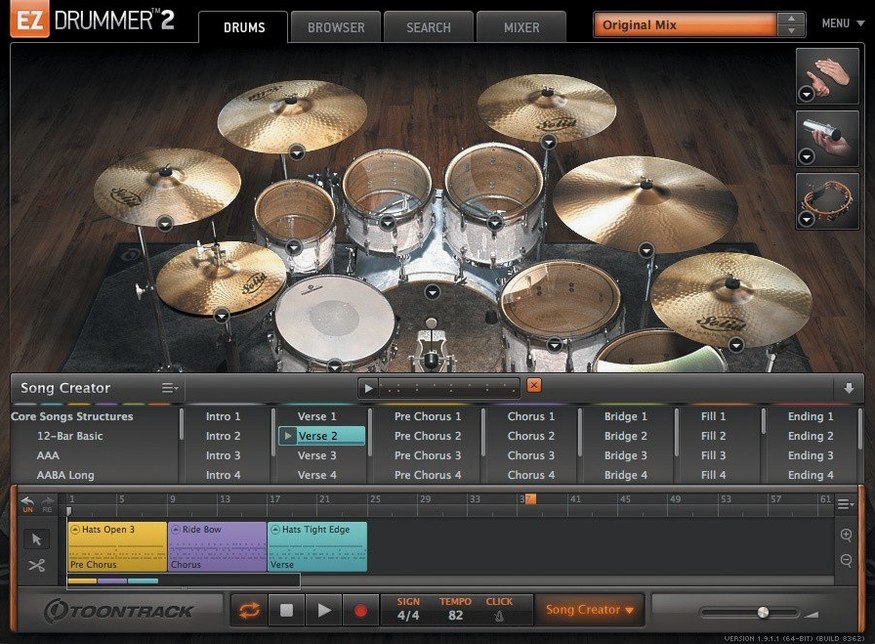
Tap2Find is one of those features that makes you wonder why every drum plugin doesn't work this way. You tap a rhythm on your desk or a single key and it pulls up matching grooves from the library — no browsing through endless folders required. That kind of thinking runs through the whole program, but before I get into what it does, let's talk about whether it'll actually run on your machine.
| What | The details |
|---|---|
| Current version | 3.1.2 |
| macOS needed | 10.15 (Catalina) or later |
| Architecture | Intel and Apple Silicon |
| Language | English |
EZdrummer 3 runs on both Intel Macs and Apple Silicon machines, so you're covered whether you're on an older iMac or a newer M-series laptop. The latest update brought the icons in line with macOS Tahoe style, tidying up the dock and project file look. Inside, you get a full drum production toolkit — mix-ready presets, a solid percussion selection, and the Bandmate feature that listens to your audio or MIDI and suggests parts. The Song Creator can take a simple idea and build it into a structured arrangement without you leaving the plugin. Grooves you like can be starred or dragged straight to the song track, and Edit Play Style lets you reshape a groove in real time. It's built for songwriters who want to drop in drums and keep moving.
The Grid Editor is not a step sequencer
Most of these aren't obvious until you've spent a few evenings frustrated with your arrangement. The big one is treating the Grid Editor like a step sequencer from a drum machine. It's not — it's velocity-sensitive and much more expressive than tapping in rigid 16th notes. If every hit sits at the same velocity, your drum track will sound like a typewriter, not a drummer. Vary the accents, especially on snare and hi-hat, and things open up immediately.
Another one: ignoring the Song Creator's arrangement options and trying to drag every groove in manually. You can spend an hour piecing together verse and chorus sections, or you can feed the Song Creator a single loop and let it propose a full structure. Even if you don't keep what it gives you, the skeleton it builds saves serious time. Related to that — not starring grooves as you browse. The library is deep and it's easy to lose a fill that caught your ear two minutes ago. Star it. Move on. Your future self will thank you.
I also see beginners loading up a kit with all the room mics and processing active, then wondering why their CPU is gasping. Mix-ready presets are convenient but they pull in a lot of channels. If you're just writing, dial things back to a drier preset and switch to the full treatment later. And one last thing — don't sleep on the percussion. It's not just shakers and tambourine tucked in a corner. Layering a subtle percussion element under a standard kit groove adds texture that makes a simple part feel finished.
Songwriters who just want to finish tracks
It's in the name, really. Songwriters who don't want to become drum programmers get the biggest return here. If your main goal is finishing songs rather than obsessing over mic placement and room bleed, the workflow fits. You drop in an idea, shape it quickly, and get back to writing. Guitarists and keyboard players who build tracks at home fall squarely into this camp — people who can play their instrument well but freeze up when faced with a blank drum grid.
Bedroom producers working across genres get a lot out of the Bandmate feature, especially if they're pulling in reference audio or humming a rhythm into their phone first. The program doesn't care whether your source is a strummed acoustic riff or a bassline tapped on a MIDI keyboard; it listens and offers grooves that sit underneath it. That alone cuts the barrier between having a melody in your head and hearing it with drums.
Users who work fast and iterate often will appreciate how little context-switching is required. You're not exporting stems to audition grooves, and you're not opening a separate editor for fills. Everything lives in one window. If you tend to lose momentum when a creative moment stalls, that single-window design matters more than it first appears. On the flip side, someone who wants deep sound-design control over every drum hit or who builds sample libraries from scratch will probably find the curated approach limiting. That's not a flaw — it's just aimed at a different person.
Edit Play Style transforms a groove with sliders
Edit Play Style is the kind of feature that hides in plain sight. You pick a groove, open the control, and nudge a few sliders — suddenly the same MIDI pattern sounds busier, sparser, or swung differently. It's not generating new notes from scratch; it's reinterpreting the existing ones based on playing intensity and timing. This means you can take one solid hi-hat groove and twist it into three variations without touching the grid.
The song track itself has a few quiet tricks. You can cut, copy, and paste groove blocks the same way you'd edit text, and the transitions between sections stay smooth even when you're mixing different feels. If you hold Option while dragging a groove block, you get a duplicate rather than a move — it's a small thing, but once you know it, arranging speeds up noticeably. And the Tap2Find box isn't limited to tapping on a desk. You can click a single note on a MIDI controller and the search still works. That means you can hum a rhythm in your head, tap it out with one finger, and have matching grooves ready before you've even loaded a kit.
Percussion grooves are searchable through the same Tap2Find system, which plenty of users miss because they assume it only covers drum kit patterns. Searching for a conga or shaker rhythm works identically — just tap it and the library filters accordingly. Layering those results under an existing drum track takes about ten seconds and adds a dimension that's hard to get from processing alone.
The icon now matches your macOS dock
The icon update to macOS Tahoe style is cosmetic, sure, but it's one less visual mismatch when you're scanning your dock or project folder. For something you open every day, consistency with the rest of the system feels more polished than a patch note suggests.
The practical changes are under the hood. The hi-hat pedal CC fix is the kind of thing that only matters if you've been bitten by it — you record a take on the song track, work the pedal for open and closed articulations, and later discover some of that data simply didn't stick. Before 3.1.2, certain CC messages during song-track recording could drop out. Now they hold. If you perform your drum parts rather than programming them exclusively, that's a genuine reliability improvement.
The mixer Solo and Mute recall fix addresses a similarly specific annoyance. You'd solo a channel to check something, unsolo it, and find the mute state of another channel had been lost along the way. Small glitch, big head-scratching moment when your carefully balanced drum mix suddenly sounds different and you can't figure out why. That sort of state-clearing bug is gone now.
The internal improvements for Infinity Grid EZX are less visible but they matter if you're using that expansion. The grid-based workflow in Infinity Grid pushes more data through the engine, and the 3.1.2 refinements keep things responsive. Toontrack also noted that anyone using EZX expansions released from late 2025 onward will need this version as a baseline. If you've seen searches for an ezdrummer 3 torrent floating around, just make sure you're grabbing a build that's 3.1.2 or newer so those expansion packs load without a hitch — you'll unlock everything that's on the table. Same goes for anyone hunting down an ezdrummer torrent: check that the version meets the 3.1.2 floor so you're not missing out as more libraries ship with that baseline.
Version 3.1.2 is a maintenance release with a few nice cleanup touches:
- The standalone app icon and project file icon now follow the macOS Tahoe style — looks right at home on recent systems.
- Under-the-hood improvements for Infinity Grid EZX users.
- A couple of fixes: hi-hat pedal CC recording on the song track now behaves properly, and mixer Solo and Mute states recall correctly between sessions.
- macOS 10.15 (Catalina) or later
- Works on Intel and Apple Silicon Macs
Questions from the stall
Does EZdrummer 3 work on Apple Silicon Macs?
Yes. EZdrummer 3 runs natively on both Intel and Apple Silicon Macs, so M1, M2, and M3 machines are fully supported.
Can EZdrummer 3 generate a whole drum track on its own?
It can. The Song Creator turns a basic idea into a complete song structure, and features like Bandmate and Tap2Find help you build parts without leaving the program.
Notes from other shops 0
Sign in or open a shop account to leave a note.
No notes yet. If you've used this on a shop Mac, tell me how it went.