1. Pick your format and open it up
EZbass loads as a VST, AU, or AAX plug-in, and version 1.3.3 ships with a standalone app sporting refreshed macOS Tahoe-style icons. It supports macOS 10.15 and up on both Intel and Apple Silicon machines, so you can drop it into Logic, Ableton Live, Studio One, or run it on its own for a quick writing session.
2. Choose a bass and a playing style
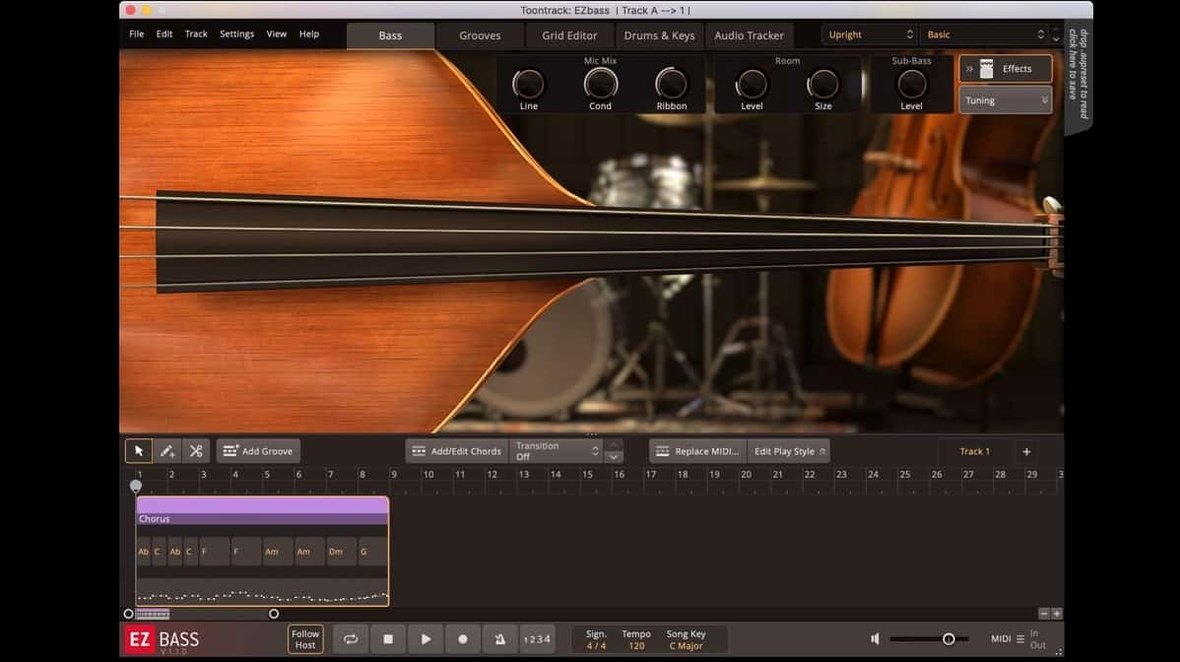
The software is built around sampled bass instruments and comes with MIDI basslines covering a broad range of styles. You pull up a preset from the EZbass line and you already have a core tone with a library of phrases ready to audition.
3. Feed it a groove or tap a rhythm
Where it gets practical for songwriting is the grid. You can generate matching basslines from drum or keyboard MIDI, or use the audio-to-MIDI conversion—the same tracking technology found in Superior Drummer 3—to turn a guitar di or a beatboxed rhythm into a bass part. The 1.3.3 update tightened audio export timing at sample rates other than 44.1 kHz, so the conversion stays locked regardless of your project settings.
4. Tweak the articulation
The latest build added right-hand mute articulation for the Rock Legend EBX, and you can now change some keyboard shortcuts in Settings, which helps if you are editing a performance by hand and want the grid to respond the way your fingers expect.
What I would use it for is turning a rough drum loop and a hummed line into a finished bass track without leaving the creative headspace. It is a songwriting tool first, so the sound and the grid are designed to keep you moving rather than tweaking knobs.
How the 1.3.3 update changes everyday use
Two fixes in version 1.3.3 matter more than they sound on paper. The menu click response issue in newer Apple hosts used to mean an occasional dead click when bouncing between the plug-in window and the DAW — the kind of thing that breaks flow after the fourth or fifth time in a session. That is gone now. The audio export timing fix at sample rates other than 44.1 kHz is equally quiet but real: if you work in 48 kHz or 96 kHz projects, exported bass tracks now sit exactly where they played during monitoring. No shifting, no nudging after the fact.
The right-hand mute articulation for Rock Legend EBX is more niche but shows where Toontrack keeps tightening the instrument. If you own that expansion, you can now write basslines where muted notes have the same definition as open ones, which makes palm-muted rock parts sound less like a workaround and more like a player.
Being able to change keyboard shortcuts from Settings is one of those small things that you do not think about until you have it. If you come from a different DAW or plug-in where certain keys are muscle memory, you can now make EZbass match rather than retraining your fingers.
Fitting EZbass into a real project
EZbass works as an AU, VST, or AAX plug-in, which means it slots into pretty much any Mac DAW without fuss. I tend to run it inside Logic or Ableton Live, feeding it a kick-and-snare pattern from whatever drum track is already playing. The bassline generation reads the drum MIDI and builds a part that locks to the kick while filling the spaces the snare leaves open. From there I drag the MIDI into the DAW timeline and call up an EBX expansion for a different instrument flavor.
It also plays well with macOS features you might not immediately connect to a bass plug-in. The standalone app responds to standard Mac keyboard shortcuts once you customize them in Settings, and the refreshed Tahoe-style icons mean it looks at home in the Dock and Finder alongside everything else on a recent macOS version. If you use the Audio Units version, it inherits whatever buffer and sample-rate settings your host is running, which is where the 1.3.3 export timing fix pays off across project types.
Tip: If you record a rough guitar DI into your DAW, route it to EZbass via the audio-to-MIDI input and it will spit out a bassline that follows the guitar rhythm. The conversion uses the same tracking engine as Superior Drummer 3, so it handles slides and muted notes with reasonable accuracy — useful when you have a riff in your head but your bass playing is not up to the task.
Scarbee captures one bass; EZbass builds the bassline for you
Against Native Instruments Scarbee Rickenbacker Bass, EZbass is less about deep-sampled articulations of a single instrument and more about writing parts fast. Scarbee gives you a meticulously sampled Rickenbacker with all the finger noise and character you would want for a finished track, but you need to program or play every note yourself. EZbass trades some of that single-instrument depth for the grid-based arrangement tools and the ability to generate basslines from other MIDI.
IK Multimedia MODO BASS 2 models its instruments physically rather than relying purely on samples, so the playing feel and string behavior can be more organic if you are performing every part by hand. It also covers a wider range of bass types out of the box. Where EZbass pulls ahead is the workflow: audio-to-MIDI conversion, the style-based MIDI library, and the tap-to-find-a-groove approach make it feel like a co-writer rather than a sound module.
There is also Ample Sound Ample Bass P Lite, which is a free sampled Precision Bass with a capable strum engine and tab player. It sounds good for the price and gives you a solid DI tone, but it does not generate or rearrange parts for you. EZbass covers that ground and then adds the tone-shaping and expansion ecosystem through EBX expansions, so you can start with a vintage or modern bass and grow the palette later without leaving the same interface.
If you are searching for Toontrack EZbass torrent or an EZbass Mac torrent to try the workflow before committing, the version here includes both sampled basses and the full audio-to-MIDI engine, so you get the complete writing experience — not a cut-down demo. Those who look for an EZbass free download often want to see how the grid and groove tools feel in a real session, and this build lets you put it through its paces on an actual track.
A few welcome tweaks landed in version 1.3.3:
- Right-hand mute articulation is now supported for the Rock Legend EBX, giving you more expressive control over muted notes.
- You can change a handful of keyboard shortcuts in Settings to match your editing habits.
- Mac icons—both standalone and project—have been updated to the macOS Tahoe style.
- macOS 10.15 or later
- Intel or Apple Silicon Mac
Questions from the stall
Can EZbass create a bassline from a drum pattern?
Yes, it can generate matching basslines from drum or keyboard MIDI, which makes it quick to build a rhythm section around an existing beat.
What does the audio-to-MIDI feature actually do?
It converts an audio recording—like a guitar part or a vocal line—into MIDI using the same technology as Superior Drummer 3, so EZbass can play the line back with a sampled bass sound.
What was fixed in the latest EZbass update?
Version 1.3.3 fixed timing issues during audio export at sample rates other than 44.1 kHz, added right-hand mute articulation for Rock Legend EBX, and updated the Mac icons to the macOS Tahoe style.
Notes from other shops 0
Sign in or open a shop account to leave a note.
No notes yet. If you've used this on a shop Mac, tell me how it went.