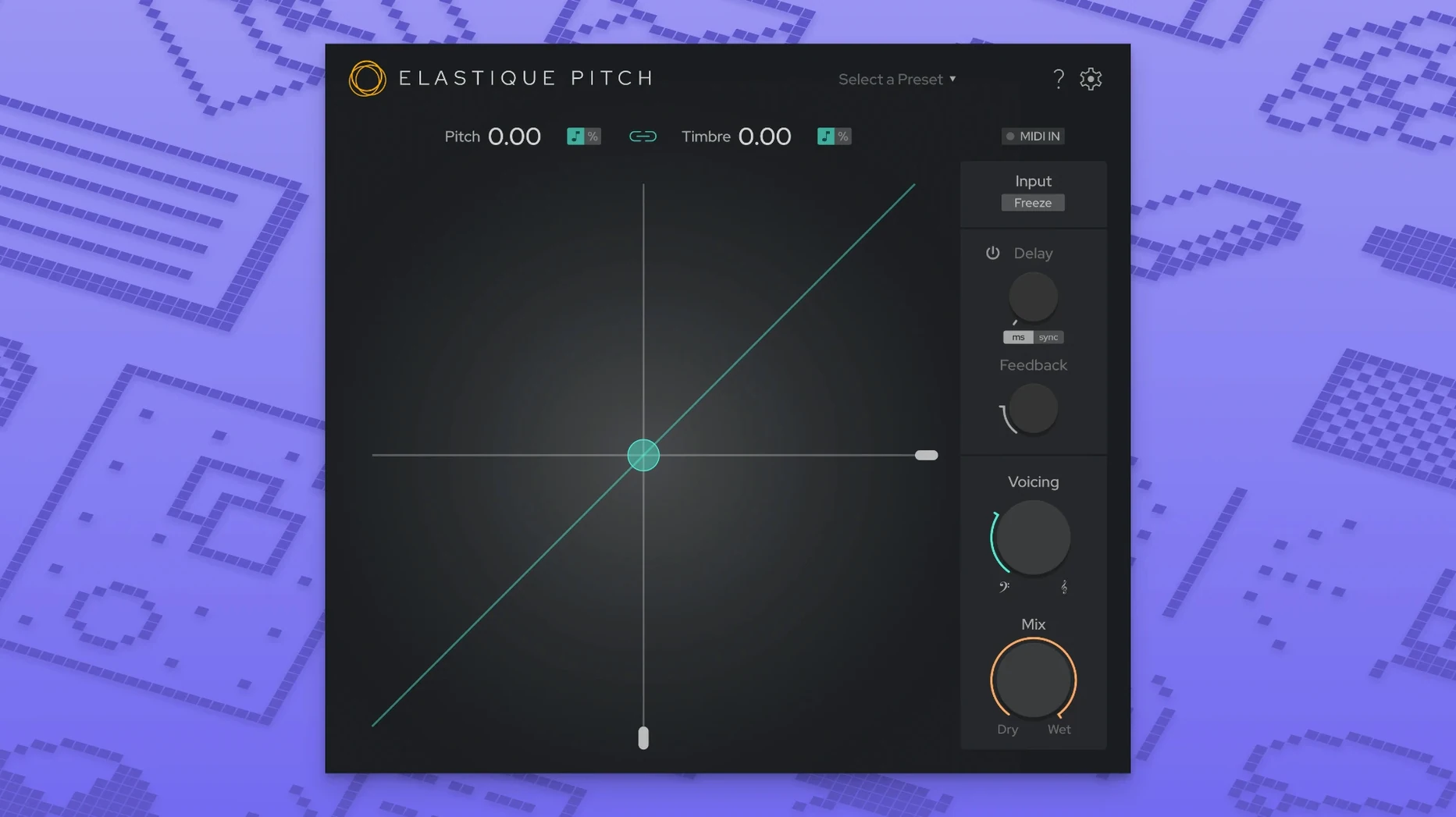
The Formant Shift knob is where things get interesting. Move it independently of the main pitch control, and you can thin out a vocal for a ghostly layer or deepen a drum loop without turning it into mud. That separation of pitch and timbre is the heart of what zPlane’s ÉLASTIQUEPRO algorithm does in version 2.5, and it all happens in real time — no rendering, no offline bounces, just immediate feedback as your track plays.
| Detail | Info |
|---|---|
| Version | 2.5.0 |
| Plugin format | VST / Audio Units / AAX |
| Mac support | macOS 10.15 or later, Intel & Apple Silicon |
I’d reach for this when a vocal take is nearly there but a few notes sit flat, or when a video edit changes speed and I need the audio to follow without the chipmunk effect. The redesigned interface keeps the pitch, formant, and timing controls right where your eyes expect them, so you’re not hunting through menus mid-session. With multichannel support now up to 16 channels, it fits into surround mixes and complex routing setups without complaint. It’s a focused tool — pitch up or down, formant up or down, timing stretch — but that single-mindedness means it does the job cleanly and stays out of the way.
Fixing a drifted last chorus note on a vocal
A typical session for me starts with a vocal track that needs a little nudge — maybe the singer drifted flat on the last chorus note. I insert elastiquePitch on the vocal channel, right in the insert slot. The plug‑in opens with its clean two‑knob layout front and center. I loop the offending phrase and hit play.
I drag the Pitch knob down by about 40 cents while watching the real‑time display. The voice lowers smoothly, and because the formant stays put by default, it doesn’t turn into a monster. That’s the first thing I check: does it still sound like the same singer, just in tune? With this plug‑in, it usually does.
Next I unlink the Formant knob and tweak it upward slightly — maybe 15 cents — to keep the breathiness intact. The change is subtle, but it prevents that “processed” sheen you get from basic pitch shifters. If the track has a doubled harmony, I’ll route both channels to a bus, insert another instance, and shift the harmony up by a few cents while dipping its formant a touch for a wider stereo spread. The whole process, from loading to a usable result, takes under two minutes. No offline rendering dialog, no waiting. Just turn the knobs while the DAW runs.
Keeping pitch and formant independent by default
Out of the box, elastiquePitch is ready to go, but a couple of adjustments make it feel more like your tool. First, check the link mode between Pitch and Formant. The default keeps them independent, which is what I want for vocals, but if you’re pitching a full mix or an instrument bus, linking them preserves the natural timbre shift that happens with physical pitch changes — think varispeed on a tape machine.
Second, look at the stereo linking behavior if you’re processing multi‑mic recordings. Keeping channels locked prevents phase drift between a close mic and a room mic when you shift them together. For sound design work, unlinking channels on purpose can create deliberate widening effects. The multichannel support up to 16 channels means you can treat each drum shell in a surround setup independently, but the plug‑in won’t force that on you — it starts grouped by default.
Tip: If you’re dialing in subtle corrections, reduce the plug‑in’s mix level slightly and blend the shifted signal underneath the dry track. It softens the transient smearing that any real‑time algorithm introduces at extreme settings.
Workflow: matching audio to a frame‑rate change
Here’s a task I run into often: a video edit comes back with a 24 fps to 25 fps conversion, and the accompanying voiceover now runs 4% faster. The editor wants the original performance preserved, just at the new speed.
I load the bounced audio into my DAW and place elastiquePitch on the track. The new interface puts the timing stretch parameter right where I need it. I enter a 4% time reduction — no need to calculate semitones because the plug‑in shows both pitch ratio and cents in its readout. I disable formant shifting entirely for this step; I want the speaker’s timbre to stay exactly as recorded, only the duration changes.
I play the stretched version against the video reference. The lip sync lands within a frame, and the voice sounds natural — no warbling, no metallic artifacts. If the room tone shifts slightly, I’ll add a second instance on the original ambience track and stretch it by the same amount, ganged via the DAW’s parameter linking. That keeps the background texture consistent. Once everything locks, I commit the processing with an offline render through the plug‑in to free up CPU, though honestly, the real‑time load is low enough that I sometimes just leave it active through the final export. The ÉLASTIQUEPRO algorithm handles sustained notes and transients without the chirping I’ve heard from older pitch‑stretching tools.
Who clicks with elastiquePitch fastest
Music producers who comp vocals track‑by‑track get immediate value from it. When you’re stacking harmonies from the same singer, small formant shifts on each layer create a chorus‑like spread without sounding artificial. The real‑time feedback means you hear the blend while arranging, not after a bounce.
Post‑production editors working with dialog and ADR pick up on the independent formant control right away. Matching a line recorded in a different session to the on‑set performance often requires shifting pitch without altering the speaker’s vocal weight. elastiquePitch handles that separation cleanly, and the 16‑channel support means it fits into surround dialog stems without extra routing gymnastics.
Sound designers who build textures from field recordings also take to it. The ability to freeze sound grains — essentially pausing the algorithm’s phase vocoder — turns a passing train recording into a sustained metallic drone. Drop the formant while the pitch stays anchored, and the source material becomes unrecognizable. It’s a simple move that spawns long ambient beds from short samples. That kind of immediacy suits people who want to shape sound while the idea is still forming, not after they’ve lost the thread in a menu dive.
Version 2.5 brings a clearer layout and wider routing:
- A redesigned user interface that keeps key controls more accessible.
- Multichannel support expanded to handle up to 16 channels.
- Runs on the latest ÉLASTIQUEPRO algorithm for smoother pitch and formant processing.
- macOS 10.15 or later
- Intel or Apple Silicon Mac
- DAW that hosts VST, Audio Units, or AAX plug-ins
Questions from the stall
Can elastiquePitch change pitch without affecting formants?
Yes, the plug-in lets you adjust pitch and formant independently, so you can shift a vocal’s note while keeping its natural timbre intact.
Notes from other shops 0
Sign in or open a shop account to leave a note.
No notes yet. If you've used this on a shop Mac, tell me how it went.