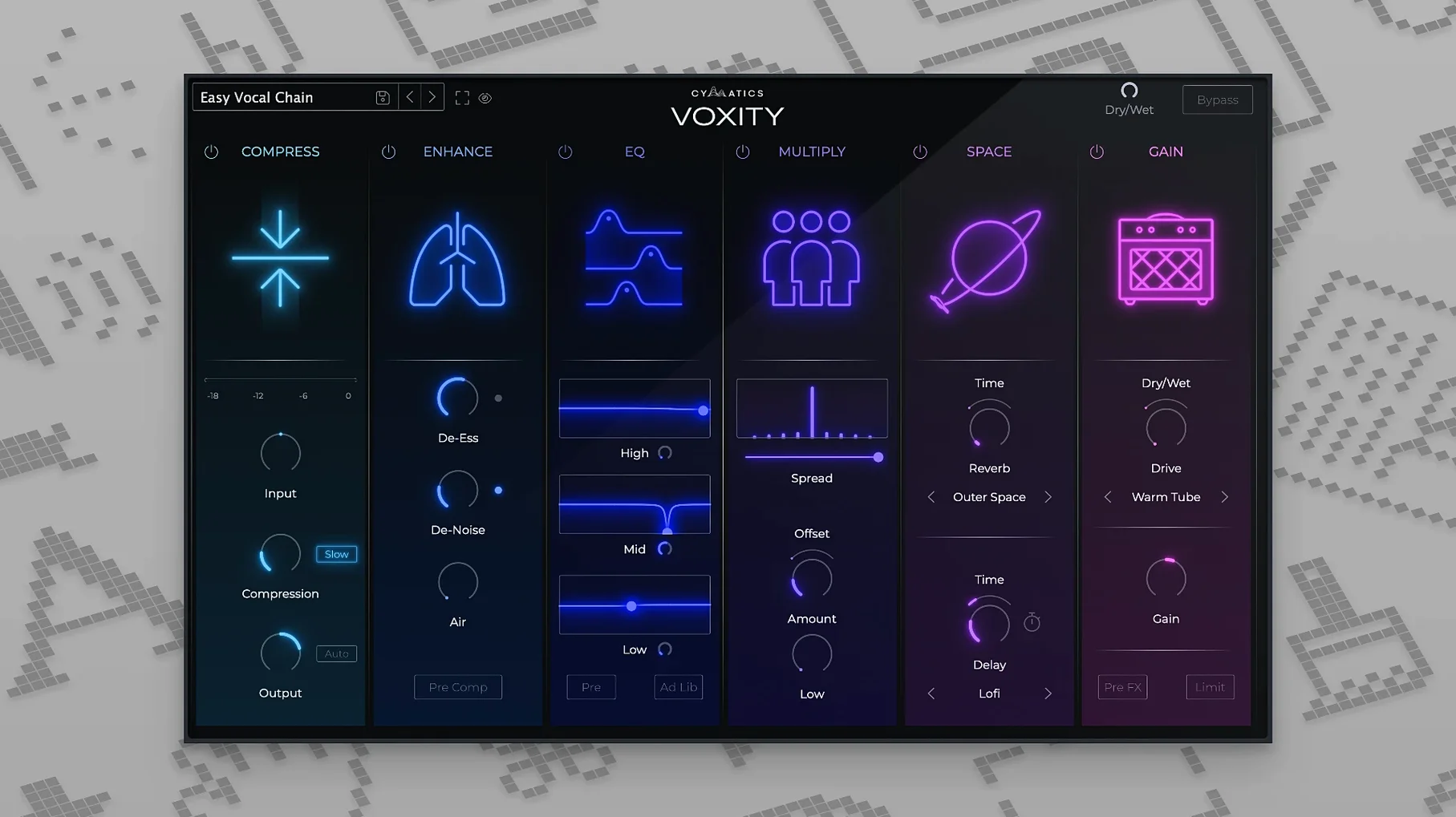
If you've spent time tweaking stock EQs and compressors to get a vocal to sit right, VOXITY takes a different path. It bundles the core moves for a finished vocal sound into one place, built specifically for the character of a human voice.
Does it do more than just reverb and delay?
Yes. It includes volume leveling to even out a performance and stereo widening to push the vocal out to the sides. Those go alongside its echo and reverb, so it's trying to shape the dry signal first, then add space.
What starting points come with it?
VOXITY comes with ready-made presets aimed at different styles. That means you can pull up a chain without building one from blank, which is handy if you want to get a rough idea of how a raw take might finish up.
ARM and x86 support, no Rosetta needed
It does. The plugin supports ARM as well as x86 architectures in 64-bit, so you won't need Rosetta if you're on a newer Mac. It asks for macOS 10.14 or later.
When every knob gets cranked at once
VOXITY bundles a lot of processing into one window, and that's exactly where newcomers can drift off course. The most common slip is cranking every knob because they're all there. You don't need the stereo widener at full tilt, the brightener pushed hard, and a heavy reverb tail all at once on a lead vocal — it turns the voice into a washed-out smear that fights the center of the mix instead of anchoring it.
Another one is ignoring the volume leveling stage before dialing in tone. If the raw take swings wildly between quiet and loud, the EQ and space effects that follow are reacting to an uneven signal. Level it first, then shape it. You'll use less processing overall.
Preset-hopping without listening in context is a trap too. A preset that sounds lush in solo often crowds the low mids or pushes sibilance forward once the beat is in. Switch between the full mix and the isolated vocal while you tweak — VOXITY's controls are broad enough that a small nudge on brightness or depth can pull the vocal back into place without starting over.
Tip: if the vocal suddenly feels disconnected from the track, pull the reverb mix down a touch and narrow the stereo spread slightly before touching anything else.
Simpler than Nectar’s modular vocal workstation
Next to iZotope Nectar, VOXITY keeps things simpler. Nectar gives you modules for pitch correction, harmonization, and a deeper EQ section with visual feedback — it's closer to a vocal workstation. VOXITY strips that back to leveling, tone shaping, width, and space, which means less time in menus and more time making decisions with your ears. If you already handle tuning elsewhere, VOXITY doesn't duplicate what you don't need.
Compared with Waves CLA Vocals, the approach is similar in spirit — both aim to give you a finished vocal sound from a handful of faders — but VOXITY leans into stereo width and depth as first-class controls rather than afterthoughts. CLA Vocals keeps the voice centered and focused, which suits dense rock and pop mixes. VOXITY lets you open the vocal outward, which makes it a natural fit for R&B hooks, atmospheric indie, or anything where the voice needs to feel wide without stacking doubles.
Against something like Soundtoys Little Plate or a dedicated reverb, VOXITY isn't trying to be a specialist space designer. The reverb and echo inside it are voicing tools — quick, musical, and meant to sit inside the same workflow as the leveling and brightening. You'd still reach for a dedicated reverb plugin for a cinematic tail or a specific room simulation, but for getting vocal ambience that works right away, VOXITY covers the ground most productions actually need.
A single plugin replacing your full vocal chain
"Will it replace my vocal chain completely?" For a lot of mixes, yes — at least for the broad-stroke processing. If your workflow already includes surgical EQ cuts, de-essing, or detailed compression, you'll likely use VOXITY as the tonal and spatial layer on top of those corrections. Think of it as the tool that takes a cleaned-up vocal and makes it sound like a record, rather than the tool that fixes every detail in the raw take.
"Does it add latency?" The plugin runs as a standard AU or VST3 insert, and on modern Macs — Intel or Apple Silicon — the processing is light enough that you won't feel it during tracking or mixing. No oversampling modes or lookahead-heavy algorithms to worry about.
"Can I use it on instruments too?" It's voiced for vocals, and that voicing is why it works quickly on a voice. You can throw it on a synth lead or a sampled phrase, and sometimes the brightener and width controls do something interesting, but the leveling and depth curves expect the dynamic range and midrange presence of a human vocal. On instruments it's more of a creative experiment than a go-to.
One window for beatmakers who sing and rap
Bedroom producers and beatmakers who sing or rap on their own tracks benefit the most. You're already wearing too many hats — writing, producing, recording, mixing — and VOXITY shrinks the vocal-mixing part from a dozen plugin windows down to one. You record a take, pull up a preset that's close to the vibe, tweak three or four knobs, and move on to the next section of the song. That speed keeps the creative momentum alive.
Content creators who mix spoken word or voiceover also get strong mileage. The volume leveling alone saves you from riding a fader through a ten-minute recording, and the brightness control helps lift a dull microphone without making sibilance painful. You won't need the stereo widener for a centered voiceover, but the depth and reverb can add just enough weight that the voice doesn't sound thin on laptop speakers.
Mixing engineers working on quick-turnaround projects — demos, reference tracks, or sessions where the client wants to hear a near-finished vocal fast — will reach for VOXITY as a scratch-pad tool that often stays in the final mix. It's not about replacing a meticulously built template; it's about getting to a sound that works before the client loses patience. If the vocal sits right and feels finished, nobody asks which plugins got it there.
- macOS 10.14 or newer
- Apple Silicon or Intel (64-bit)
- Compatible DAW host
Questions from the stall
Is this a standalone app or a plug-in?
VOXITY runs as a plug-in inside a DAW; you need a host that loads 64-bit audio units or VSTs.
Can I use VOXITY without an internet connection?
Yes. Once it's installed and authorized, the presets and processing run locally on your machine.
Notes from other shops 0
Sign in or open a shop account to leave a note.
No notes yet. If you've used this on a shop Mac, tell me how it went.