If you're on a Mac, Snapback needs macOS 10.13 or later and it runs natively on both Intel and Apple Silicon processors. Host-wise, it shows up as VST 2, VST 3, AU, and AAX—I've had no trouble pulling it up in Ableton Live, Logic Pro, Bitwig, and the other usual suspects.
| What | The details |
|---|---|
| Format | VST 2, VST 3, AU, AAX |
| Mac requirements | macOS 10.13+, Intel or Apple Silicon |
| Built-in samples | 200+ ready-made sounds |
| Key extra | Filters, waveform visualizer, Reverse button |
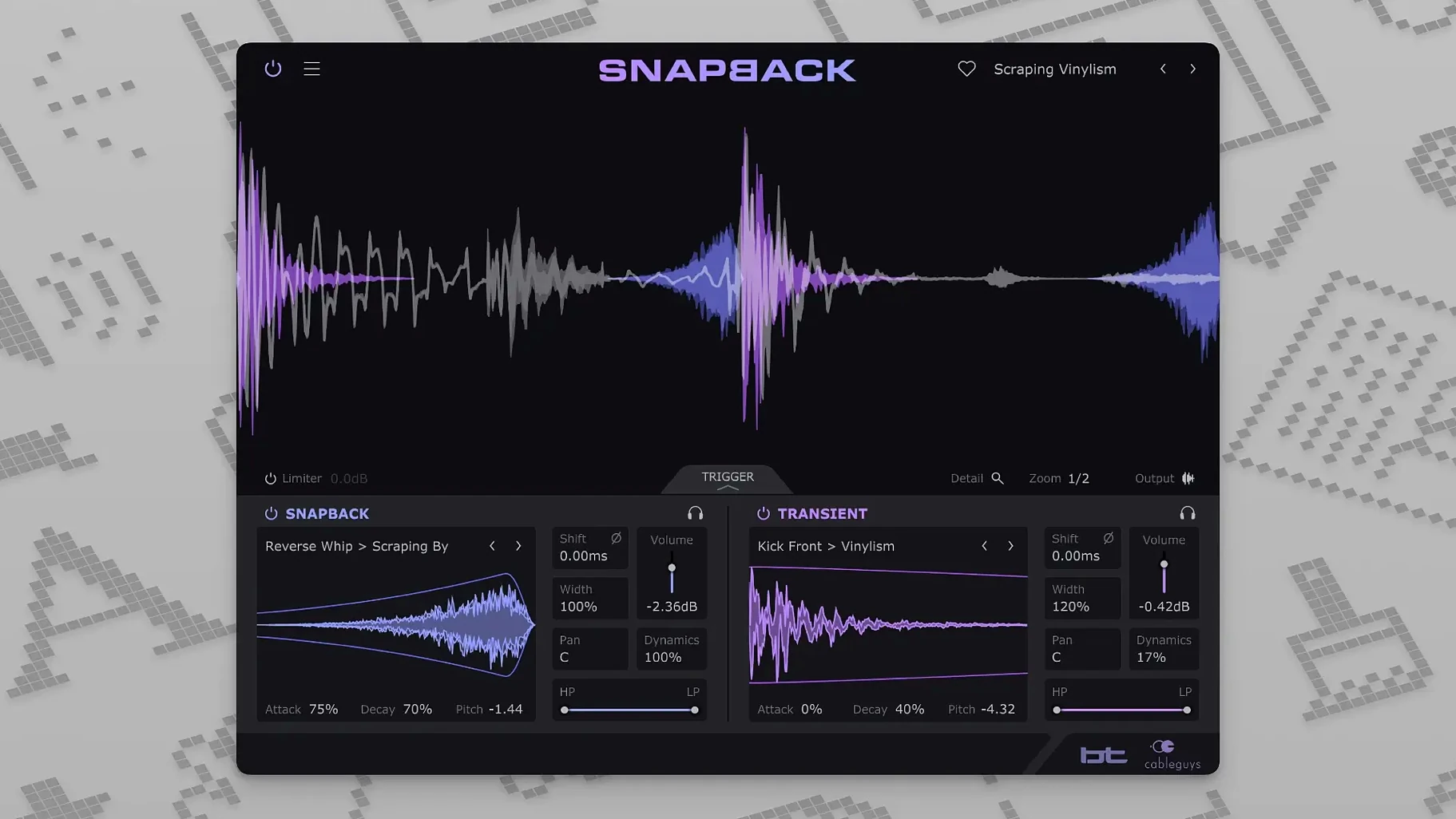
What I like about the sound side is how direct it is. Snapback detects each drum hit automatically and syncs the added sample right to the transient—no nudging wave forms around. The waveform visualizer makes that alignment obvious at a glance. The 200-plus built-in samples cover the basics for kicks and snares, and the filters let you shape the attack and texture without reaching for another plugin. Created with BT, it leans toward giving percussion extra snap and character rather than just piling on low end. The Reverse button from version 1.1 opens up some fun backwards textures too. For a shop owner cutting drum tracks between packing orders, anything that tightens up a snare or kick this quickly earns its place.
Transforming flat kicks into mix-ready punches
Beatmakers and electronic producers who build drum parts from scratch tend to click with Snapback fastest — it turns a flat kick into something that punches through a busy mix in seconds. Mix engineers dealing with live drum recordings get a different kind of mileage: a weak snare track can borrow attack from a sharp transient sample without any manual slipping or phase guesswork.
Sound designers and sample pack creators lean on the sample import and the Reverse button a lot. Dragging in field recordings or foley hits and letting Snapback sync them to a drum pattern creates rhythmic textures that would take ages to cut and place by hand. The pitch and envelope controls give enough shaping to make those layers feel intentional rather than pasted on.
If you mostly work with soft synths and MIDI drums, the plugin fits into a slot and stays there — it's not the kind of tool you need to overthink. People who hate staring at waveform zoom and dragging tiny clips around tend to appreciate the automatic detection more than anyone.
Questions I'd ask before installing
Does it add noticeable latency? Snapback works by analyzing audio ahead of the playback head, so there's a small processing delay. In practice, most DAWs handle this with plugin delay compensation, and I haven't seen it throw timing off in Logic or Ableton sessions. If you're monitoring through the plugin while recording live drums, you'll want to toggle it off for tracking and re-enable it during mixing.
Can I use my own samples or am I stuck with the built-in ones? User sample import is drag-and-drop straightforward — WAV files work without fuss. The 200-plus factory sounds are a solid starting point, but the plugin really opens up when you feed it your own transient material. A short click from a hardware drum machine or a slice of ambient noise can become a repeatable layer across an entire track.
Does it choke on fast or complex drum parts? Double-kicks and rapid hi-hat patterns can occasionally confuse the detection, especially if the hits are very close together. Tweaking the sensitivity usually sorts it out, and the waveform display helps you spot where it's catching the wrong transient. For most four-on-the-floor and standard breakbeat patterns, it locks on without any babysitting.
Light on Apple Silicon, polite on older Intel Macs
Loading Snapback on an Apple Silicon Mac feels light — the interface draws quickly and the sample browser scrolls without stutter. On older Intel machines running Ventura or Monterey, it still opens in a reasonable window and doesn't spike the CPU meter the way some convolution or spectral processors do. RAM usage stays modest even with custom samples loaded, which matters when you're running a dozen instances across a full drum kit.
The waveform visualizer updates in real time as you adjust detection sensitivity, and there's no lag when dragging samples onto the interface. Filter and envelope changes are immediate — turning the attack knob while playback runs gives you that instant feedback that makes dialing in a sound feel musical rather than technical.
Stability-wise, I haven't run into crashes when switching between AU and VST 3 versions in different hosts. AAX in Pro Tools behaves the same as the other formats. The version 1.1 MIDI port expansion from 16 to 256 is something modular synth users and large template builders will notice — fewer headaches when routing external triggers across a complex setup. For everyday drum layering, the plugin stays out of the way and does its one job without eating resources or destabilizing a session. If you grab a Snapback VST torrent or a Cableguys Snapback crack, the plugin itself runs clean once it's in place and doesn't phone home or bog down the system.
Version 1.1 adds a couple of handy things:
- A Reverse button for flipping samples into backwards textures.
- An expansion of addressable MIDI ports from 16 to 256 for more complex triggering setups.
- macOS 10.13 or later
- Intel or Apple Silicon processor
- VST 2, VST 3, AU, or AAX host DAW
Questions from the stall
What hosts does Cableguys Snapback work with on Mac?
It comes in VST 2, VST 3, AU, and AAX formats, and the developer lists Ableton Live, Logic Pro, Pro Tools, Cubase, Bitwig Studio, FL Studio, and REAPER among the supported DAWs.
Notes from other shops 0
Sign in or open a shop account to leave a note.
No notes yet. If you've used this on a shop Mac, tell me how it went.