BlueCat PatchWork runs on any 64-bit Mac from macOS 10.9 onward, on both Intel and Apple Silicon machines. It sits inside your DAW as a plug-in and gives you a rack where other effects can live.
What its controls do to a mix
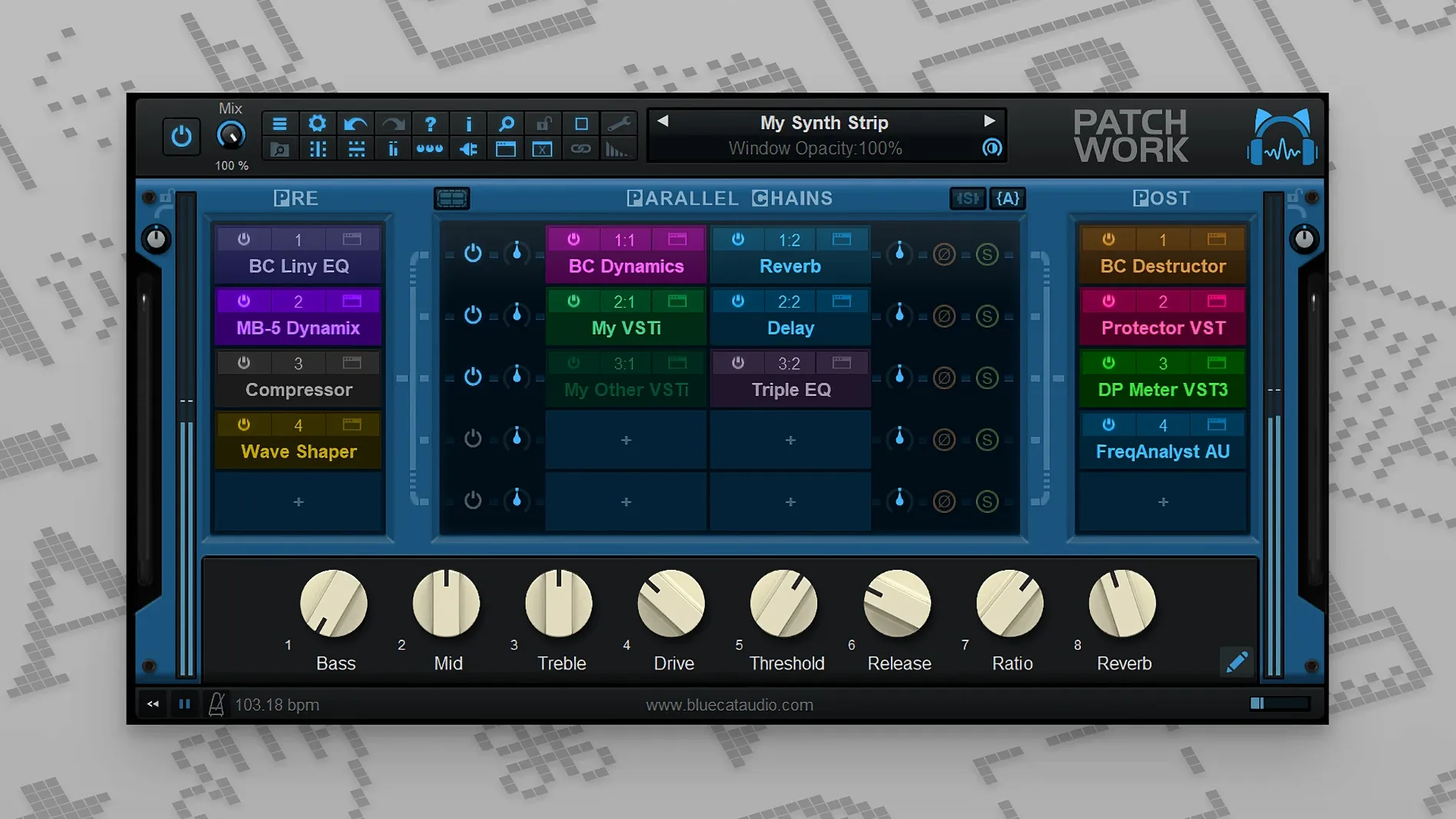
- Routing grid: Series, parallel, or split paths let you feed a compressor into an EQ or run a dry bass signal beside a distorted one.
- Mix and gain per slot: Blend each effect in small amounts instead of all-or-nothing, which helps tame aggressive saturation or chorus washing.
- Latency compensation: Keeps parallel chains in time, even when one side uses a lookahead limiter or linear-phase EQ.
- MIDI control: The 2.75 release added MIDI for individual bypass and interface open/close actions, plus more event types for parameter control.
- Effects chain tools: Copy, paste, save, and reload whole chains, or search through saved plug-ins by name.
Building parallel vocal buses without extra sends
Building a small parallel bus inside a vocal track without setting up extra sends, or loading a handful of VST3 effects that my DAW's own format support gets fussy about. The built-in 16-channel recorder from 2.75 also means I can capture a processed take right from the rack if I want to compare settings later.
Smoothing your first session with scan-path tweaks
A fresh install of PatchWork comes with sensible defaults, but a few tweaks make the first session smoother. Open the preferences early and check these:
- Plug-in scan paths. The scanner picks up standard folders on its own, but if you keep effects in a custom location or have old 32-bit-only components you want to skip, add or exclude those directories now. A clean scan saves you from scrolling through incompatible entries later.
- Default rack size. I start with eight slots showing instead of four. It feels roomier when you're building chains on the fly and saves a click every time you add a parallel row.
- MIDI control setup. If you plan to bypass slots or toggle editor windows from a controller, assign a couple of test mappings right away. The MIDI learn responds quickly — right-click a bypass button, move a knob, and it's locked in. Doing this once teaches you the rhythm of it before you're deep in a session.
- Preset browser behavior. The real-time search is sharp, but the default sort order might not match how you name things. Switch to alphabetical or most-recent if that fits your brain better. You'll thank yourself when you're looking for a chain you saved at 2 a.m.
Near-zero hit on Apple Silicon, even with a loaded rack
PatchWork loads inside a DAW track without fuss — the window appears, you drop effects in, and it stays out of the way. On an Apple Silicon Mac, I see near-zero hit when the rack is empty, and a loaded chain of ten plug-ins barely moves the CPU needle beyond what the same plug-ins would draw natively. The latency compensation does its job quietly; parallel chains with a lookahead limiter on one side and a simple EQ on the other stay sample-aligned, and I've never had to nudge tracks manually.
Memory use climbs with each loaded plug-in, which is expected — it's hosting real instances, not lightweight wrappers. With 64 slots available, you can push the rack far past what's sensible, but the app doesn't stop you. That freedom is part of the appeal. Stability holds up through long mixing sessions, even when I'm swapping chain presets while playback runs. The built-in effects that ship with PatchWork are lightweight utility pieces — tuner, level meter, basic EQ — and they sip resources, so keeping one in the chain for visual feedback costs almost nothing.
A small practical note: VST3 editors on macOS load only when you show the interface, which means a freshly opened rack won't paint every plug-in window at once. I actually prefer this; it keeps the workspace clean and lets you open only what you need to tweak.
Save every chain to build a personal preset machine
- Save chains religiously at first. The effects chain tools added in 2.75 — copy, paste, save, reload — turn PatchWork into a preset machine. Every time you build something useful, hit save and give it a clear name. Even a simple de-esser into a compressor chain becomes reusable across projects.
- Use the 16-channel recorder as a safety net. Record a processed take before you commit to a destructive bounce elsewhere. Comparing settings later is easier when you have a rendered file sitting in the rack's own recorder, not buried in your DAW's audio pool.
- Try one parallel path early. Split a dry signal beside a wet one, blend with the per-slot mix control, and listen to what a touch of parallel compression or distortion does. It's the feature that changes how you think about insert effects, and it takes five minutes to set up.
- Lean on the search box. The plug-in browser scans everything and lets you type partial names. In the first few days, when you're still learning where everything lives, full-text search across saved plug-ins cuts the browsing time to seconds.
Some people search for a bluecat patchwork mac download or look up bluecat patchwork torrent links when they're setting up a new machine, and I understand the impulse — you want the rack running before the creative moment passes. Once it's installed, the real work is building a handful of go-to chains that you'll reuse for months.
The latest official release notes list version 2.78 from May 2026. The 2.75 release brought MIDI control for bypass and interface open/close actions, more MIDI event types for parameters, chain copy/paste/save/reload, and a built-in 16-channel recorder.
- macOS 10.9 or newer
- Intel or Apple Silicon Mac
- 64-bit only
Questions from the stall
How many plug-ins can PatchWork hold?
One instance hosts up to 64 VST, VST3, Audio Unit, or built-in plug-ins.
Can it load third-party effects?
Yes, it loads third-party VST and VST3 plug-ins and includes a scanner for finding them.
Notes from other shops 0
Sign in or open a shop account to leave a note.
No notes yet. If you've used this on a shop Mac, tell me how it went.