Getting a static synth pad to feel like it’s breathing can be surprisingly difficult. Efx AMBIENT solves that by giving you six specialized modes that turn clean signals into evolving, spatial textures without piling on a dozen extra plug-ins.
On a send for ambient pads
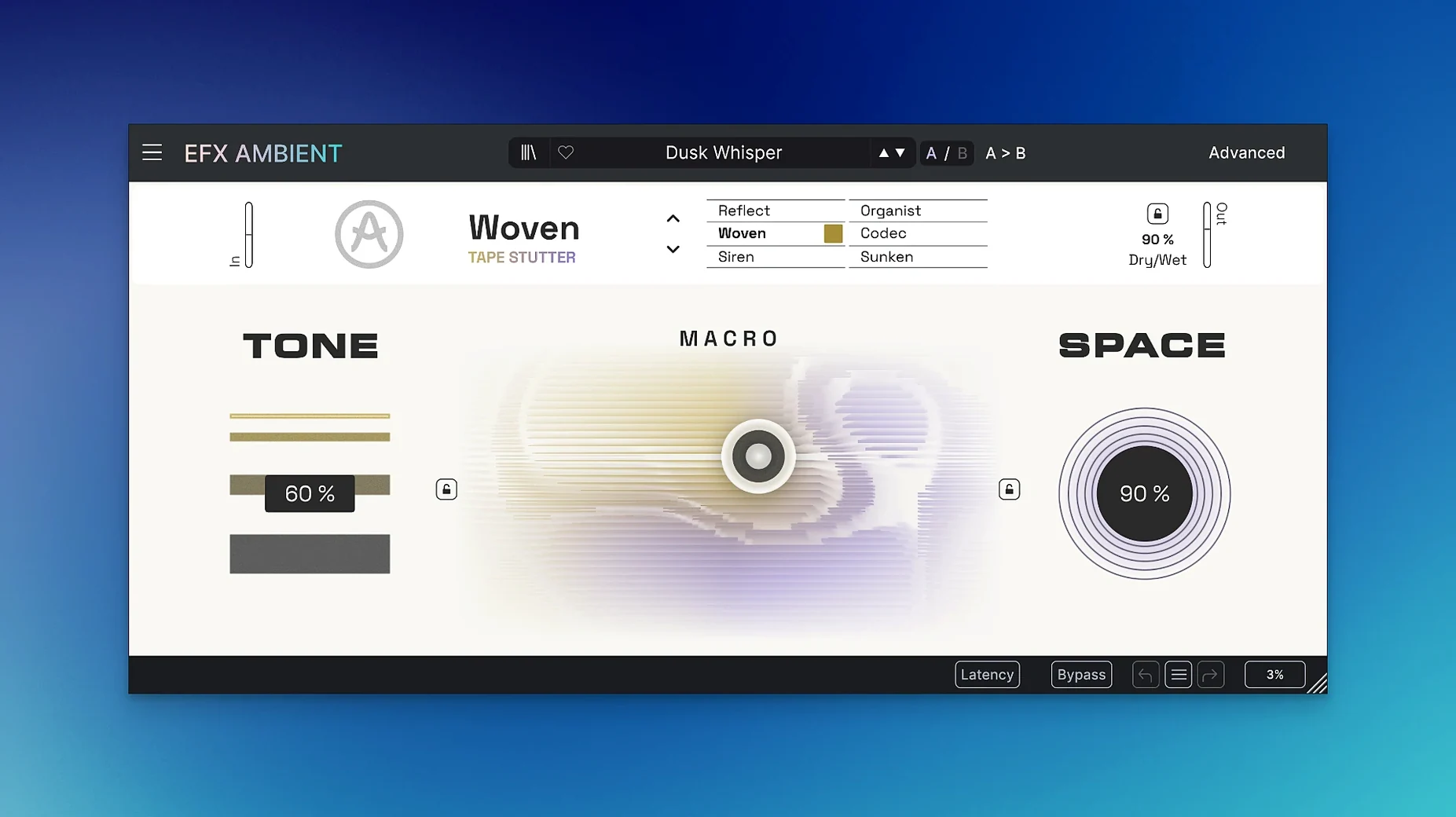
Place it on a return track and feed it a simple chord progression. One mode set produces soft, blurred textures that sit behind a vocal or lead without crowding them. The 2D Macro control lets you shift the character of the blur in real time, so the backdrop never feels static.
On an instrument track for unusual transitions
Drop it directly onto a guitar or synth line when a section needs to dissolve. Another mode set includes reverse playback behavior, which pulls the tail of a note into a swelling wash — perfect for moving from a chorus into a breakdown.
Across the master bus for gentle movement
Used sparingly on the stereo bus, Efx AMBIENT adds a subtle sense of depth that glues a mix without obvious modulation. A light touch with the macro keeps the effect tidy while giving the whole track a more three-dimensional feel.
DAW hosts it actually opens in right now
Does it work with my DAW? Efx AMBIENT runs in any host that supports VST, AU or AAX formats — that covers Logic Pro, Ableton Live, FL Studio, Cubase, Reaper and pretty much everything else people use on a Mac. It's 64-bit only, so older 32-bit hosts won't see it, but anything from the last decade should pick it up without fuss.
Will it bog down my session? The spectral processing and feedback networks behind those six modes do use CPU, especially when you stack multiple instances. On an Apple Silicon machine it's comfortable — you can run several on aux tracks without the fan spinning up. On an older Intel Mac, it helps to commit or freeze tracks once you've dialed in the sound. The Advanced panel's time-based shaping is where the processor feels it most, so leaner settings there keep things snappy.
Can I try it before I commit? You can grab it right here and take it through its paces. The six modes are distinct enough that a quick run through your own material tells you more than any demo video — drop it on a dry snare, a pad, and a vocal bus and you'll know within ten minutes whether it fits your workflow.
Dropping it next to a convolution reverb
Efx AMBIENT doesn't demand a particular ecosystem. It slots into any 64-bit Mac DAW as a standard Audio Unit or VST3 plug-in, which means it coexists happily with your existing arsenal. I often pair it with a convolution reverb placed after it in the chain — the ambient tail feeds into the impulse response and the result feels like a space that's constantly shifting rather than a static room simulation.
On the macOS side, it respects the system-wide audio routing that Audio MIDI Setup provides. If you're using an aggregate device to combine interfaces, the plug-in doesn't care — it just processes whatever your DAW sends it. The installer places the plug-in in the standard /Library/Audio/Plug-Ins folders, so any host that scans those paths will find it on launch.
For sound designers who work across multiple machines, the presets live in Arturia's own format and can be backed up alongside your project files. No cloud dependency, no subscription handshake needed to open your own work later.
When the plug-in doesn't appear after installing
The plug-in doesn't show up after installing. This usually means the DAW scanned before the installer finished. In Logic, go to the Plug-in Manager and hit "Reset & Rescan Selection". In Ableton, a full rescan from Preferences > Plug-ins does the trick. If it still doesn't appear, check that you're running a 64-bit session — some DAWs let you switch to 32-bit bridge mode, and Efx AMBIENT won't load there.
Latency makes real-time playing feel sluggish. The pitch-shifting and reverse modes introduce a small processing delay because they need to look ahead at the audio. If you're tracking a performance live, switch to one of the blurred texture modes — those run with minimal latency — and save the heavier modes for mixing when you can compensate with your DAW's delay compensation.
The macro control feels too jumpy. The 2D Macro maps to multiple parameters at once, and the default curve can be sensitive. Open the Advanced panel and adjust the range of each mapped parameter — narrowing the depth keeps the motion within musical bounds. A small tweak there turns a chaotic sweep into something much more controllable.
Presets load but sound nothing like you expected. Most of the factory settings assume a fairly hot input signal. If you're feeding it a quiet source, the spectral processing doesn't have enough to grab onto. Bring the track level up before the plug-in, or use the input trim if your DAW inserts a gain stage before the effect.
The plug-in window is tiny on a Retina display. Arturia's interface scales with the system resolution, but if it appears small, check your DAW's plug-in scaling setting — some hosts override the native UI size. Toggling between "native" and "host-scaled" in the plug-in wrapper usually fixes this.
Initial release, version 1.0.0.
- macOS 11.0 or later
- Intel and Apple Silicon Macs
Questions from the stall
How many modes does Arturia Efx AMBIENT have?
It includes six distinct operating modes, covering everything from blurred textures to reverse playback effects.
Notes from other shops 0
Sign in or open a shop account to leave a note.
No notes yet. If you've used this on a shop Mac, tell me how it went.