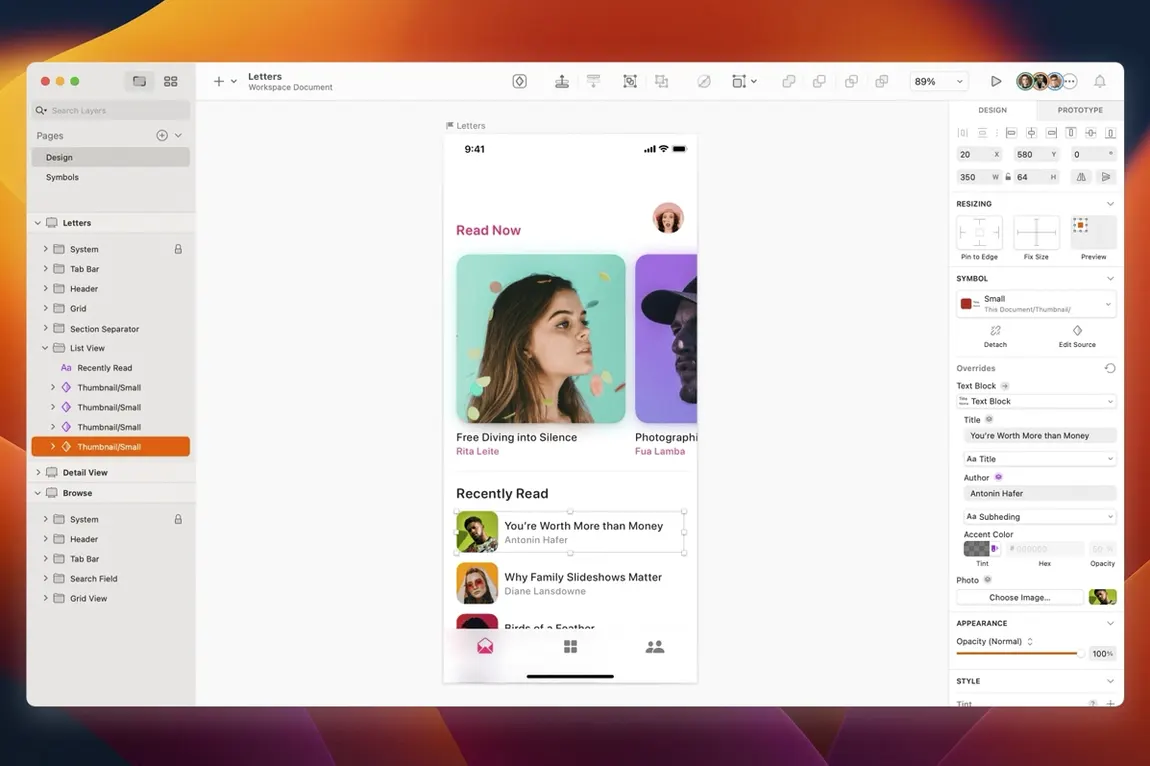
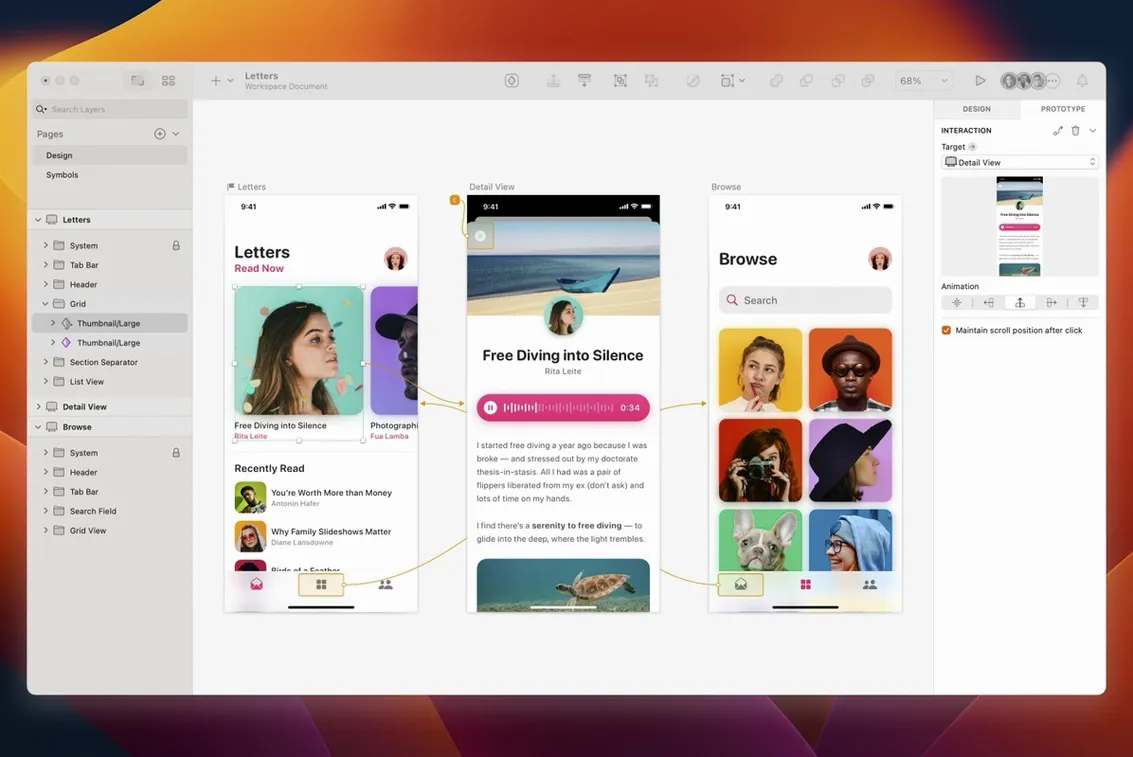
If you’ve spent any time in Figma’s browser-based world, Sketch feels like coming home to a well-organized desk. It’s a native Mac app built from the ground up for screen design — no browser tabs fighting for memory, just a focused workspace for drawing interfaces, websites, and icons.
macOS 14 or newer, runs fast on M-series Macs
Before you get too excited, let’s check the basics. Sketch needs macOS 14 or later and runs natively on both Intel and Apple Silicon machines. If you’re on an M-series Mac, it’ll feel snappy right out of the box.
- Check your macOS version. Apple menu > About This Mac. If it says 14.0 or higher, you’re good.
- Grab the installer. You’ll get a standard disk image from Bohemian Coding’s site.
- Launch and start sketching. The app opens to a clean canvas — artboards, vector tools, and a layer list that won’t confuse anyone who’s used a design tool before.
What I’d use it for: rough wireframes in the morning, polished UI mockups by lunch, and a quick icon export before calling it a day. The plugin ecosystem means you’re never stuck repeating boring layout tasks — there’s probably a helper for whatever slows you down.
A screen design workflow, from wireframe to export
Let me walk you through how a typical mobile checkout screen comes together in Sketch. This isn't theory — it's the kind of task that pops up when a client needs a revision by Thursday and you still have packaging designs to finish for the shop.
Start with an artboard. Pick an iPhone preset from the Insert menu — Sketch ships with a decent set of device sizes out of the box. I name mine Checkout — Step 2 right away, because vague layer names add up fast when you're juggling ten screens. Drop in a navigation bar from the Symbols library. If you haven't built one yet, now's the time: a simple header with a back arrow and a title text layer, converted to a Symbol with Cmd+K. Symbols are the backbone of a sane Sketch file. Change the master, and every instance updates. That's hours saved over a project.
Next, rough out the form fields. Rectangle tool for input backgrounds, text tool for labels and placeholder copy. I keep spacing consistent by nudging layers with the arrow keys while holding Shift — ten pixels at a time, no guessing. Group each field and its label together, then use the Tidy button in the inspector to distribute them evenly. Alignment matters more than most people admit. A form that's off by four pixels looks sloppy even if nobody can name why.
When the structure feels right, switch to the prototyping tab. Link the "Place Order" button to a confirmation artboard. Set the transition to Push and keep it under 300 milliseconds — snappy, not jarring. Hit Cmd+P to preview in the Sketch Mirror app on a phone or just in-window. This is where you catch things like a tap target that's too close to the edge or a label that reads fine on a 27-inch display but crowds the button on a real device.
Export is the last step. Select the artboard, check the Export panel, and add a 2x PNG preset for developer handoff. If the dev team prefers SVG for icons, mark individual icon layers as exportable and set the format to SVG. One click, and everything lands in a tidy folder. No extra compression tools needed.
Tip: Keep a "scratch" page in your Sketch file for experiments. Drag messy explorations there instead of deleting them. You'll often circle back to an idea you thought was dead.
Window corners now match macOS Golden Gate
Version 2026.3.1 isn't a dramatic overhaul, but the fixes matter when you're deep in a project. Document windows now follow the system corner radius on macOS Golden Gate — a small visual shift that makes Sketch feel less like a port and more like a citizen of the operating system.
One fix I appreciate involves the stack layout bug. Before 2026.3.1, setting a minimum width on a text layer inside a stack could produce unpredictable results — text clipping or spacing that didn't match what the inspector claimed. That's sorted now, so button labels inside horizontal stacks behave the way you set them. Less time rebuilding groups by hand.
Tooltip clipping near the screen edge got patched too. If you work with the inspector docked to the right side of a smaller laptop screen, you probably saw truncated tooltips on controls near the bottom corner. That's gone. The same release fixed a text alignment issue in the Rename Selected Layers sheet and a blank-canvas glitch when using Writing Tools. None of these are flashy, but together they remove friction from a full workday.
How Sketch fits with other apps and macOS features
Sketch plays well with tools you probably already use. Copy a vector shape and paste it into Keynote or Pages — it arrives as an editable shape, not a flattened bitmap. That's useful when a client presentation needs a custom diagram and you'd rather draw it once. Drag an exported PNG directly into a Finder folder or drop it onto a Messages conversation for quick feedback. No export-then-locate dance.
On the prototyping side, Sketch files open in Sketch Mirror for live previews on an iPad or iPhone via USB or Wi-Fi. Handoff tools like Zeplin and Abstract read Sketch documents natively, so developers get measurements, color values, and asset slices without you preparing separate spec sheets. If your workflow favors collaboration outside the Mac ecosystem, third-party plugins bridge Sketch to platforms like InVision and Marvel.
macOS integration runs deeper than it looks. Quick Look previews Sketch files in Finder, so you can skim thumbnails without launching the app. Spotlight indexes layer names and artboard titles, which turns into a lifesaver when you're hunting for "that one subscription settings screen" across dozens of files. Continuity Camera lets you snap a photo on an iPhone and insert it straight into a canvas — handy for pulling real-world textures or reference shots into a mood board without intermediate steps.
Version 2026.3.1 is a tidy maintenance update:
- Document windows now match the system corner radius on macOS 27 Golden Gate.
- A stack layout bug with text layer minimum width is squashed.
- Several minor improvements and fixes round out the release.
- macOS 14 or later
- Runs on Intel and Apple Silicon Macs
Questions from the stall
Does Sketch work on Apple Silicon Macs?
Yes, Sketch runs natively on Apple Silicon, so M-series Macs get full performance without Rosetta translation.
Notes from other shops 0
Sign in or open a shop account to leave a note.
No notes yet. If you've used this on a shop Mac, tell me how it went.