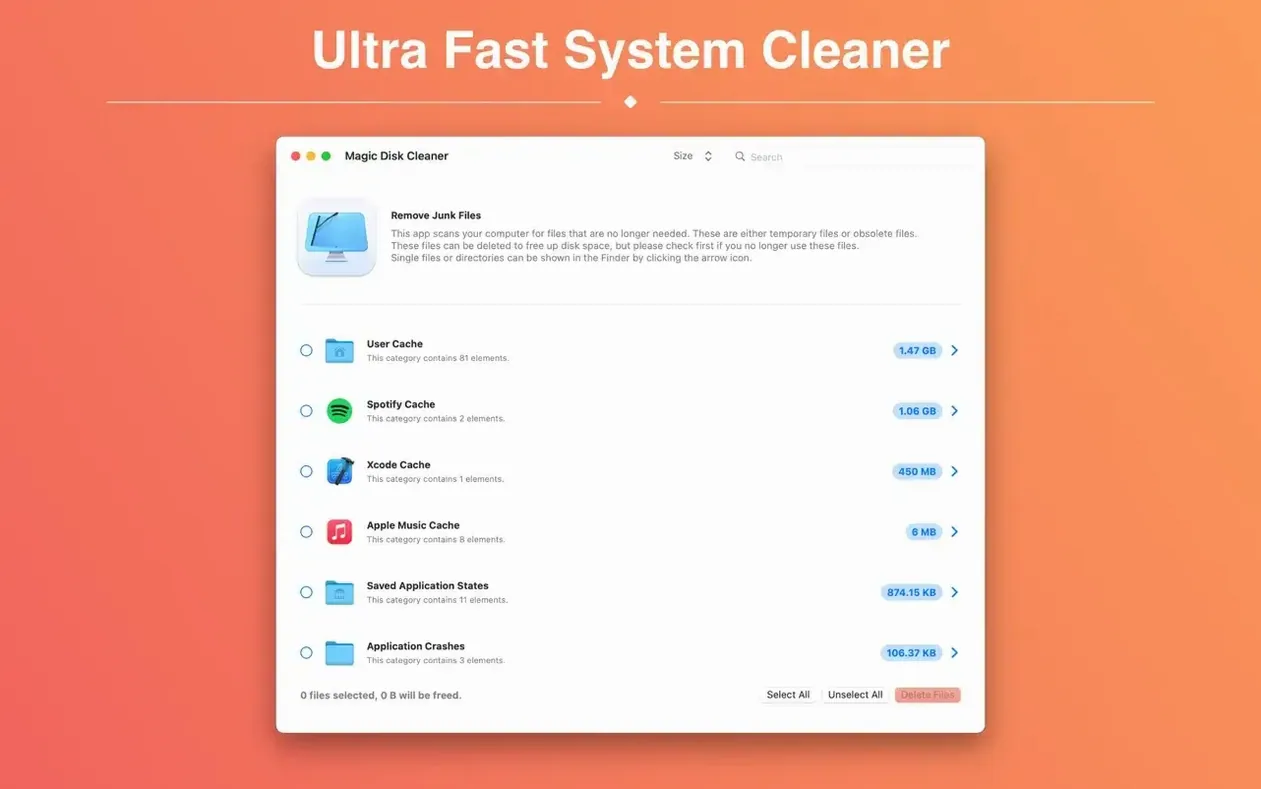
Magic Disk Cleaner works on any Mac running macOS 15.6 or newer, both Intel and Apple Silicon models. It skips the setup wizard altogether — the app starts scanning for temporary files the instant you launch it. Here's how a quick clean-up usually goes:
- Open the app and watch it populate the list within seconds.
- Spot caches from apps like Slack, Xcode, or your browser sitting at the top.
- Click any item to see its exact folder path before you decide.
- Hit Clean to remove everything in one go.
That is the whole routine. No confirmations buried in submenus, no scheduling to figure out — just a straightforward way to reclaim space from files you did not even realize were still hanging around.
When it asks for Full Disk Access permission
Not every scan goes perfectly, and that is normal. Here are a few things people run into with Magic Disk Cleaner and how I handle them.
One of the first surprises: the app sometimes asks for Full Disk Access permission more than once after an update. That is a macOS security quirk, not a bug. When it happens, open System Settings → Privacy & Security → Full Disk Access, unlock the padlock, remove Magic Disk Cleaner from the list, then add it back in manually. A restart of the app usually sorts it.
Another head-scratcher is when the scan completes but shows a smaller number than you expected. Temporary files get purged by macOS itself during restarts, or another cleaning tool might have already swept through. The app can only show what actually exists on disk at that moment.
Sometimes a particular cache folder shows zero bytes but still appears in the list. That is because the folder structure remains even after the files inside are gone. Deleting the entry removes the empty folder, which is harmless but worth knowing so you do not wonder why nothing changed.
If the app hangs during a scan — rare, but I have seen it mentioned — force-quitting and relaunching almost always fixes it. The scan starts fresh and does not leave partial results behind.
A full scan finishes in under ten seconds
A full scan on my MacBook Air with a couple hundred gigabytes of data finishes in under ten seconds. The initial pass hits the obvious spots — user caches, system logs, application support folders — and the list populates incrementally, so you can start reviewing while the deeper scan continues.
While scanning, CPU usage hovers around 15–25% for a brief moment and then drops to near zero. Memory use stays modest, usually under 120 MB. The app does not install a background daemon or a launch agent, which means it is not doing anything when you close it. For a shop computer that runs inventory software and photo editors side by side, that matters.
Deletion speed depends entirely on the number and size of the files. Removing a few hundred megabytes of browser caches is instant. Clearing several gigabytes of Xcode derived data or old iOS backups takes a few seconds longer while macOS processes the file removal. The app itself does not slow down other work during that phase.
Clicking Clean without checking the list first
The first thing new users do is click Clean without looking at the list. The app does not delete anything essential, but you might lose convenience files — like saved window states or recently-used file lists — that you would have preferred to keep. Scroll through the results first. It takes thirty seconds.
Another common slip: confusing temporary files with personal documents. Magic Disk Cleaner only targets caches, logs, and temporary support files. It does not touch your Desktop, Documents, or Photos folders. But I still see people panic when they see an app name they rely on listed in the scan results. That is just the cache folder for that app — deleting it does not touch the application itself or your saved work inside it.
Beginners also tend to run the app once, free up a chunk of space, and then never open it again for months. Temporary files build back up quickly, especially if you use browsers, design tools, or communication apps all day. Making it a weekly habit keeps the space from creeping back unnoticed.
Some people download a magic disk cleaner mac tool expecting it to find duplicate photos or large old downloads. This is not that kind of cleaner. It does one thing — temporary files — and sticks to it. Knowing that upfront saves disappointment.
Hover over any item to see its full folder path
A few details in Magic Disk Cleaner are easy to overlook but make the tool nicer to live with.
- Path preview on hover. Hovering over any item shows the full folder path in a tooltip. I use this constantly before deleting anything from an app I do not immediately recognize.
- Sorting by size. Click the column header to reorder results from largest to smallest. If you need space fast, tackle the top three items and leave the rest for later.
- Copy path shortcut. Right-click any entry and choose Copy Path to grab the folder location. Handy if you want to inspect the folder in Finder before deciding, or if you are documenting what you cleaned for a client's machine.
- No dock clutter. The app lives in the menu bar or as a single window. Close it and it is truly gone — no background service watching your disk.
- Rescan without restarting. After deleting a batch, hit the refresh button instead of quitting. The scan runs again and shows updated numbers immediately.
When someone searches for a magic disk cleaner 4.1.3 reference or an older version, they are usually looking for these same fundamentals — the current version keeps that straightforward approach intact, just updated for newer macOS releases and Apple Silicon support.
Here's what changed in version 6.0.0:
- The User Cache category now shows its correct German name.
- This version requires a Mac with Apple Silicon. If you're on an Intel Mac, stick with the previous version — it'll keep working just fine.
- macOS 15.6 or later
- Apple Silicon or Intel 64-bit (version 6.0.0 requires Apple Silicon; Intel Macs can use the previous release)
Questions from the stall
Does it delete files automatically?
No. Magic Disk Cleaner lists all removable temporary files, but you choose what to delete with a single click — nothing gets removed without your say-so.
Notes from other shops 0
Sign in or open a shop account to leave a note.
No notes yet. If you've used this on a shop Mac, tell me how it went.