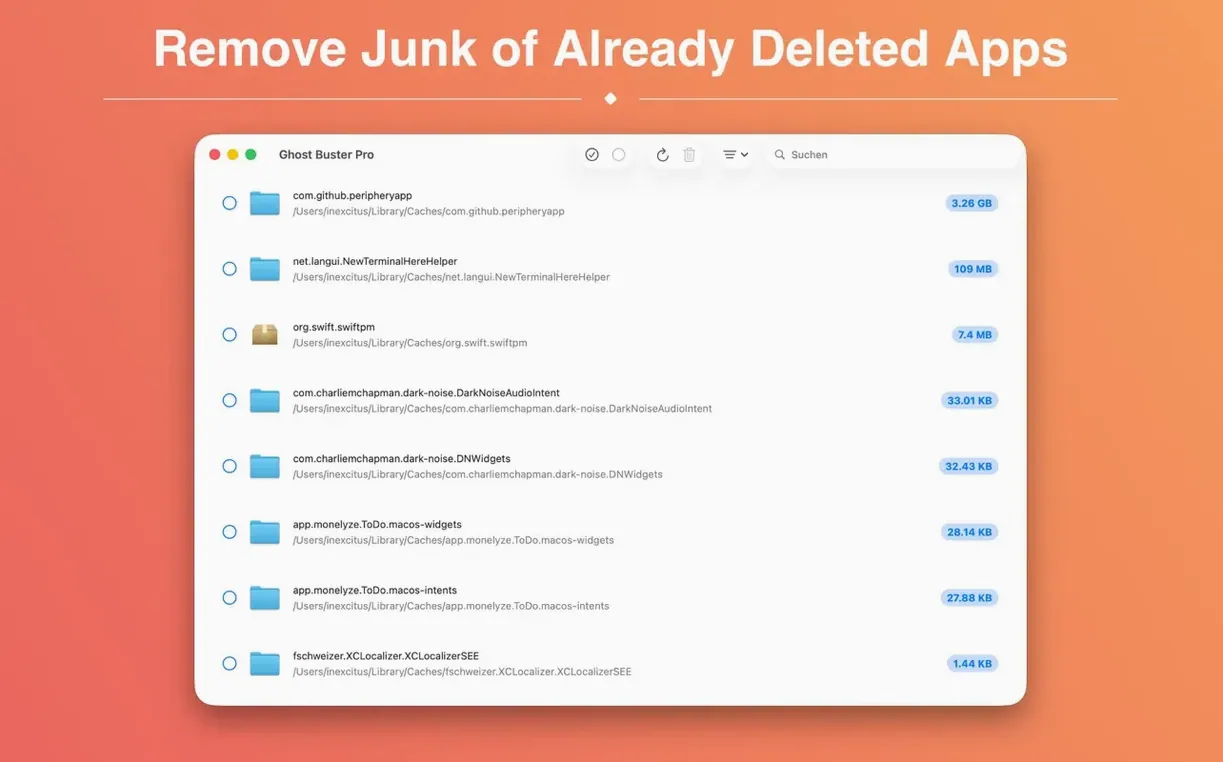
Dragging an app to the Trash rarely removes everything. Preferences, caches, and support files sit tucked away in the Library, slowly eating up space. Ghost Buster Pro hunts those leftovers down so you don't have to go digging through system folders yourself.
Clean up leftover files from apps you removed months ago
- Finding preference panes, logs, and containers from apps you removed months ago.
- Keeping a clean Library folder without manually browsing hidden directories.
- Folks who test lots of software and want to wipe the slate clean between trials.
- Small-shop owners who manage their Macs themselves and hate unexplained disk bloat.
You review and approve every file before anything gets deleted
- It never deletes anything without your say-so — you review and confirm every file first.
- Requires macOS 15.6 or later and runs on both Apple Silicon and Intel Macs.
- The interface is direct: it starts scanning as soon as you launch it, with no setup screens in between.
Sort by size to spot the biggest space hogs instantly
The main job is straightforward, but a few quiet touches save real time once you notice them. I missed a couple during my first week and only stumbled on them later.
- Sort by size right away. The results list has a Size column that isn't the default sort. Click it once and the biggest space hogs float to the top — helpful when you just want to reclaim gigabytes fast and don't care about alphabetizing.
- Reveal in Finder before deleting. Right-click any file in the list and choose Reveal in Finder. I use this when a leftover name looks unfamiliar and I want to check its parent folder before removing it. Two seconds of extra caution, no regrets.
- One-click cleanup. After you tick the checkboxes next to the files you want gone, a single button handles the rest. No second confirmation dialog, no "are you really sure" — it trusts that you already made your choices in the list.
- Instant scan on launch. The app doesn't greet you with a splash screen or a setup wizard. You open it, it starts scanning. If you're in a hurry, that small decision by the developer saves a handful of clicks every session.
Tip: If you're hunting a specific app's leftovers — say you uninstalled something but its preferences keep causing trouble on reinstall — let the scan finish, then type part of the app name in the search field. The list filters as you type, and you can select the matching group in one go.
What happens if Ghost Buster flags a file you still need
A few questions pop up regularly on forums and in shop conversations. Here's the practical side of each one.
Does it remove files from apps I still use?
No. Ghost Buster Pro only looks for files tied to applications that are no longer present on your Mac. If the app itself is still sitting in your Applications folder, its support files won't appear in the scan results. That's the key safety rail: the tool matches leftovers to absent parents, not to installed ones.
Can I undo a deletion?
Not from inside the app. Deleted files go to the Trash, so you can fish them out from there if you act before emptying it. After that, they're gone. The app's approach assumes you reviewed the list carefully before clicking delete — the Trash is your safety net, not an internal undo history.
What kind of files does it actually catch?
Preferences plists, Caches folders, Application Support directories, saved states, logs, and container folders for sandboxed apps. It scans the common Library locations — both the user Library and the system-wide one — so the usual hiding spots are covered. It doesn't reach into obscure custom directories that some niche developer tools create, but for everyday Mac software the coverage is thorough.
Is it safe to use alongside other cleanup utilities?
Generally yes, since it only acts on files you explicitly select. But I wouldn't run two cleanup tools back-to-back without checking what each one found. Different scanners flag different things, and occasionally an older ghost buster pro mac user note mentions overlapping results. A quick glance at both lists before deleting prevents double-tapping a file that's already in the Trash.
The new icon finally matches macOS 27’s rounder look
Version 6.2.0 brought a handful of adjustments that affect daily use more than a changelog might suggest.
- New app icon for macOS 27. A cosmetic change, but a welcome one — the icon now fits the rounder, more dimensional style of the latest system. It sits neatly in the Dock alongside other updated apps without looking like a holdover from two releases ago.
- Under-the-hood scanning tweaks. The app's detection logic got refined for newer macOS directory structures. In practice, this means fewer false positives — files that once showed up as "orphaned" despite belonging to an installed app now correctly stay hidden.
- Language support expanded. The interface now speaks Russian, English, German, Spanish, Italian, Simplified Chinese, Korean, Polish, and French. For a small shop utility, that's a surprisingly broad reach, and the translations read naturally rather than machine-stitched.
- Apple Silicon and Intel parity. The build handles both architectures natively, so there's no Rosetta translation lag on Apple Silicon Macs. Scanning speed feels identical whether you're on an M-series chip or an older Intel machine.
If you've been running an older version, the update is worth it for the quieter scan results alone. Fewer items in the list means less scrolling and faster decisions about what to keep.
Manually chasing down leftover files is tedious work that no small-business owner should have to schedule. Whether you grabbed a useful ghost torrent to try the app or installed it through a bundle, the tool stays focused on one thing: showing you what got left behind and letting you clean it up on your own terms. For anyone who tests software regularly or just wants to stop wondering where their disk space went, a ghost buster pro that respects your judgment is the right kind of assistant.
Version 7.0.0 is a clean, focused update. The scan tool now has built-in help that explains how it finds leftovers and which ones are safe to remove, so you don't have to guess. Each result also gets a small info button that tells you why the item was flagged in the first place. One hardware note: this version needs Apple Silicon. If you're still on an Intel Mac, stick with the previous release and it'll keep working just fine.
- macOS 15.6 or later
- Apple Silicon or Intel 64-bit
Questions from the stall
Does Ghost Buster Pro automatically delete files?
No. The app only removes leftover files after you review them and give explicit consent — nothing gets wiped without your approval.
Can I share Ghost Buster Pro with my family?
Yes, the current version supports Family Sharing, so other members of your household can use it under the same purchase.
Notes from other shops 0
Sign in or open a shop account to leave a note.
No notes yet. If you've used this on a shop Mac, tell me how it went.