
AppZapper 3000 1.0.1 runs on macOS 15.6 and later, both Intel and Apple Silicon Macs. It is a rebuilt version of the original AppZapper, updated with a new design and adapted to modern Apple security requirements. This uninstaller goes beyond the standard macOS method of dragging an app to the Trash — it finds and removes the related files that often get left behind.
| Detail | Info |
|---|---|
| Version | 1.0.1 |
| Developer | Austin Sarner, Brian Ball, Clemens Knieper |
| macOS | 15.6 or later |
| Architecture | Intel & Apple Silicon |
| Language | English |
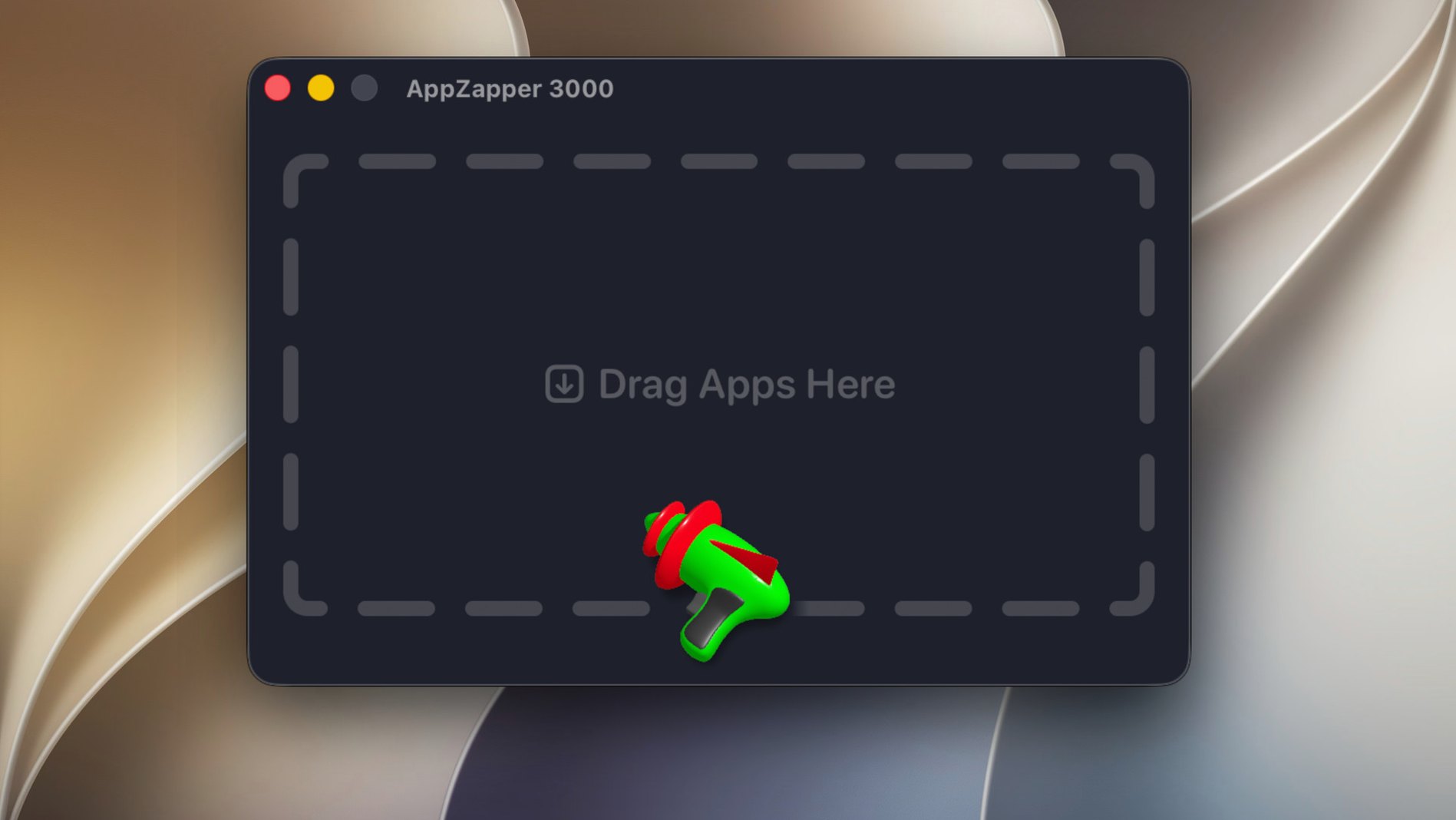
To remove an app, simply drag it into AppZapper 3000. The process takes a few seconds. The new version also adds a zap-all removal flow, handy when you want to clean up several apps at once. For a small shop like mine, keeping the Mac free of orphaned files means less clutter and one less thing to worry about.
Small-business owners who hate wasted drive space
AppZapper 3000 is for anyone who has ever wondered why their Mac's drive space seems to shrink after uninstalling a program. But a few kinds of users will appreciate it most.
Small-business owners like me live with a mix of apps — a payment processor, a photo editor, a backup tool, a few niche utilities. We install and uninstall more than the average person, often trying two or three apps before finding the one that fits. Each of those trials leaves crumbs in hidden folders. Over a year, those crumbs add up. AppZapper 3000 sweeps them out.
A video editor or music production suite can scatter files across ~/Library/Application Support/, ~/Library/Preferences/ and ~/Library/Caches/ in seconds. Standard uninstalls miss most of them. AppZapper 3000 catches them.
Anyone who shares a Mac with family or employees will like the peace of mind. When someone leaves an app behind, its leftover files don't just waste space — they sometimes cause conflicts with new software. A clean uninstall keeps things stable.
And if you are the type who likes to keep your system tidy for its own sake, the zap-all flow makes spring cleaning quick. You can clear out a handful of unused apps in one go without hunting through folders.
Removing a cloud-sync app: files, processes and preferences gone
Let me walk through one real task. Say you have a cloud-sync app you tested for a month and decided against. It left a folder of local files, a background process and a few preference files.
- Open AppZapper 3000 from Applications. The window is simple — a list area and a prompt to drag an app in.
- Open the Applications folder in Finder. Locate the cloud-sync app's icon and drag it onto the AppZapper 3000 window. It does not matter if the app is still running; the tool handles it.
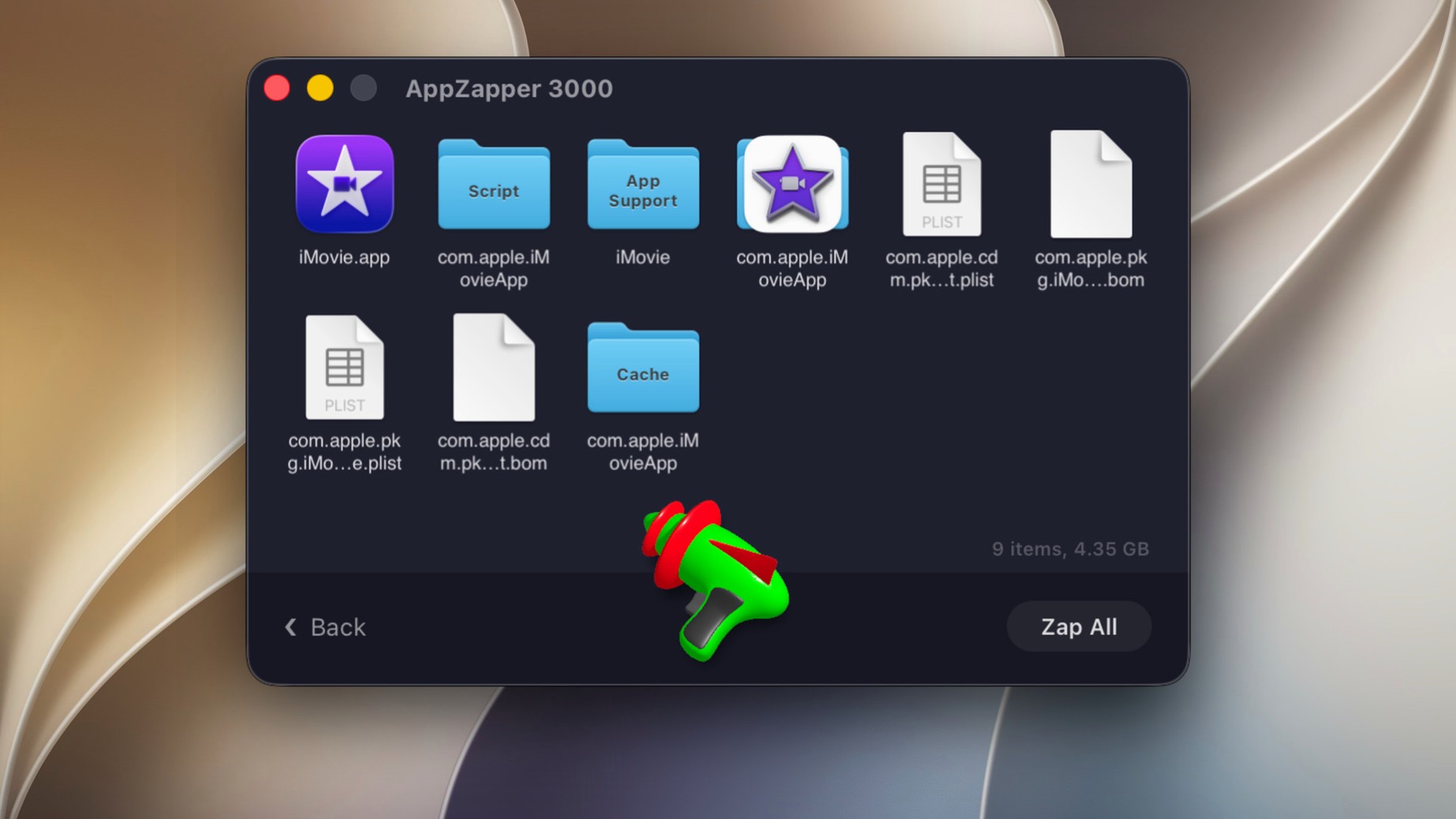
- The app scans for a few seconds. A list appears showing every file and folder it found: the main application, the helper service in
/Library/Application Support/, the autostart entry, the cache folder, the preferences file and the log files. I can read through them before anything is deleted. - If I see a file I want to keep — say, a config backup for another app that used the same sync service — I uncheck it. Every unchecked item stays on my drive.
- Click the zap button. The deletion takes about two seconds. AppZapper 3000 shows a confirmation that the files are gone.
- I open Finder and navigate to
~/Library/Application Support/to confirm the empty folder is no longer there. It is gone.
That task took maybe thirty seconds total, including the pause to check the file list. Without AppZapper 3000, I would have had to remember where each file lived, then delete them one by one — and I probably would have missed the small log files tucked away in /var/.
A cleaner design that matches modern macOS
Version 1.0.1 is a rebuilt version of the original AppZapper, first released in 2006. The biggest change is the new design. The original felt like a utility from the mid-2000s — functional but plain. The new design matches the cleaner look of modern macOS apps. The buttons, fonts and layout feel natural on macOS 15.6.
The adaptation to modern Apple security requirements matters more than it sounds. Recent versions of macOS are stricter about what apps can access. The original AppZapper relied on older permissions that no longer work. This version follows the current rules, so it runs without extra configuration or security warnings.
The zap-all removal flow is the other big addition. In the original, you removed one app at a time. Now you can select multiple apps from the list and remove them together.
Under the hood, the built-in protections were updated too. The app now checks more carefully before deleting system or shared components. If you accidentally drag a macOS system utility into the window, it will warn you before proceeding.
Two settings to tweak right after installing
AppZapper 3000 does not have many settings, which I like. But there are two things worth doing right after you install it.
Check the list view preference. The app shows found files in a list by default. You can toggle between a simple list and a detailed view that shows file size and modification date. I prefer the detailed view because it helps me spot large leftover caches that I might want to delete even if I keep the main app.
Set your confirmation habit. The app asks for confirmation before every zap action. You can reduce that to a single click by enabling the "Quick Zap" option in the preferences. I leave the confirmation on — I like the extra check — but if you remove many apps at once, the one-click flow is faster.
There is also a preference to show hidden files in the scan results. I recommend turning it on. Hidden files are the ones most standard uninstalls miss, and seeing them in the list is the whole point of using a dedicated uninstaller.
App won't show after dragging? Here's why
The app does not show up in the list after dragging.
This happens if you drag a file that is not an application — for example, a support folder or a script. AppZapper 3000 only accepts macOS apps. Drag the actual .app file from Applications or the Dock. If you are not sure where the app is, find it in the Applications folder in Finder.
The scan finds too many files and I am worried about deleting something important.
AppZapper 3000 has built-in protections against deleting system or shared components. The list it shows is filtered to files that belong to the app you are removing. Still, if you see a file with a name you do not recognize, uncheck it. You can always run the scan again later.
The zap-all flow removes an app I still want.
The zap-all list only shows apps that AppZapper 3000 found during its scan. If you accidentally selected an app you want to keep, simply uncheck it before clicking zap. There is no undo, so take an extra second to review the list.
Nothing happens when I click the zap button.
This usually means the app does not have permission to delete the files. Make sure AppZapper 3000 is running from your Applications folder, not from a zip file or desktop copy. On macOS 15.6, the app needs standard permissions to write to /Library/ and system folders. If the problem persists, restart the app and try again.
I deleted an app but its leftovers are still in the Trash.
AppZapper 3000 moves files to the Trash by default. If you want them gone for good, empty the Trash after the scan completes. That keeps your drive space clean without removing the safety net of a recoverable delete.
- Returned with a fresh new design
- Adapted to modern Apple security requirements
- Added a zap-all removal flow
- macOS 15.6 or later
- Intel or Apple Silicon
Questions from the stall
Does AppZapper 3000 work on Apple Silicon Macs?
Yes, it runs on both Intel and Apple Silicon Macs with macOS 15.6 or later.
How do I uninstall an app with AppZapper 3000?
Drag the app you want to remove into the AppZapper 3000 window, and it will find and delete the app along with its related files.
What is new in version 1.0.1?
The app has a new design, was adapted to modern Apple security requirements, and adds a zap-all removal flow for cleaning multiple apps at once.
Notes from other shops 0
Sign in or open a shop account to leave a note.
No notes yet. If you've used this on a shop Mac, tell me how it went.