You come back from a record fair with a stack of rare DSD albums, plug in your external DAC, and open your local music library. Before you cue up a gapless live set, you want to know the software will actually work with your setup without hiccups.
Native Apple Silicon support and macOS 14 baseline
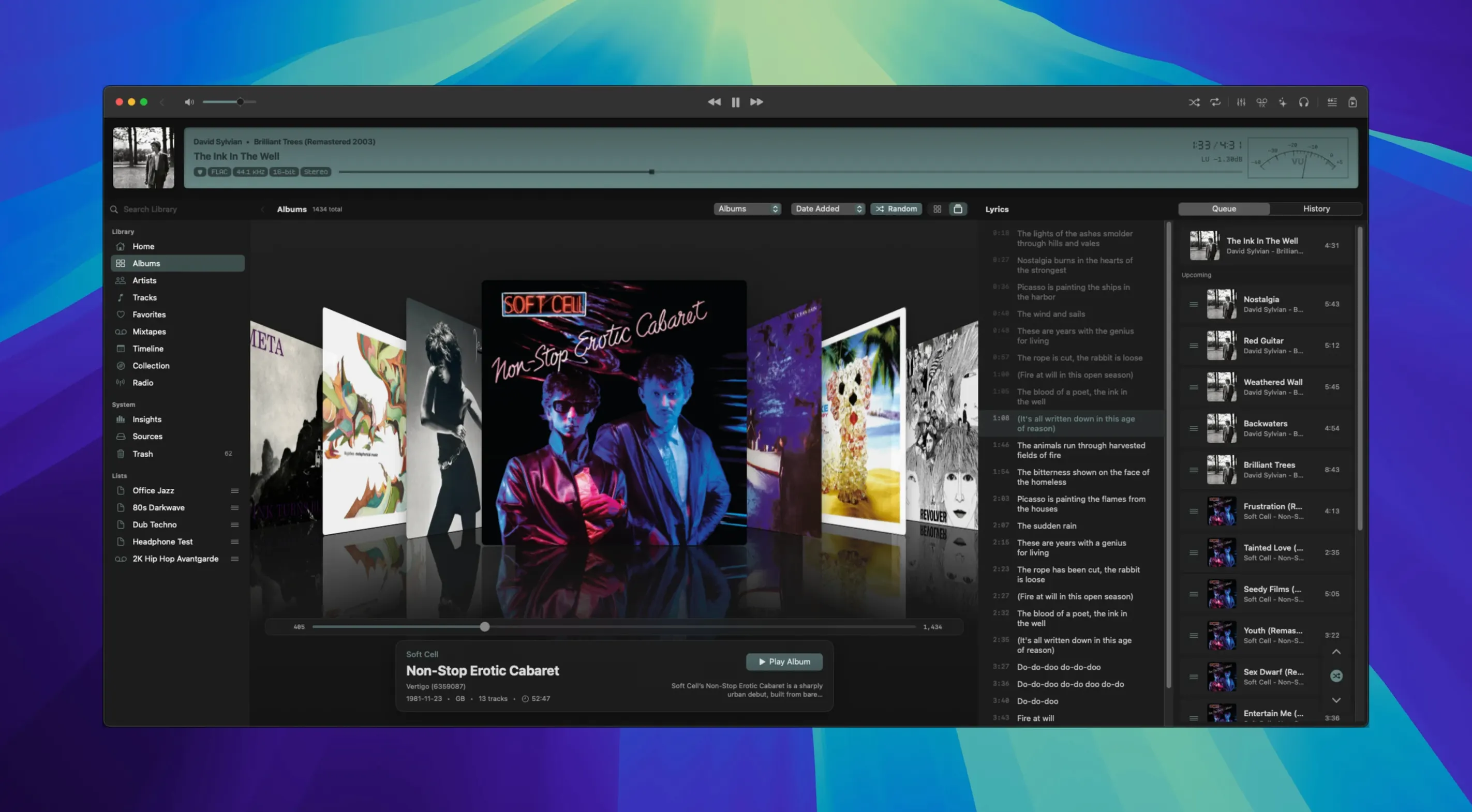
Zenteek is a native macOS music player built for audiophiles with large local libraries. It needs macOS 14 or newer and runs natively on both Apple Silicon and Intel Macs. The current version 1.7.2 build 203 brings direct DSD playback over DoP, meaning your high-resolution DFF, DSF, and DST-compressed files play straight through to your DAC with proper seeking and smoother device switching. The interface is in English, and the app puts unused audio monitors to sleep until you need them, which keeps CPU usage in check during long listening sessions.
Gapless playback and real-time DSD indexing
Zenteek handles gapless playback and real-time indexing, so your library stays browsable even as you add new files. The main display now shows DSD output status with badges and tooltips, and you have access to built-in visualizers for when you want something more than album art. It's a practical platform for anyone who keeps their music stored locally and wants an uncluttered way to play it back at full quality.
Switch to exclusive mode for your main DAC
Out of the box, Zenteek uses CoreAudio shared mode, which is fine for casual listening but bypasses the point of a dedicated player. Head into preferences and switch your output to exclusive mode for the DAC you use most. This hands sample-rate control over to the player and stops system sounds from interrupting a DSD stream. While you're there, confirm that gapless playback is toggled on — it usually is by default, but checking now saves you a jolt when a live album cuts between tracks.
The DSP tools are tucked away in a panel many people overlook. If you have headphones with a known frequency dip or a room that eats bass, the parametric EQ is worth a few minutes of tweaking. Save your curve as a preset so you're not redoing it later. I'd also turn on the global search shortcut; it's off initially, and once assigned, it lets you pull up any track from anywhere on your Mac without switching windows.
Drag in FLAC or DSD folders from Finder
Zenteek sits comfortably next to file-management tools rather than streaming services. Since it indexes in real time, you can drop new FLAC or DSD folders into your library directory from Finder or a download manager, and the player picks them up without a manual rescan. This makes it a natural partner for something like Max or XLD when you're batch-converting formats.
On the macOS side, media keys work as expected for play, pause and skip, and the Now Playing widget in Notification Center stays in sync. If you use a third-party system utility that remaps keyboard shortcuts, you can route those to Zenteek's global search or playback controls without conflicts. For people who keep a Zenteek torrent Mac folder of live recordings, the real-time indexing means you can start listening while the folder is still populating — the library view refreshes as files appear.
A NAS path won't auto-update like a local folder
The most common stumble is expecting Zenteek to behave like a streaming app. It does not watch a network share for changes the same way it watches a local folder, so pointing it at a NAS path without understanding that distinction leads to missing files and frustration. Mount the share in Finder first, then add the mounted volume to the library.
Another early misstep is forgetting to check the sample-rate indicator before playing a DSD album. If your DAC doesn't light up with the right DSD badge, the chain is probably stuck in PCM because exclusive mode wasn't set for that specific device. A quick look at the status tooltip in the main display clears up what's actually reaching the hardware. Finally, new users sometimes dump a massive folder tree into the library and wonder why the interface lags for thirty seconds. That's the real-time indexer doing its job — give it a minute, and everything settles into place.
Version 1.7.2 focuses on high-resolution DSD playback:
- Direct DSD playback over DoP, with seeking and improved device switching
- Better support for DFF, DSF, and DST-compressed DSD files
- DSD output status indicators, badges, and tooltips in the main display
- macOS 14 or newer
- Apple Silicon or Intel Mac
Questions from the stall
What audio formats does Zenteek support for high-resolution playback?
Zenteek plays DFF, DSF, and DST-compressed DSD audio files, with direct DSD output over DoP to compatible DACs.
Does Zenteek work on older Intel Macs?
Yes, it runs on both Apple Silicon and Intel Macs as long as they are updated to macOS 14 or newer.
Notes from other shops 0
Sign in or open a shop account to leave a note.
No notes yet. If you've used this on a shop Mac, tell me how it went.