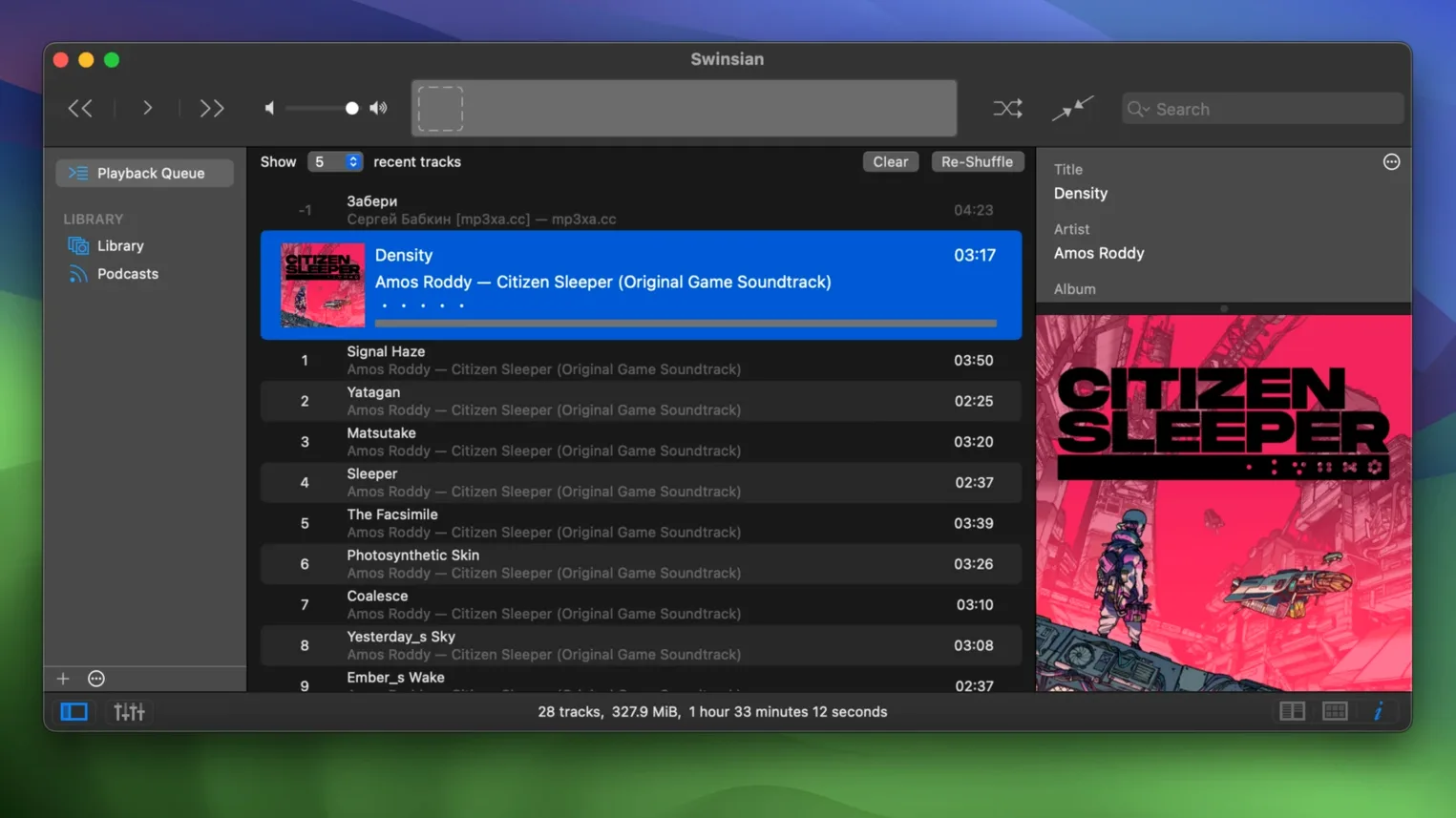
Swinsian is a music player for macOS that treats your audio folder as the source of truth.
Folder watching and room for huge libraries
- Folder watching. Point Swinsian at your music folder and it picks up new files automatically — no manual importing.
- Stays snappy with large libraries. If you have tens of thousands of tracks, the interface doesn't grind to a halt.
- Tag editing that means business. Find-and-replace with regular expressions, batch tag changes, and a complete tags view for fixing messy metadata.
- Smart search. Regular-expression search for when you need to track down tracks by pattern, not just by name.
Who I'd point toward it
This one makes sense if you keep a sizable local music collection — especially lossless files like FLAC — and you're tired of your player trying to upsell you a streaming subscription. The folder-watching alone saves busywork, and the regex-powered tag cleanup is a lifesaver for anyone who has ever stared down a library full of inconsistently named albums. It also handles practical extras like duplicate detection, album artwork fetching, podcast downloads, and Last.fm scrobbling without turning them into a big production.
First days with Swinsian — three moves that pay off later
Getting the player running takes five minutes. Getting it yours takes a bit longer, but a few early decisions keep things tidy down the line.
- Set up watched folders before you do anything else. Drop your main music directory into the Watched Folders list under Preferences and let the app scan once. After that, anything you add to that folder appears in the library without a second thought — rip a CD, download a Bandcamp purchase, drag in a folder from a backup drive, and it just shows up.
- Pick your column layout and stick with it. The track listing lets you add, remove, and reorder columns — Composer, Bit Rate, Date Added, whatever matters to you. Spend ten minutes setting that up early, and browsing a large library gets much faster.
- Check the duplicate finder before you do a big tag cleanup. Duplicate detection works best on a library that hasn't been heavily retagged yet. Run it once in the first day or two, and you'll catch the low-hanging doubles while their metadata still matches.
Dropping an album into the watched folder
Here's how a working hour with Swinsian usually goes for me — not a tutorial, just the rhythm of the thing.
1. Add fresh music. I drop a new album into my watched folder from a Bandcamp download. Swinsian picks it up within seconds; the tracks appear in the Recently Added smart playlist without me touching anything.
2. Shape the sound. If it's a quiet recording, I open the equalizer and nudge the midrange up a touch. The 10-band view is quick for small adjustments — I save the 31-band for when I'm really dialing in problem tracks. The EQ settings stick per-track if I want them to.
3. Fix the tags. The new album's tags are a mess — genre field blank, artist name inconsistent with the rest of the discography. I select all the tracks, open the tag editor, and use a simple find-and-replace to unify the artist field. For the genre, I highlight everything and type once. Done in under a minute.
4. Build a playlist for the week. I create a smart playlist that grabs anything added in the last seven days, rated three stars or higher, and not played yet. Swinsian populates it as soon as I set the rules. I drag it into its own window and keep it open off to the side while I work on other things.
5. Let it play. Gapless playback handles the transitions. If something catches my ear, the global keyboard shortcut pauses it without switching windows. The notification pop-up tells me what's playing without pulling focus.
Skipping manual imports and fixing a confused browser
None of these are catastrophic, but they cause friction that the app is designed to avoid.
- Importing instead of watching. People coming from other players sometimes drop files onto the Swinsian window to import them one batch at a time. That works, but if the files are already inside a watched folder, you're doing double work. Set the folder once and stop dragging.
- Forgetting the regex search is there. The regular-expression search box is subtle, and a lot of users just type plain keywords into it for weeks before they realize it can match patterns. If you want every track whose title starts with a number, or every album tagged with a four-digit year in a specific range, learn the toggle — it's right there in the search field menu.
- Ignoring the cue sheet support. If your library includes long DJ mixes or classical recordings stored as a single file with a cue sheet, Swinsian reads the embedded track markers. Beginners sometimes split those files manually before adding them, not realizing the player handles cue metadata natively.
- Not customizing the art grid labels. Version 3.0.8 added more options for what shows under album artwork in the grid view. If you live in the art grid, spend two minutes in Preferences picking the label fields that actually help you browse — year, genre, track count, whatever makes scanning faster.
- Overlooking the separate playlist windows. You can tear any playlist out into its own window. It sounds minor, but keeping a working queue in one window while browsing the full library in another changes how you move through a big collection.
- macOS 10.13 or newer
- Works on Apple Silicon and Intel 64-bit Macs
Questions from the stall
Does Swinsian support FLAC files?
Yes. Version 3.0.8 specifically fixed playback of quadraphonic FLAC files, so standard stereo FLAC support is well covered.
Can Swinsian watch folders for new music automatically?
Absolutely. That's one of its core features — point it at your music folder and it adds new tracks as they appear, no manual imports needed.
Notes from other shops 0
Sign in or open a shop account to leave a note.
No notes yet. If you've used this on a shop Mac, tell me how it went.