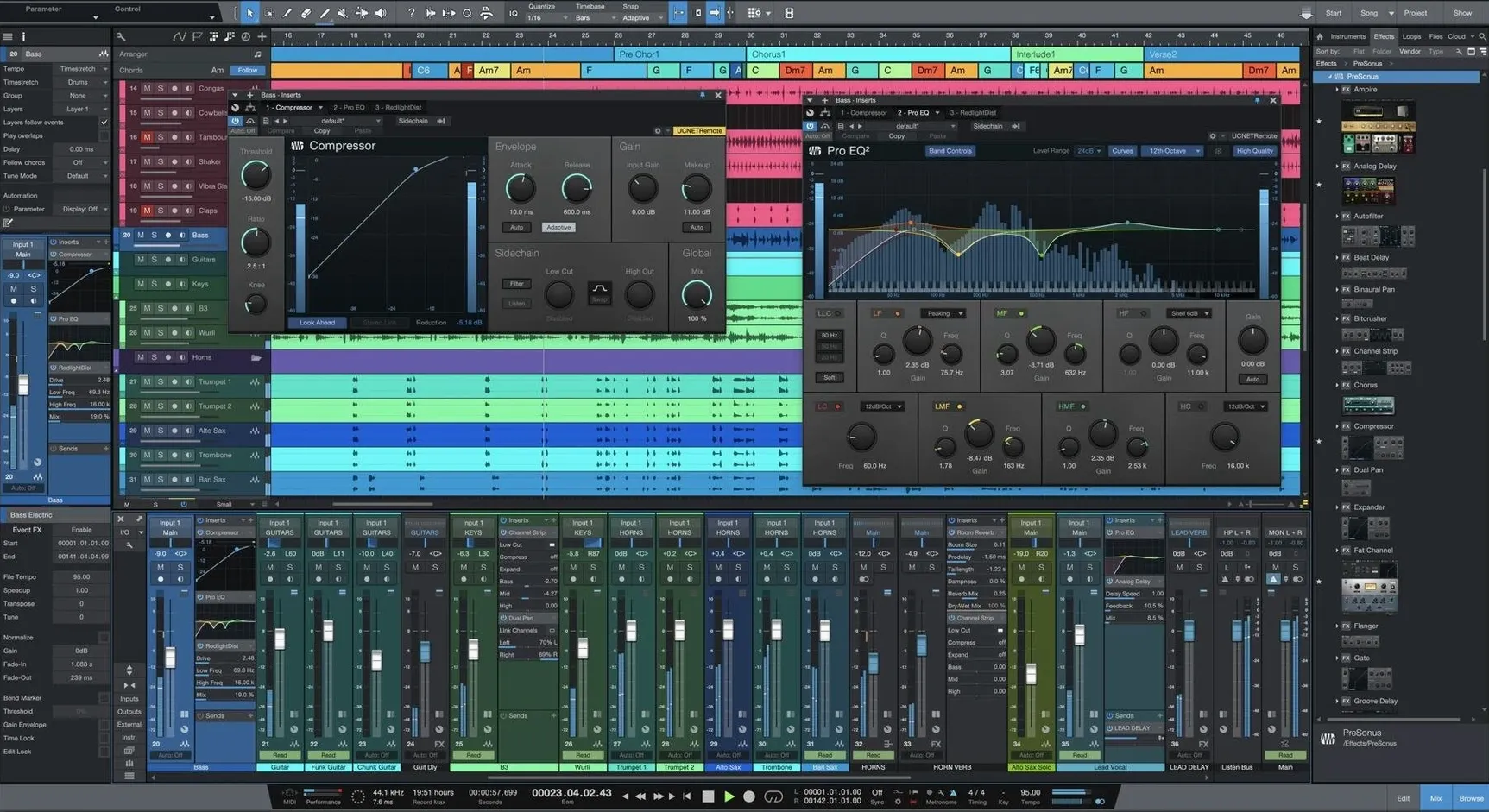
Studio One Pro is a full-featured digital audio workstation that covers recording, production, mixing, mastering and live performance from a single window. It is made by PreSonus Audio and the current version, 7.0.0, runs natively on both Apple Silicon and Intel 64-bit Macs.
The drag-and-drop DAW that opens your old sessions
A DAW like Studio One Pro sits at the center of a wider toolkit. It opens songs and projects from earlier versions, so long-running sessions keep their history. The drag-and-drop workflow means pulling in loops from Finder or samples from a companion library feels as quick as moving files around the desktop. For anyone already using Mac-native editors or notation tools, the included Native Effects plug-ins reduce the need to hunt down extra processing right away.
Stem separation for remixes and on-the-fly arrangement tools
The new AI-powered Stem Separation makes quick work of pulling apart a mixed track into vocal, drum and instrumental layers — handy when a client sends a stereo bounce and asks for a remix. Unlimited Launcher Scenes and Playlists turn the app into a capable live performance hub, and advanced tempo detection keeps imported audio locked to the grid without manual warping. Version 7 installs as a separate application, so it sits alongside any existing Studio One installation without overwriting it.
Who clicks with Studio One fastest
Some DAWs lean hard toward one crowd — electronic producers, band recordists, post-production editors. Studio One Pro spreads itself wider, but a few types of Mac user tend to settle in especially quickly.
Songwriters who think in sections. The Song page's Scratch Pads and Arranger Track let you shuffle verse, chorus and bridge ideas without copying and pasting for an hour. If you write by feel and want to test a different structure on the fly, the drag-and-drop arrangement workflow removes most of the friction that kills momentum.
Engineers juggling tracking and mixing in the same session. Switching between the Song page and the Console feels like two views of the same data, not two separate environments. The low-latency monitoring pipeline and the native channel-strip processing mean you can dial in a monitor mix while tracking, then carry those settings straight into the final mix without exporting stems or rebuilding the session.
Live performers who already produce in Studio One. The Show page has been around for a while, but version 7's unlimited Launcher Scenes and Playlists push it further into live-set territory. Backing tracks, virtual instrument layers and real-time effects snapshots all live inside the same project file you rehearsed with — no need to bounce stems and move them to a separate performance app.
Mastering engineers working on multi-song releases. The Project page treats an album as a single mastering session with consistent loudness targets, track spacing and metadata. It is less about "fix a mix" and more about "finish the whole release," which suits anyone who masters their own material or handles short-run independent projects for others.
No ReWire — what to do instead for Reason or Live routing
No DAW is entirely trouble-free. A few sticking points crop up often enough to mention.
ReWire is gone. Studio One 6 and 7 dropped ReWire support. If you relied on it to pipe audio from Reason or Ableton Live into Studio One, that workflow is no longer available. The workaround is to run the secondary app standalone and route audio through a virtual sound card like BlackHole or Loopback, or to bounce stems from the other DAW and import them manually. Neither is as slick as the old ReWire sync, but both get the audio where you need it.
Activation confusion after installation. Version 7 installs as a separate application — it does not replace Studio One 6 or earlier releases. That means you have two applications in your Applications folder, each with its own preferences and activation. If you open the wrong one and your recent songs are missing, check whether you launched the older version by mistake. The included activation guide walks through the first-run steps; following it in order avoids the most common hiccup.
Stem Separation expectations. The AI-powered offline Stem Separation is genuinely useful, but it is not magic. A dense, heavily compressed stereo mix will separate less cleanly than a well-balanced recording. For best results, feed it uncompressed or lossless files rather than mp3s, and treat the separated stems as starting points for a remix, not finished multitracks. A little cleanup with the editing tools goes a long way.
Check your audio device and block size before hitting record
Out of the box, Studio One Pro makes a few assumptions you might want to adjust before you start a serious project.
Audio device and block size. Head to Preferences > Audio Setup and confirm the app sees your interface, not the built-in Mac speakers. Set the block size low (64 or 128 samples) while tracking and higher (512 or 1024) during mixing to give the CPU breathing room. The dropout protection setting in the same panel can be raised if you hear clicks and pops during heavy sessions.
Plug-in scan paths. If you own third-party Audio Units or VST plugins, go to Preferences > Locations > VST Plug-ins and make sure your custom folders are listed. Rescan after adding new paths. The plug-in manager shows which formats loaded and flags any that failed, so a quick check after installation saves head-scratching later when a favorite compressor does not appear in the browser.
Auto-save and backup behavior. Studio One can auto-save on a timer, but the default interval might be longer than you would like. Under Preferences > General, set the auto-save frequency to something you can live with — three to five minutes is common. The app also keeps timestamped backup copies if you enable them, which is worth turning on before you regret not having done so.
Browser favorites and file types. The browser panel on the right can show or hide file types like loops, instruments and effects presets. Right-click the browser header and uncheck anything you never browse. If you keep a folder of your own samples or impulse responses, drag it into the Files tab so it stays pinned across sessions.
Audio Unit and VST3 plug-ins from other DAWs just work
Studio One Pro does not exist in a bubble. On a Mac, it ties into several system-level features and third-party tools.
Audio Unit and VST3 hosting. Both plug-in formats are supported, so instruments and effects purchased for Logic Pro or other DAWs appear in Studio One as well. The plug-in sandboxing feature optionally runs third-party plug-ins in a separate process, which means a misbehaving effect crashes its sandbox rather than the whole session — a small detail that saves a lot of stress during tight deadlines.
Core Audio and aggregate devices. macOS Core Audio lets you combine multiple interfaces into an aggregate device via the Audio MIDI Setup utility. Studio One sees this aggregate as a single I/O device, which helps when you need more inputs than a single interface provides or want to route audio between applications without additional hardware.
MIDI and external hardware. Any class-compliant MIDI controller, keyboard or drum pad that macOS recognizes shows up in Studio One's external devices list. The control-link system maps hardware knobs and faders to on-screen parameters by right-clicking and choosing "Assign," which is quicker than manually building MIDI-learn maps for every session.
Drag-and-drop with Finder and other apps. You can drag audio files straight from a Finder window onto a track, or drop a loop from a sample-management app that supports macOS drag export. It works the other direction too — select a region in the arrangement, drag it to the desktop, and Studio One bounces a new audio file on the spot.
For those exploring how Studio One fits into a larger Mac production setup, the app has carved out a reputation as a capable all-rounder. Searches like presonus studio one for mac often lead users to community discussions about hardware integration and performance, while studio one pro torrent queries point to the reality that many producers try before they commit. The official version installs cleanly alongside other DAWs without file-format lock-in, and projects from Studio One 7 torrent Mac downloads often surface in forums where users troubleshoot compatibility — checking your audio interface drivers and plugin formats up front helps everything run smoothly.
How Studio One stacks up against similar Mac DAWs
Three common alternatives on macOS are Logic Pro, Ableton Live and Cubase. Each overlap with Studio One in different ways, and the differences matter more than the similarities.
Studio One Pro versus Logic Pro. Logic Pro is deeply tied to Apple hardware and the macOS ecosystem, which means tight integration with Mac features like the T2 chip's audio handling and native Apple Silicon optimization from day one. Studio One Pro runs on both Mac and Windows, so collaborators on different platforms can share project files. Logic's stock instrument and loop library is larger, but Studio One's drag-and-drop workflow and the Project page for mastering give it an edge for people who track, mix and finish releases inside one application. If you never work outside the Apple ecosystem, Logic feels natural. If you collaborate cross-platform or want a mastering workflow built into the same app you record in, Studio One pulls ahead.
Studio One Pro versus Ableton Live. Ableton Live's Session View is its signature feature — a non-linear clip-launching playground that electronic performers and loop-based producers adore. Studio One's Show page and Launcher Scenes cover similar ground but feel more like a DAW first and a performance tool second. For live sets built around triggering clips and improvising arrangements, Live is hard to beat. For recording bands, comping vocal takes, and moving from tracking to mixing with a conventional console workflow, Studio One is more direct. The two apps complement each other well, and many users run both.
Studio One Pro versus Cubase. Cubase and Studio One share a lineage — several of Studio One's original developers came from Steinberg. Both offer strong MIDI sequencing, deep audio editing and a traditional left-to-right timeline. Cubase has a longer feature history and more granular control over expression maps and advanced MIDI routing. Studio One trades some of that depth for a less cluttered interface and a faster workflow for common tasks like comping, mixing and mastering. Longtime Cubase users who find the interface busy often find Studio One refreshing; the reverse is true for those who rely on Cubase's deeper toolset for orchestral scoring or intricate MIDI manipulation.
Version 7.0.0 brings a few practical additions:
- AI-powered offline Stem Separation pulls mixed audio into layers.
- Unlimited Launcher Scenes and Playlists open up live performance workflows.
- Advanced tempo detection keeps imported audio tight to the project tempo.
- macOS 12.4 or newer
- Apple Silicon or Intel 64-bit Mac
Questions from the stall
Does Studio One Pro 7 support ReWire?
No, Studio One 6 and Studio One 7 do not support ReWire.
Notes from other shops 0
Sign in or open a shop account to leave a note.
No notes yet. If you've used this on a shop Mac, tell me how it went.