Serato Studio runs on anything from macOS 10.14 Mojave up to the brand-new macOS 26 Tahoe, on both Intel and Apple Silicon machines. If your Mac can still open the Serato DJ library, it can open Studio.
Beat-making core stays steady while version 2.5 polishes control surfaces
| What it is | Current version |
|---|---|
| Beat-making software for DJs and producers | 2.5.0 |
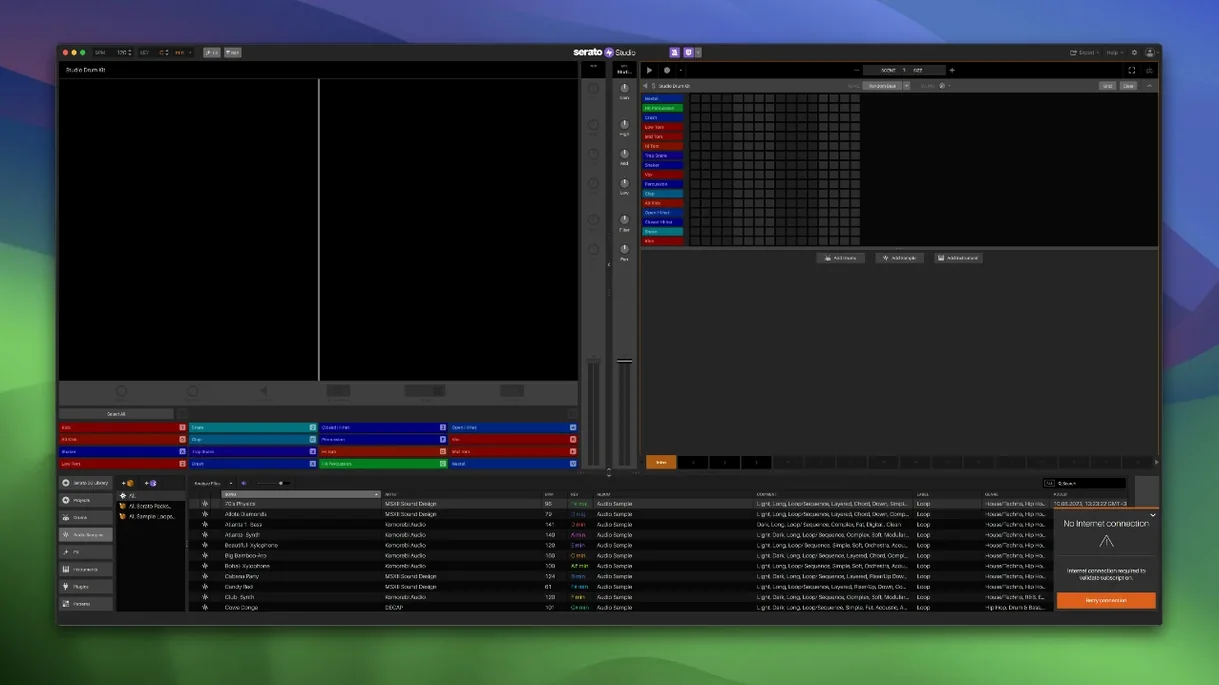
Version 2.5.0 is mostly a compatibility and control-surface update, which actually tells you a lot about where the software already was. The core beat-making toolkit didn't need rethinking. You still get ready-made drum patterns that snap to your project BPM, one-touch key switching, and an Auto Chord mode that generates progressions locked to the song key. The Feel control—which nudges timing to imitate a live keyboard player—hasn't gone anywhere. Color-coded waveforms, the mixer channel, and the shared Serato library are all exactly where you left them. What changed is the hardware reach (native AlphaTheta SLAB support) and a genuinely useful stem upgrade: you can now adjust individual levels for acapella, melody, bassline and drum stems inside Sample Decks, and automate Stems On/Off plus those individual levels in Scene View. The setup screen keeps its Reverse Pad Order option, and stem export still works the way it did—pull apart a track and rebuild it your own way. If you already produce on Serato DJ hardware, Studio still feels like the same room, just with different tools on the bench.
A focused sketchpad for DJs, not a full recording studio replacement
People sometimes ask me how Serato Studio stacks up against Logic Pro or Ableton Live, and the honest answer is: it doesn't try to be either of them. Logic gives you a full recording studio with a steep learning curve and an instrument library that takes days to explore. Ableton gives you a live-performance sandbox with session view and deep sound-design tools. Studio gives you a beat-making surface that thinks like a DJ setup. If you already know your way around Serato DJ, the shared library, cue-point familiarity, and pad-based workflow mean you start making something musical in under ten minutes.
Against FL Studio on Mac, the difference is even clearer. FL Studio rewards producers who like building patterns in a step sequencer and routing audio through a mixer strip. But it has never felt particularly at home on macOS—it carries Windows DNA in every menu. Serato Studio runs natively on Apple Silicon and Intel, shares its library with Serato DJ without export gymnastics, and treats your DJ crates as source material rather than something to convert first.
Where Studio pulls ahead for my kind of small-shop work is the stem handling. You can drag a track from your existing Serato library onto a Sample Deck, separate acapella, melody, bassline, and drums, adjust each stem level independently, and automate those changes in Scene View. Logic and Ableton both require third-party tools or manual phase-cancellation tricks for that. And the Auto Chord mode—just pick a key and let the software generate progressions—saves me from staring at a MIDI keyboard wondering what comes next.
Skipping the included Core Pack to hunt for cracks
One thing I see a lot: people installing Studio and immediately hunting for a Serato Studio crack Mac or Serato Studio torrent instead of giving the included Core Pack a proper run. The built-in drum kits, instruments, and loops cover more ground than most newcomers realize. Spend an afternoon with what ships in the installer before you go chasing extra sound packs.
Another common mistake is ignoring the Feel control. Beginners tend to quantize everything to the grid and then wonder why their beats sound stiff. A small nudge on that slider—even five or ten percent—introduces the micro-timing variations of a real player. It is the difference between a drum pattern that sounds programmed and one that breathes.
Also: forgetting that the Serato DJ library is already available. Some producers open Studio as if it is a blank slate and start importing samples from Finder, completely missing that their years of DJ crates, cue points, and sorted playlists are sitting right there in the browser. That shared library is half the reason a DJ picks this app over something else.
Let it scan your Serato DJ library before anything else
After you install, open Studio and let it scan your Serato DJ library before you do anything else. It finds your crates automatically, but giving it a few minutes on first launch avoids that "where are my tracks?" moment. Once the library settles, drag a familiar vocal track onto a Sample Deck and play with the individual stem levels—pull the drums out, drop the melody, keep the acapella. That one exercise teaches you more about the workflow than reading any manual.
Next, create a Scene or two just to test automation. Enable Stems On/Off and draw a quick ramp on the bassline level. You will probably mess it up, which is exactly the point—the automation lanes in Scene View work like Serato DJ's fader curves, and learning them by feel is faster than learning them by tutorial.
Last tip: map the Reverse Pad Order option in the setup screen the moment you connect DJ hardware. Some controllers feel more natural with the pads flipped, depending on whether you cue with your left or right hand. It takes seconds to toggle, and it might prevent a lot of mis-triggered samples in the first week.
Version 2.5.0 brings a handful of focused additions that DJ-producers will actually notice:
- Native control support for the AlphaTheta SLAB controller.
- macOS 26 Tahoe compatibility, so it runs on the latest Mac operating system.
- Per-stem level adjustment for acapella, melody, bassline and drum stems inside Sample Decks.
- Automation for Stems On/Off and individual stem levels in Sample Decks when working in Scene View.
- macOS 10.14 Mojave or later (including macOS 26 Tahoe)
- Intel or Apple Silicon Mac
Questions from the stall
Does Serato Studio share the same library as Serato DJ?
Yes, it uses the same Serato library, so your crates, cues and analyzed files appear in both applications without extra importing.
Can I export stems from Serato Studio?
Stem export is built in—you can separate a track into acapella, melody, bassline and drum parts, then export them for remixing or arranging elsewhere.
What hardware works with Serato Studio 2.5.0?
It works with Serato DJ hardware and adds native control for the AlphaTheta SLAB controller in this version, alongside existing support for pads and mixers from the Serato ecosystem.
Notes from other shops 0
Sign in or open a shop account to leave a note.
No notes yet. If you've used this on a shop Mac, tell me how it went.