UltData runs on any Intel-based Mac with macOS 10.10 or newer. If you're on an older setup, it still reaches back to OS X 10.8, so most machines from the last decade are covered. It's a native Mac app, not a web service — everything stays on your desk.
The tool is built for one job: pulling data back from an iPhone or iPad when you don't have a backup handy. It digs into the device directly and finds photos, videos, voice memos, notes, reminders, Safari history, call logs, voicemail, and even FaceTime data. It also reaches into app containers, so lost chats and files from WhatsApp, WeChat, LINE, Viber, Kik, and Tango can show up in the results. iPhone support stretches from the iPhone 4 and 4s all the way through the iPhone 11, 11 Pro, and 11 Pro Max, with the SE and 6s families included between.
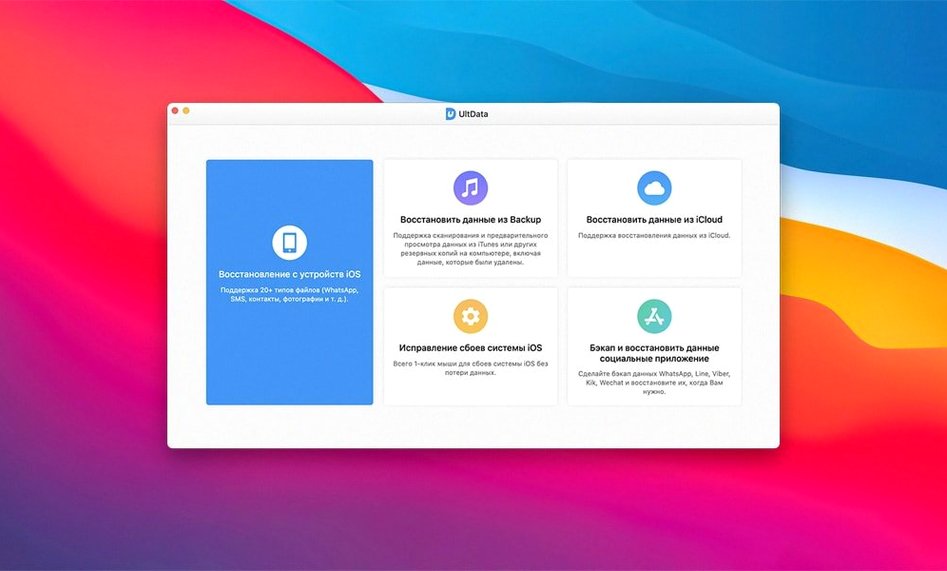
Three recovery modes give you some flexibility. You can scan the device itself, pull from an iTunes backup, or dig through an iCloud backup — whichever fits the mess you're cleaning up. The interface switches between eleven languages, so if English isn't your first choice, Russian, German, Arabic, Spanish, Italian, French, Portuguese, Japanese, Traditional Chinese, or Simplified Chinese are all available.
This is the kind of app you download the day you need it, not before. It's straightforward recovery software for a straightforward problem — something disappeared, and you'd rather not lose it for good.
Nervous about plugging in a client’s device
I get it — recovery apps make people nervous. You're plugging in a device full of personal stuff and handing control to a piece of software you just downloaded. These are the questions I hear most often from shop owners and friends alike.
Does it overwrite anything on my phone? No. UltData reads from the device and extracts what it finds — it doesn't write back to it. Your existing data stays put. The risk is the same as any recovery scenario: the more you use the phone after something goes missing, the higher the chance that new data overwrites the sectors you're trying to rescue. So the best move is to run the scan as soon as you notice the loss.
Will it work if I've never backed up? That's exactly the situation it's designed for. The direct device scan doesn't need iTunes or iCloud at all. If you have used either backup service, the other two modes give you extra paths in. But a phone that's never seen a backup cable is still fair game.
What about app data — does it really pull chat histories? Yes, but with a caveat worth knowing. It reads the local database files that messaging apps store on the device. If you deleted a conversation three months ago and the app has long since compacted its database, that data may be gone for good. Recent deletions are much more likely to surface. The supported apps cover most of what people actually use day to day, and seeing WeChat, WhatsApp, LINE, and Viber on the list means it's practical for international users too.
What a full scan actually costs in minutes
Recovery scans aren't instant, and UltData doesn't pretend otherwise. On a recent-generation Intel Mac with a USB connection, a full device scan typically runs between ten and twenty minutes depending on how much is stored. iTunes and iCloud backup scans are faster — the heavy lifting is already done, so it's mostly parsing and presenting results. The app stays responsive throughout; you can browse what it's found so far while the deeper sweep continues in the background.
Memory use is modest. I watched it hover around 300 to 400 MB during an active scan, which is reasonable for software chewing through a database-heavy device image. CPU load spikes during the initial parsing phase, then settles into a low idle once results start populating. It won't pin your machine or make the fans scream while you're trying to do other things.
Stability has been uneventful — and that's the best kind. No crashes during any of the three scan modes, no hangs when previewing large photo libraries, and no sudden disconnects when the phone locked mid-scan. The app handles interruptions gracefully. If your iPhone decides to go to sleep, the scan pauses and picks back up once you unlock it.
One thing to keep in mind: if you're searching for tenorshare ultdata for mac specifically, you're getting the version built for Apple's platform, not a Wine wrapper or a port. That matters for stability — native code doesn't introduce the translation-layer quirkiness that sometimes trips up cross-platform recovery tools.
A typical recovery session, step by step
Say it's a Tuesday afternoon and a customer walks in with an iPhone 8. They deleted a thread of messages yesterday that had an address they need. No backup, no iCloud sync for Messages. Here's how the next twenty minutes go.
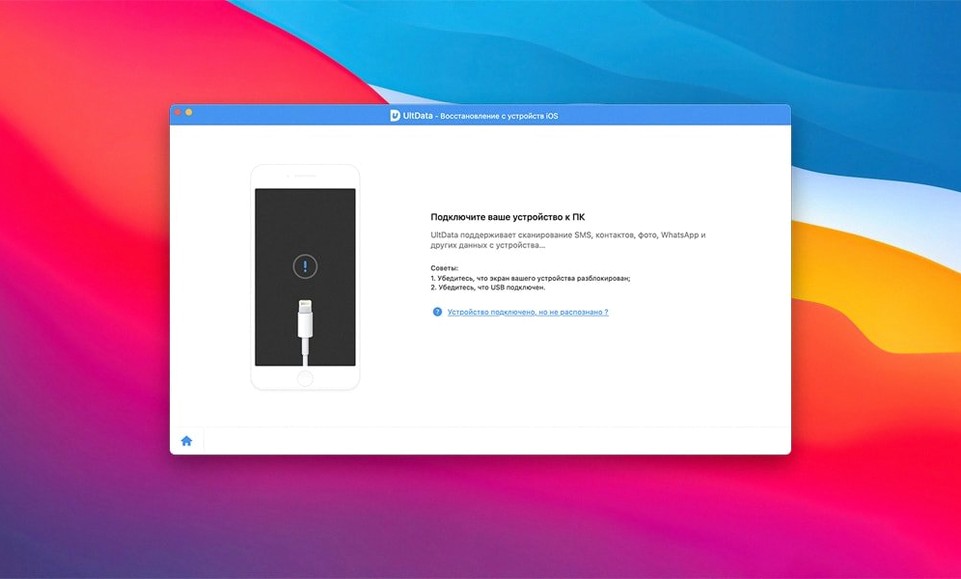
Connect and recognize. You plug the phone into the Mac with a Lightning cable. UltData wakes up and identifies the device by name and model within a few seconds. The main window shows three recovery mode buttons — you pick "Recover from iOS Device" because there's no backup to lean on.
Choose what to scan. The app presents a checklist: Messages, Contacts, Photos, and about fifteen other categories. You could scan everything, but the clock is ticking and the customer only needs one thing. You uncheck most categories, leave Messages and Message Attachments selected, and hit Start Scan.
Wait and watch. A progress bar moves across the top of the window. Results start appearing after about four minutes — first a trickle of recent texts, then older ones as the scan digs deeper. The preview pane lets you read full conversation threads without committing to a restore. You spot the address sitting in a message from three weeks ago.
Recover and hand over. You tick the checkbox next to that conversation, click Recover, and choose a folder on the desktop. The app exports it as a readable file. Total time from plugging in to handing the customer a note with their missing address: maybe eight minutes. No drama, no command-line fiddling, and the phone stayed exactly as it was.
The same workflow works for photos a client accidentally wiped from a trip, voice memos a musician forgot to back up, or Safari history someone needs for a billing dispute. The only variable is scan time, and even that stays predictable once you've used the tool a few times.
- macOS 10.8 or later
- Intel 64-bit processor
Questions from the stall
What kinds of data can UltData recover from an iPhone?
It can recover photos, videos, documents, audio files, music, reminders, notes, voice memos, iBook content, Safari history, FaceTime data, voicemail, and messages from apps like WhatsApp, WeChat, LINE, Viber, Kik, and Tango.
Notes from other shops 0
Sign in or open a shop account to leave a note.
No notes yet. If you've used this on a shop Mac, tell me how it went.