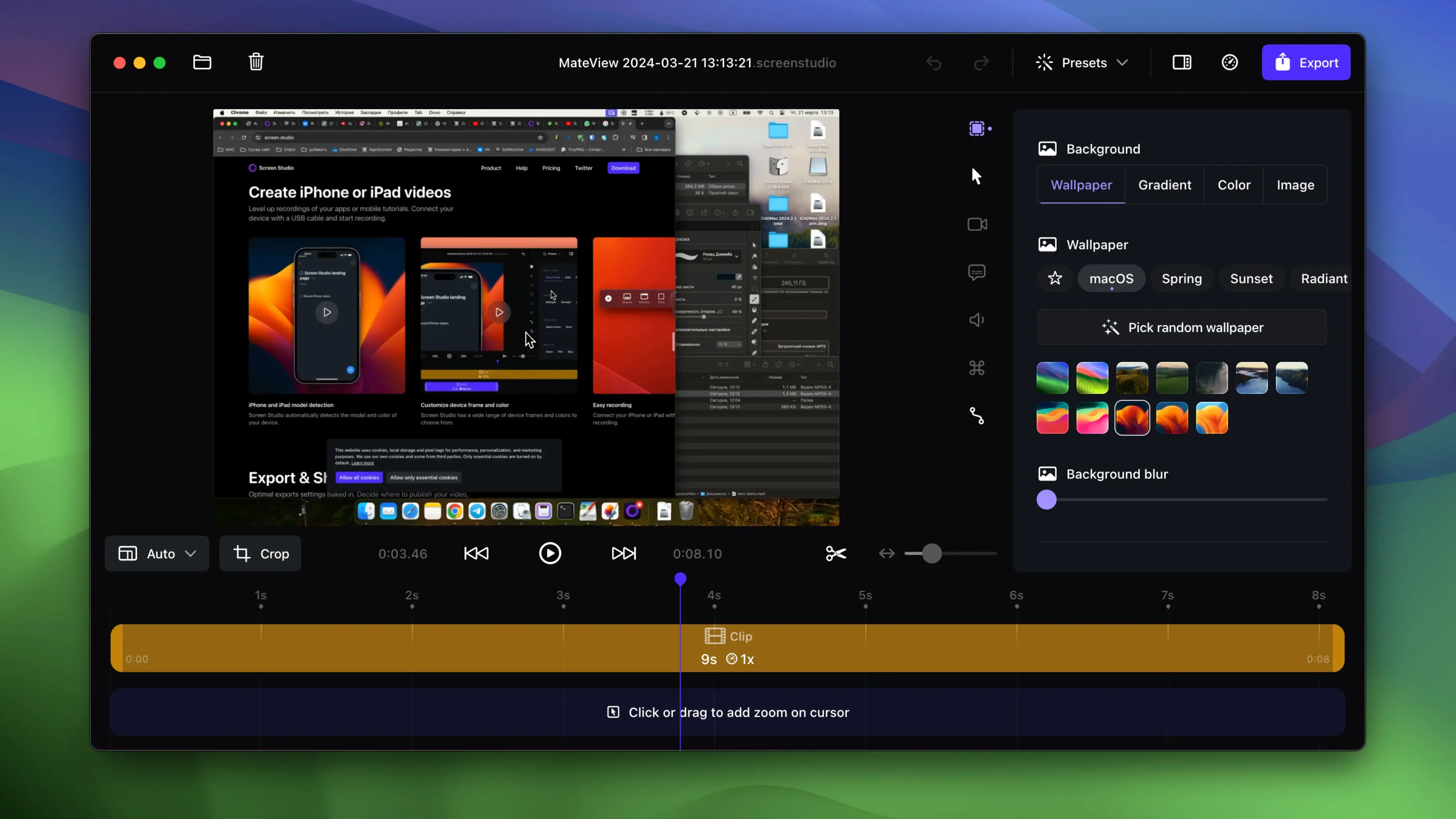
Explaining a software trick with a static screenshot always falls short. People need to see the cursor move and the menus open. Screen Studio for Mac solves that by recording your screen and doing the editing work for you — it zooms in on what matters while you stay focused on the task.
- Pick a window or full screen, hit record, and walk through your demo. The app automatically follows clicks, drags, and typed input with smooth zoom movements.
- Cursor motion gets smoothed out in the final video. No more jittery pointer jumps that make viewers seasick.
- Plug in an iPhone or iPad via USB and it detects the device model and color, then records a clean frame around the screen — no status bar clutter.
- After recording, generate a local transcript right on your Mac. Handy for adding captions or searching the spoken parts later.
- Export as video or GIF, or copy the recording straight to the clipboard and drop it into Slack, Notion, or an email.
You can tweak the background, spacing, shadow, and padding around your recordings too, so the final clip looks polished without opening a separate editor. Webcam, microphone, and system audio are all supported in one pass.
Drag zoom keyframes onto the timeline
Version 3 brought a handful of changes that shift how day-to-day recording actually feels. The zoom editing got more direct — you can now drag zoom keyframes onto the timeline instead of fiddling with sliders or re-recording a segment. That alone cuts editing time when a click didn't land quite where the automatic detection expected.
Cursor looping arrived quietly in a point release and solves an old demo-recording annoyance. When your pointer ends up in some random corner at the end of a clip, the loop gently brings it back near the starting position. The final video looks intentional rather than abandoned mid-thought. Combined with the existing cursor smoothing and the ability to hide a static cursor with a fade, the pointer behavior feels less like raw screen capture and more like a considered presentation.
The device recording pipeline also matured. Plug in an iPhone or iPad over USB now and Screen Studio detects the model and color automatically — no manual cropping or guessing at bezel dimensions. The framing is consistent across recordings, which matters when you're building a series of mobile app walkthroughs and want each clip to match.
System audio capture gained per-app selectivity in the 3.x cycle. Instead of grabbing every ping and notification sound, you can record audio from only the apps you specify. For tutorial creators who narrate while demonstrating, that means fewer retakes caused by an unexpected system alert blaring over the voiceover.
How Screen Studio compares with similar Mac apps
Mac screen recorders cluster into two rough groups: the everything-and-the-kitchen-sink tools and the quick-capture utilities. Screen Studio lands somewhere unusual — it's focused on automatic polish rather than raw capture or timeline complexity.
Screen Studio versus OBS Studio. OBS is the Swiss Army knife of screen recording, with scene composition, streaming, and plugin support that Screen Studio doesn't attempt. But OBS requires you to set up every zoom, crop, and transition yourself. Screen Studio's automatic zoom following and cursor smoothing happen without building scenes — you press record, demonstrate something, and the app decides where to focus. For a quick product demo or a bug report clip, that's the difference between five minutes and forty-five. OBS wins on flexibility; Screen Studio wins on speed to a shareable result.
Screen Studio versus CleanShot X. CleanShot X excels at screenshots, annotated captures, and short recordings with quick sharing options. Its video side stays closer to the raw capture — you get the recording, some basic trimming, and the ability to hide desktop clutter. Screen Studio adds the motion layer that CleanShot doesn't: zooms that follow your clicks, smoothed cursor paths, and automatic framing adjustments. If your recordings tend to sit inside longer tutorials or polished demos rather than quick internal shares, the extra editing automation in Screen Studio saves real time.
Screen Studio versus Loom. Loom prioritizes instant sharing with a cloud-first approach. Record, get a link, send it. Screen Studio stays local — transcripts generate on your Mac, exports land wherever you put them, and no account is required. For teams that live in Loom's ecosystem, that immediacy is hard to beat. For creators who need 4K exports, editable zooms, device framing, or cursor effects before sharing, Screen Studio covers ground that Loom doesn't try to reach.
Screen Studio’s download and trial rules in one breath
Runs native on Intel and Apple Silicon without Rosetta
Yes, the app runs natively on both architectures. The current build supports macOS 13 and newer, so any Mac that runs Ventura or later — Intel or Apple Silicon — handles it without Rosetta translation overhead.
Zoom processing waits until you stop recording
The zoom and motion processing happens after recording, not during. While you record, the app captures the raw screen feed with minimal overhead — similar to QuickTime Player's screen recording load. The automatic zoom decisions and cursor smoothing apply in the editing phase, so your Mac isn't trying to analyze clicks and render zooms simultaneously.
Can I record system audio from one app while narrating?
Yes. The per-app audio selection lets you grab sound from, say, Safari while keeping your microphone active for voiceover. Other app sounds and system alerts stay out of the recording. This is especially useful when demonstrating web apps or music software where clean audio capture matters.
What if I don't want the automatic zooms?
You can disable them entirely or edit them after recording. Drag unwanted zoom keyframes off the timeline, or select manual zoom regions instead. The automation is a starting point, not a locked decision — treat it as a rough first pass that you refine rather than something you're stuck with.
Tip: If you're recording for vertical formats like Reels or TikTok, set the export to vertical before you start editing. Screen Studio adjusts the framing logic to keep the zoomed action centered in a tall crop, which saves repositioning later.
- macOS 13 or later
- Apple Silicon or Intel 64-bit Mac
Questions from the stall
Can Screen Studio record my iPhone screen?
Yes, connect an iPhone or iPad via USB and Screen Studio will detect the device model and color automatically, then record a clean, framed capture.
Does Screen Studio work on Windows?
No, it is a native macOS application and requires macOS 13 or later.
Notes from other shops 0
Sign in or open a shop account to leave a note.
No notes yet. If you've used this on a shop Mac, tell me how it went.