DynamicLake Pro works on any Mac running macOS 11 or later, whether it has an Intel chip or Apple silicon. If your machine stays on the current side of that line, the app can tuck a slim, animated info strip right into your menu bar or a floating pill on the desktop.
What does DynamicLake Pro actually add to macOS?
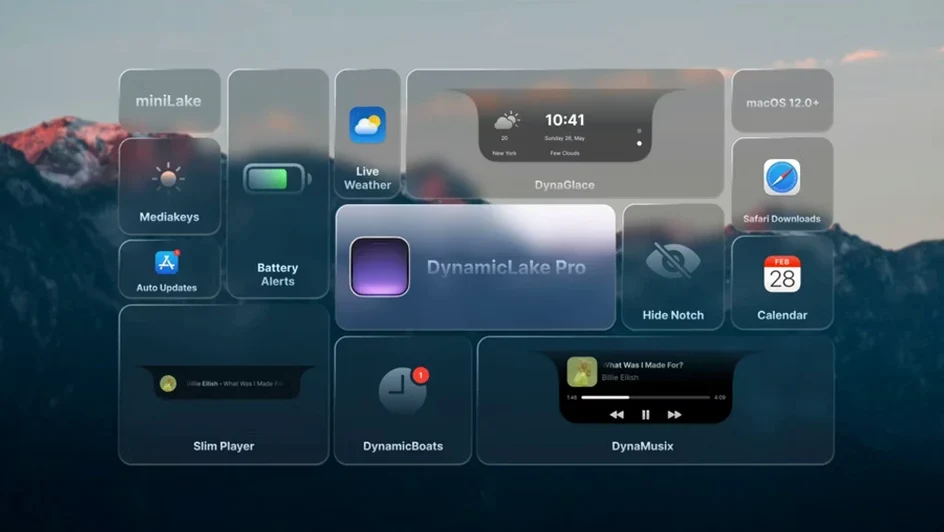
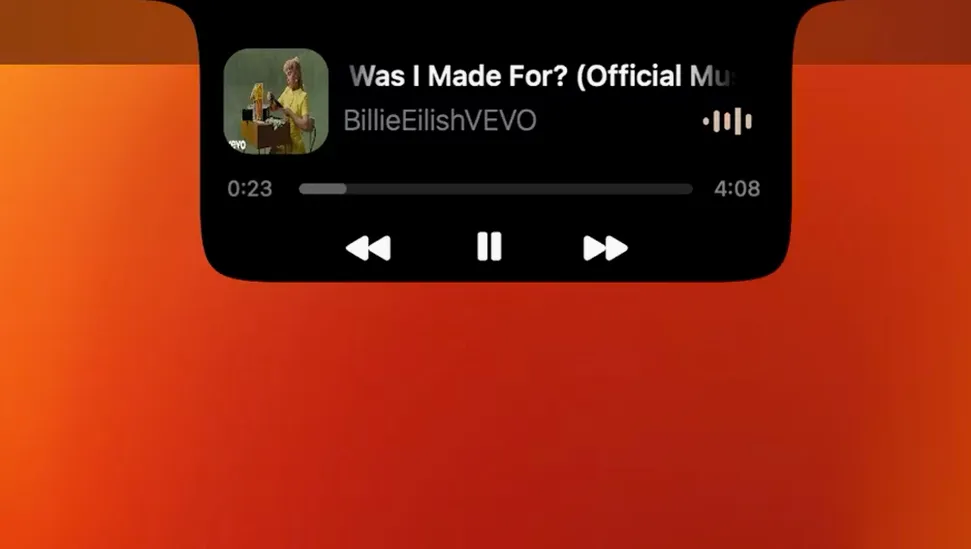
It gives you a Dynamic Island-style panel that shows music playback, calendar events, weather, and Bluetooth connection alerts. You get three main tools in one: the main DynamicLake panel, a compact miniLake view for just the essentials, and DynaGlance for a quick look at your schedule and forecast.
Who would find this useful?
Anyone who keeps an eye on a few bits of info all day and wants them visible without opening full apps. A small-shop owner can watch for a Bluetooth receipt printer reconnecting, see the next appointment, and check the weather for deliveries, all from a tiny overlay that stays out of the way.
What's the quick app switcher about?
It's called DynaSwitcher. Press Option+Tab and a compact app switcher pops up from the DynamicLake panel. It's a fast, visual way to jump between open apps without losing your place.
Does it handle connection alerts?
Yes. DynaConnect shows a small notification whenever a Bluetooth device connects or disconnects. It's handy for tracking when your keyboard, trackpad, or headphones come online.
DynaKeys shortcuts hiding in plain sight
DynamicLake Pro packs a few shortcuts that aren't shouted about in the main settings window, and I only noticed them after a week of daily use.
The DynaKeys overlay is one of those. When you tap a volume, brightness or keyboard backlight key, a slim animated pill appears near the cursor showing the level change. It's the kind of thing Apple's own HUD does, but styled to match the DynamicLake look — and it works for backlight keys that don't always get a visual on older Macs.
Another quiet helper: timers you set in the macOS Clock app show up in DynamicLake automatically. No pairing step, no preference to toggle. Set a pasta timer, and a small countdown pill sits in the menu bar strip until it dings.
If you hold the Option key while clicking the miniLake view, it cycles through layout sizes rather than opening the full panel. It's never mentioned in the welcome screen, but it saves a trip to preferences when you want the compact strip for a meeting and the wider pill for music later.
Notifications not popping up for one app
A few things trip up new users, and the fixes are usually quick.
The panel won't show for a specific app's notifications. DynamicLake Pro reads from macOS Notification Center, so if an app's alerts are set to "None" in System Settings, the pill never appears. Check System Settings > Notifications and make sure the app uses Banners or Alerts — not just a badge. After that, the quick-reply field should pop up for supported apps like Messages and WhatsApp.
DynaSwitcher doesn't respond to Option+Tab. Sometimes another utility grabs that shortcut. I had a clipboard manager that stole it without a warning. Open DynamicLake's preferences, look under the Switcher tab, and reassign the combo if needed. A simple Option+Shift+Tab works just as well and rarely conflicts.
miniLake disappears after a restart. There's a startup behavior setting tucked in the General preferences. If "Start miniLake at login" isn't checked, it won't reappear until you open the main app again. Tick that box and the strip shows up after every reboot.
Bluetooth alerts feel too chatty. If you have devices that sleep and wake often, DynaConnect can get noisy. Head into the Connect preferences and you'll find a list of known devices where you can mute alerts per device. I muted my trackpad but left my headphones active — the quiet I wanted without losing the useful ping.
When MediaMate or NotchNook fits better
If you're looking at DynamicLake Pro, you've probably also heard of MediaMate and NotchNook. They overlap in spirit but aim at slightly different needs.
MediaMate focuses tightly on the now-playing experience and the system HUD. It replaces the volume and brightness overlays with something cleaner, and its music mini-player is polished. But it doesn't touch calendar events, weather, Bluetooth alerts or app switching. I'd call MediaMate a great single-purpose tool, while DynamicLake Pro spreads across five or six daily glance-and-go tasks in one install.
NotchNook leans hard into the notch area on newer MacBooks, turning it into a drop zone for files, shortcuts and a media player. It's clever if you have a notched Mac and want that hardware cutout to feel useful. The downside is it doesn't help much on desktops or older MacBooks without a notch, and it doesn't include the scheduler, Bluetooth notifications or the quick app switcher. DynamicLake Pro works identically on a Mac mini and a MacBook Pro — the panel lives in the menu bar or as a floating pill regardless of your screen shape.
For someone who wants a unified strip that handles music, quick app switching, connection alerts and at-a-glance calendar and weather, DynamicLake Pro covers more ground. If you only care about a prettier volume HUD, a focused app like MediaMate might be all you need.
Battery and memory footprint during a real workday
I ran DynamicLake Pro alongside my usual shop tools — a point-of-sale app, Safari with too many tabs, a photo editor, and a messaging app — and it stayed quiet in the background. Activity Monitor showed it hovering around 90 to 130 MB of RAM most days, with occasional bumps when DynaMusic pulled album art or DynaGlance refreshed weather data. CPU use barely registered above one percent on an Apple Silicon machine unless I was rapidly switching apps with the Option+Tab overlay active.
The animations stay smooth. The pill expands and collapses at 60 frames per second on my machine, and I didn't see stutters even when a large file copy was running in Finder. I did notice that the weather update interval affects battery more than anything else. Setting DynaGlance to refresh every 15 minutes instead of every 5 kept the energy impact nearly invisible in macOS's battery menu.
Stability-wise, I haven't had a crash in version 1.8. The app survived waking from sleep, a Bluetooth keyboard reconnecting mid-session, and a few rapid display resolution changes when I plugged into an external monitor. The only quirk I spotted: if you switch your system language while the app is running, some labels revert to English until you restart the app. A minor thing, and fixed in seconds.
If you're curious about the app, you might find downloads floating around under names like dynamiclakepro or dynamiclake free in various places. Some people search for dynamic lake pro crack or dynamic lake crack hoping to skip activation, but the version listed here doesn't require activation in the first place — you open the disk image, drag the app to Applications, and launch it.
- macOS 11 or later
- Apple Silicon or Intel 64-bit Mac
Questions from the stall
Which languages does DynamicLake Pro support?
The interface supports Russian, English, German, Hebrew, Spanish, Italian, Simplified Chinese, Korean, Portuguese, Slovak, Turkish, French, and Japanese.
Notes from other shops 0
Sign in or open a shop account to leave a note.
No notes yet. If you've used this on a shop Mac, tell me how it went.