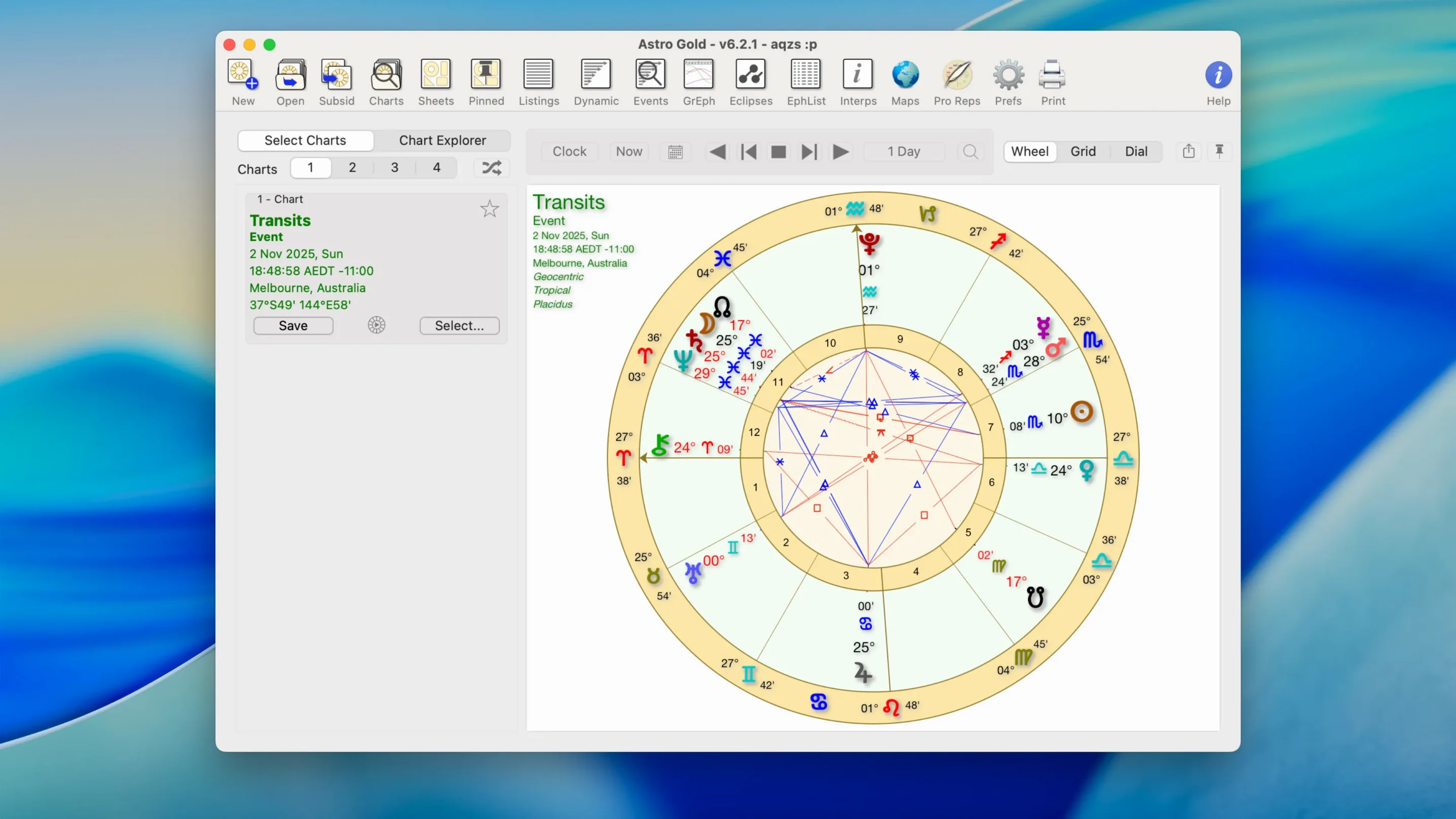
A consulting astrologer sits with a client, pulls up a natal chart, then layers on today’s transits to find what’s active right now. A few clicks later, she compares two charts for a relationship reading with synastry, then checks how a move to Lisbon might shift things with a relocation chart. Astro Gold handles all of that on a Mac, from the first chart wheel to the fine-tuning of orbs and aspects.
| What it covers | System needs |
|---|---|
| Natal, transit, synastry, composite, Davison, and relocation charts | macOS 10.13 or later, Apple Silicon and Intel 64-bit |
| Medieval and modern techniques, tropical and sidereal zodiacs | English interface, published by Cosmic Apps Pty |
What makes it feel like a working astrologer’s tool rather than a toy is the control over the details. You can set your own orb tolerances, filter which planets and aspects appear, and switch between chart styles that show aspects or keep the wheel clean. The app doesn’t lock you into one tradition, either — you can move between medieval methods and modern psychological approaches, and pick tropical or sidereal coordinates depending on the reading. It’s astrology software built for the Mac from the ground up, not a port that feels out of place, and it runs on both older Intel machines and the latest Apple Silicon models.
Native Mac feel versus Solar Fire’s emulation layer
Astrology software on the Mac has never been a crowded field, but a few names come up regularly. Solar Fire remains the heavyweight for Windows users, and while there’s a Mac version via emulation wrappers, it never feels native — menus lag, keyboard shortcuts misfire, and printing charts can turn into a small project. Astro Gold is the clean Mac-native alternative that covers most of the same ground without the friction. If someone needs every obscure harmonic and midpoint calculation Solar Fire offers, the difference matters; for most working astrologers, Astro Gold already has what they reach for daily.
Time Nomad is another Mac option, and it’s lighter and more minimalist. Where Time Nomad leans toward a sleek, almost iOS-like feel with fewer visible controls, Astro Gold puts more on screen at once — multiple chart wheels, detailed aspect grids, ephemeris tables. A student dipping into astrology casually might prefer Time Nomad’s simplicity. Someone casting charts for clients all day will likely appreciate that Astro Gold doesn’t hide the settings behind extra taps.
Then there’s Kairon, which has its fans for its high-precision calculations and academic tone. Kairon can feel intimidating on first open, and its chart design sits somewhere between functional and austere. Astro Gold’s round and square chart styles are warmer on the eyes during a long consultation, and the interface doesn’t assume you’ve memorized every astronomical abbreviation. It’s the app that bridges professional depth and approachability without sliding into oversimplification.
Apple Silicon support that keeps your Mac cool
Version 6.0 was the big architectural leap — full Apple Silicon support arrived, and the performance difference was immediate. Chart calculations that once took a noticeable beat now resolve instantly, and the app no longer nudges the Mac’s temperature up during long sessions. Cosmic Apps also refined the chart rendering engine around that time, so wheels look sharper on Retina displays and custom aspect configurations save reliably between sessions.
By version 6.2.1, the updates had settled into polish rather than upheaval. The fixed star catalog got attention, with more precise positions and better integration into chart wheels so you’re not squinting at labels that overlap. Asteroid handling grew smoother too — Chiron and Proserpina now sit naturally in aspect lines instead of feeling tacked on. And the ephemeris browsing feels quicker, with less waiting when jumping between decades. None of these changes grab headlines, but when you’re working through five client charts in an afternoon, small refinements in speed and readability add up.
A reading environment tuned for consulting astrologers
Consulting astrologers who run their practice from a Mac are the obvious fit. The app’s chart styles, orb controls, and multi-chart layout mean they can set up a reading environment that matches how they actually work — not how a developer imagined they might. Someone who casts natal charts, runs transits, and occasionally checks relocation lines for a client considering a cross-country move will find all of that in one place without switching tools.
Astrology students who’ve moved past the basics also benefit. The medieval and modern technique support lets them explore different traditions as their studies deepen, and having tropical and sidereal zodiacs side by side means they can compare approaches without buying separate software. The ephemeris and fixed star catalog give them reference material they’d otherwise keep in browser tabs or dog-eared books.
There’s also a quieter group: people who want astrology software that simply runs well on a Mac. Maybe they’ve tried running Windows astrology apps through compatibility layers, or used web-based tools that slow down with large chart files. Astro Gold launches like any other Mac app, respects Dark Mode, and doesn’t feel foreign. For someone searching terms like astro gold for mac or astro gold mac, the draw is often exactly that — a capable astrology tool that belongs on the platform they already use.
- macOS 10.13 or later
- Works on Apple Silicon and Intel 64-bit Macs
Notes from other shops 0
Sign in or open a shop account to leave a note.
No notes yet. If you've used this on a shop Mac, tell me how it went.