
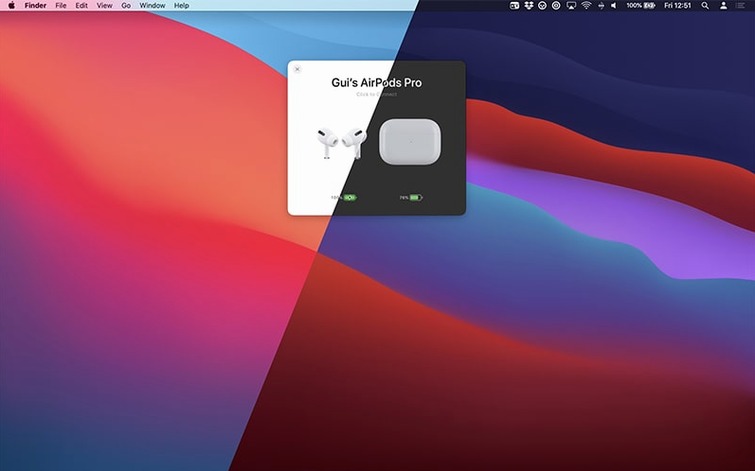
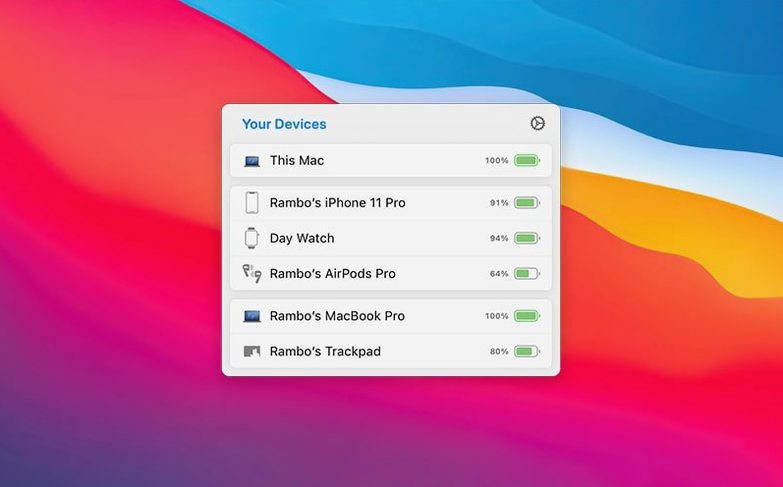
AirBuddy 3 refines what was already a solid utility by giving you more control over how you see and connect to your audio gear. The latest beta lets you swap the menu bar icon between the app icon, a clean battery indicator, or nothing at all—a small change that signals a broader shift toward letting you tailor the experience. It still shows you at a glance if your left or right AirPod is draining faster, but the real depth for experienced users is in the custom connection modes. You can set up automatic behaviors for when a specific device connects, turning what used to be a manual pairing routine into something that just happens the way you want.
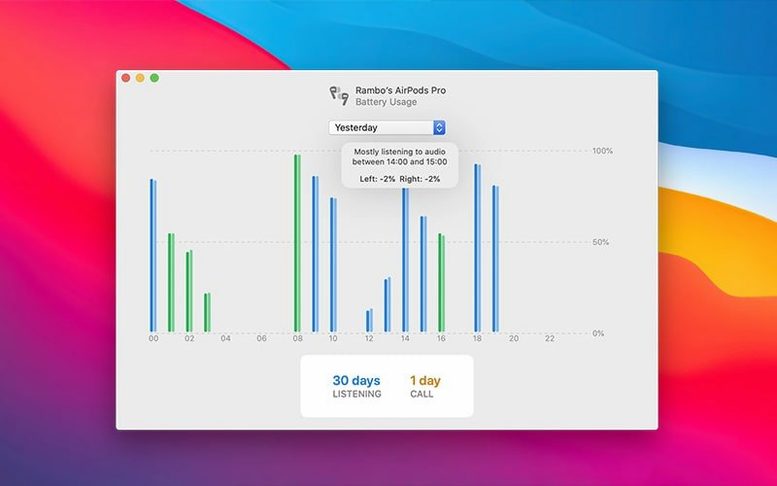
The headset usage history is another tool that rewards a closer look. You can pull up battery patterns across the last 12 hours, 24 hours, or the previous day to spot a case that needs charging or a listening habit you didn’t realize you had. Pair that with one-click connection and keyboard shortcuts for switching listening modes, and the app moves beyond a simple battery reporter into a proper device manager. It also brings playback controls and nearby peripheral monitoring into the same menu, so you spend less time digging through Bluetooth settings and more time working.
Little shortcuts you might walk right past
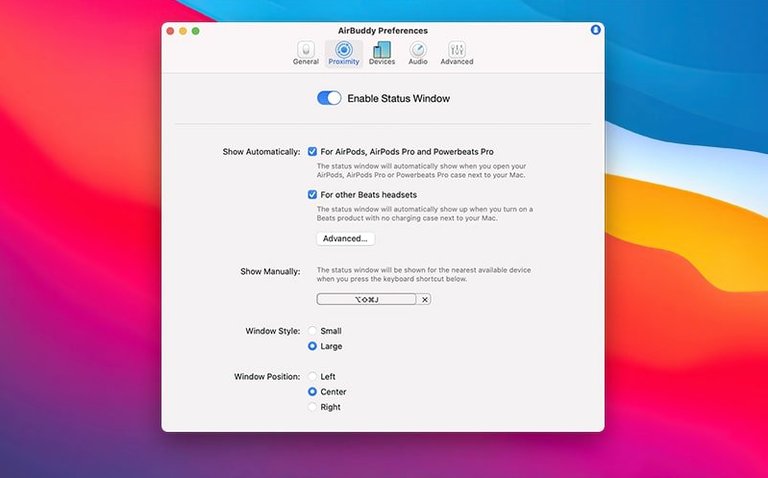
Most people open the status window and stop there, but AirBuddy 3 rewards a bit of poking around. The trackpad gesture for swapping listening modes on AirPods Pro is the kind of thing you stumble into once and then use constantly—no need to click through menus. A quick two-finger swipe on the device tile toggles between transparency and noise cancellation, and it feels so natural you wonder why it isn't standard in macOS.
Keyboard shortcuts are another quiet power move. You can assign a global hotkey to connect your most-used AirPods without touching the menu bar at all. If you bounce between a desk Mac and a laptop, that alone saves a surprising number of clicks each day. Combine it with the custom connection modes, and you can set the same shortcut to also drop the volume to a specific level and mute the mic on connect—handy if you take calls in a shared space and don't want to broadcast your whole room the moment you put your AirPods in.
The menu bar icon options from the airbuddy beta deserve a second mention. Swapping to the battery indicator only frees up visual space, and hiding the icon entirely keeps things tidy if you rely on the status window or keyboard shortcuts instead. It's a small detail that makes the app feel less like an add-on and more like something baked into the system.
Tighter grouping for mixed-device households
The move to version 3 tightened up device grouping in ways that matter for everyday use. Earlier builds could get confused about which AirPods belonged to which Apple ID when multiple sets floated around a family Mac. AirBuddy 3 now groups devices based on their relationships to each other, so your iPhone, your AirPods, and your MacBook show up as one cluster, while your partner's Beats stay separate. No more squinting at serial numbers to figure out which set is yours.
Magic Handoff also got smoother. Moving a Magic Mouse or keyboard between Macs feels less like a negotiation now—the handoff triggers faster, and the app remembers which peripherals you tend to move together. If you routinely switch a trackpad and keyboard as a pair, the connection mode setup lets you treat them as a bundle rather than two separate actions. For anyone running an airbuddy mac setup alongside an iPad on the same desk, the whole device-switching rhythm becomes almost thoughtless.
Playback controls now sit directly in the device tile, so pausing or skipping doesn't require opening a separate now-playing widget. It's the kind of refinement that comes from the affinity beta style of iterative polish—nothing flashy, just less friction when you're in the middle of something.
AirPods missing after install, and the quick re-pair fix
The most common frustration is AirPods not showing up right after installation. The fix is usually straightforward: pop your AirPods into the case, hold the setup button until the light flashes white, then reconnect them to your Mac through Bluetooth settings. AirBuddy picks them up within a few seconds after that. If they still don't appear, toggling Bluetooth off and on from the menu bar—not from System Settings—tends to shake things loose.
Another snag involves the battery indicator showing one AirPod at zero while the other reads full. This is almost always a charging contact issue inside the case, not an airbuddy 3 bug. Clean the contacts at the bottom of each AirPod stem with a dry cotton swab and reseat them in the case. The reading typically corrects within a minute.
The listening mode gesture sometimes stops responding after a macOS update. Reinstalling the app over itself usually restores it, since the helper component that talks to the AirPods Pro firmware can get unloaded during a system upgrade. You won't lose your settings—they live in a preference file that survives the reinstall.
For users trying the airbuddy beta alongside other beta software like adobe beta generative fill or the affinity beta, a rare conflict can cause the status window to lag when launching. Closing the window and reopening it from the menu bar clears the stutter. If it persists, temporarily setting the menu bar icon to the app icon rather than the battery indicator sometimes stabilizes the redraw. This quirk tends to disappear in the stable release, but it's worth knowing if you run bleeding-edge builds across multiple apps.
The current AirBuddy 3 beta adds more control over your menu bar, letting you pick the app icon, a battery indicator, or no icon at all. The core feature set covers battery monitoring, one-click AirPods connection, playback handling, and moving peripherals between Macs.
- macOS 14 or later
- Works on Intel and Apple silicon Macs
Questions from the stall
Which macOS versions does AirBuddy 3 support?
The current release requires macOS 14 or later, though beta release notes indicate a requirement for macOS 13 or later on release. It runs on both Intel and Apple silicon Macs.
Can I customize how the menu bar icon looks?
Yes, beta release notes describe an option to choose between the app icon, a battery level indicator, or hiding the icon completely.
What kind of usage history does AirBuddy track?
It shows headset battery usage history for the previous 12 hours, 24 hours, or the previous day, so you can see charging and usage patterns.
Notes from other shops 0
Sign in or open a shop account to leave a note.
No notes yet. If you've used this on a shop Mac, tell me how it went.