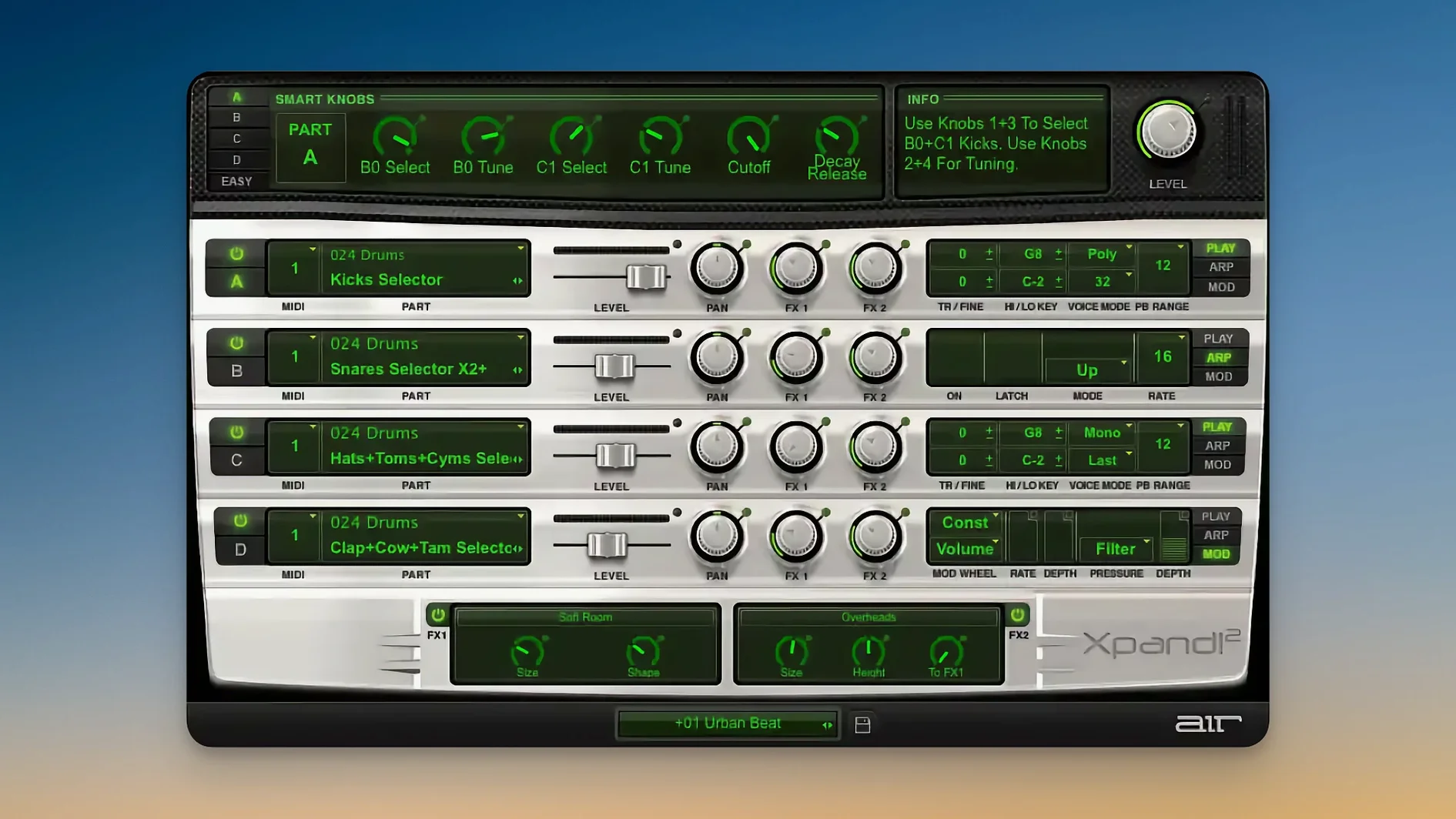
Every Xpand!2 preset holds four active sound slots, and each slot gets its own MIDI channel. That is the first thing to understand because it means you are not just loading one sound—you are layering up to four. Switch any slot to a different channel from your controller and you can play a bass line with your left hand while a pad and a lead sit on other channels. The slot strip makes this obvious once you look for it.
Pick a simple polyphonic pad in slot one, then set slot two to a monophonic synth bass. In monophonic mode the voice priority matters a lot: try Last priority first so your fastest key press always wins, then switch to Lowest if you want a more predictable bottom note for basslines. Each slot also carries its own arpeggiator, so turning it on for just the lead part while the pad floats underneath gives you movement without touching the other layers.
The sound engines are worth poking at early. Xpand!2 pulls from subtractive, FM, wavetable, and sample playback depending on the patch, and the two onboard effect processors sit right there for quick tweaks. MIDI Learn makes assigning a knob to filter cutoff or effect wet/dry painless—right-click, twist your hardware knob, done. Pitch Bend and Aftertouch work as you would expect across all four slots.
If you are on a Retina or HiDPI display, the interface scales cleanly on Apple Silicon Macs running macOS 13 or later. Start with any multi-part preset, unmute one slot at a time, and listen to how the four pieces fit together. That alone teaches you more than reading the manual.
Who clicks with Xpand!2 the fastest
A few kinds of Mac users slide into Xpand!2 and look up ten minutes later with a finished part. The first is the DAW composer who builds fast—someone who drags a plugin onto a track, flips through category folders, and needs a bass, a pad, and a pulse all at once without opening three separate instruments. Four slots on independent MIDI channels means you sketch a verse by assigning slots to different keyboard zones and playing them live instead of drawing lanes with a mouse.
Live performers get something specific here too. Because each slot responds to its own MIDI channel, a controller with split zones or a second keyboard turns Xpand!2 into a lightweight stage rig. You can leave the laptop closed, map a few smart controls to a rotary controller, and morph between a soft verse patch and a huge chorus layer with one knob. The arpeggiators run in sync with your host tempo, so tapping a footswitch to hold a pattern while you solo over the top just works.
Sound designers doing quick-and-dirty layering also find a natural home. The combined engine types—subtractive, FM, wavetable, sample—mean you are not married to one synthesis method when stacking slots. Slot one might pull from a sampled marimba transient, slot two an FM bell, slot three a wavetable sweep, and slot four a filtered saw pad. Blend them with per-slot volume and panning, and you have a composite that sounds like you spent an hour in three separate plugins. You spent four minutes.
If you make hip-hop, electronic, or film score cues where texture density matters more than deep sound design per element, Xpand!2 fits the work rhythm. It rewards the instinct of "let me hear two more things on top of this" rather than coaxing every detail from a single oscillator.
Switch mono slots to Low-note priority for layered chords
Out of the box, a few defaults hold back what the engine can do. Change these early and they stick with you across sessions.
Voice priority on monophonic slots. The default is often Last note priority, which works for leads but fights you on basslines. For anything anchored in the low end, switch to Lowest priority. Your left-hand phrasing stays consistent even when you accidentally brush a higher key.
Arpeggiator latch behavior. Each slot's arpeggiator runs independently, but by default some presets leave latch off. If you want a held pattern while both hands play elsewhere, enable latch on that slot and set the note range so it only triggers from a specific octave. That way your chord hand does not accidentally retrigger a pattern meant for the bass zone.
Effect routing order. The two effect processors sit in series per slot, and the preset order is not always the one you would pick. Try moving a chorus before a distortion on a wavetable lead, or putting a delay ahead of a reverb on a percussive slot. The sound changes more than you would expect from two knobs.
MIDI Learn assignments for smart controls. The six smart knobs are pre-mapped on many presets, but they respond to right-click MIDI Learn instantly. Before building a multi-slot performance patch, map at least two of them to slot volume or effect wet/dry across the parts you know you will tweak live. It beats reaching for the mouse during playback.
Polyphony per slot. The 64-voice ceiling per polyphonic part is generous, but stacking four dense pads can push it. If a slot plays sustained chords, dial its voice count down to 8 or 12 and let the other slots breathe. You will not hear the difference, and the CPU thanks you on an older Apple Silicon machine.
Four parts that stack instead of one deep morphing engine
Put Xpand!2 next to Logic Pro's Alchemy and the difference is structural. Alchemy is a deep single-patch synthesizer with morphing, spectral resynthesis, and a modulation map that rewards patient exploration. Xpand!2 does not try to compete on depth per patch—it competes on how many layers you can stack before the creative impulse fades. Alchemy asks you to shape one sound beautifully; Xpand!2 asks you to grab four sounds and shape them together. For cue composers who need a finished texture in the time it takes to load a project template, the four-slot design wins on speed.
Against Native Instruments Kontakt, the comparison is about focus. Kontakt is a sampler ecosystem—libraries, scripting, disk streaming, and an ocean of third-party expansions. Xpand!2 is a self-contained multitimbral synth with no sample importing and no library management overhead. If your work leans on orchestral realism or deeply scripted instruments, Kontakt is the obvious tool. If you want a fast four-part layer with synthesis engines baked in and zero file browsing, Xpand!2 opens and plays while Kontakt is still scanning its database. Several users who found an xpand 2 torrent initially to try the core sound end up keeping it precisely because it loads like a hardware module—no fuss, no waiting.
Compared to Arturia Analog Lab, the distinction is preset philosophy. Analog Lab gives you curated presets from Arturia's modeled classics, each one a snapshot of a specific vintage synth. It sounds gorgeous, but you browse one sound at a time. Xpand!2 gives you four sounds that you mix, zone, and arpeggiate independently. Someone who found an xpand2 torrent while looking for a quick layering tool often realizes the four-slot architecture changes how they compose—from "pick a preset and tweak" to "stack presets and perform."
Building a performance patch from scratch
Here is a realistic workflow for a live keyboardist who needs one patch that covers bass, pad, lead, and rhythmic pulse—all playable from a single 61-key controller with no backing tracks.
1. Clear the slate. Load an initialized patch or a simple preset where all four slots are active but unassuming. Mute slots 2, 3, and 4 so you hear only slot 1 while building.
2. Set up the bass zone (slot 1). Browse the Bass category and pick a round, sub-heavy patch. Switch the voice mode to Monophonic and set priority to Low. In the slot settings, restrict the note range to C1–B2. Pan center. No arpeggiator yet.
3. Add a rhythmic element (slot 2). Unmute slot 2, set its MIDI channel to match slot 1 (so it triggers from the same left-hand range), and pick a percussive or pluck patch from the Arpeggiated or Sequence category. Turn on the arpeggiator, set it to a 1/16 note pattern, and enable latch. Now your left hand plays a bass note and drives a rhythmic pulse simultaneously.
4. Layer the pad (slot 3). Switch slot 3 to a different MIDI channel or set its note range to C3–B4 so it ignores the left hand. Find a warm, slow-attack pad. Pull its volume down until it sits behind the bass and pulse. Add a touch of reverb from the first effect
- macOS 13 or later
- Apple Silicon Mac
Questions from the stall
How many sounds can Xpand!2 play at once?
Each preset holds four active sound slots, and polyphonic parts support up to 64 voices, so you can layer and stack a lot of sound at the same time.
Does Xpand!2 work with an external MIDI controller?
Yes, it supports Pitch Bend, Aftertouch, and MIDI Learn, and each of the four slots can be assigned its own MIDI channel.
What synthesis types does Xpand!2 use?
It combines subtractive synthesis, FM synthesis, wavetable synthesis, and sample playback to build its sounds.
Notes from other shops 0
Sign in or open a shop account to leave a note.
No notes yet. If you've used this on a shop Mac, tell me how it went.