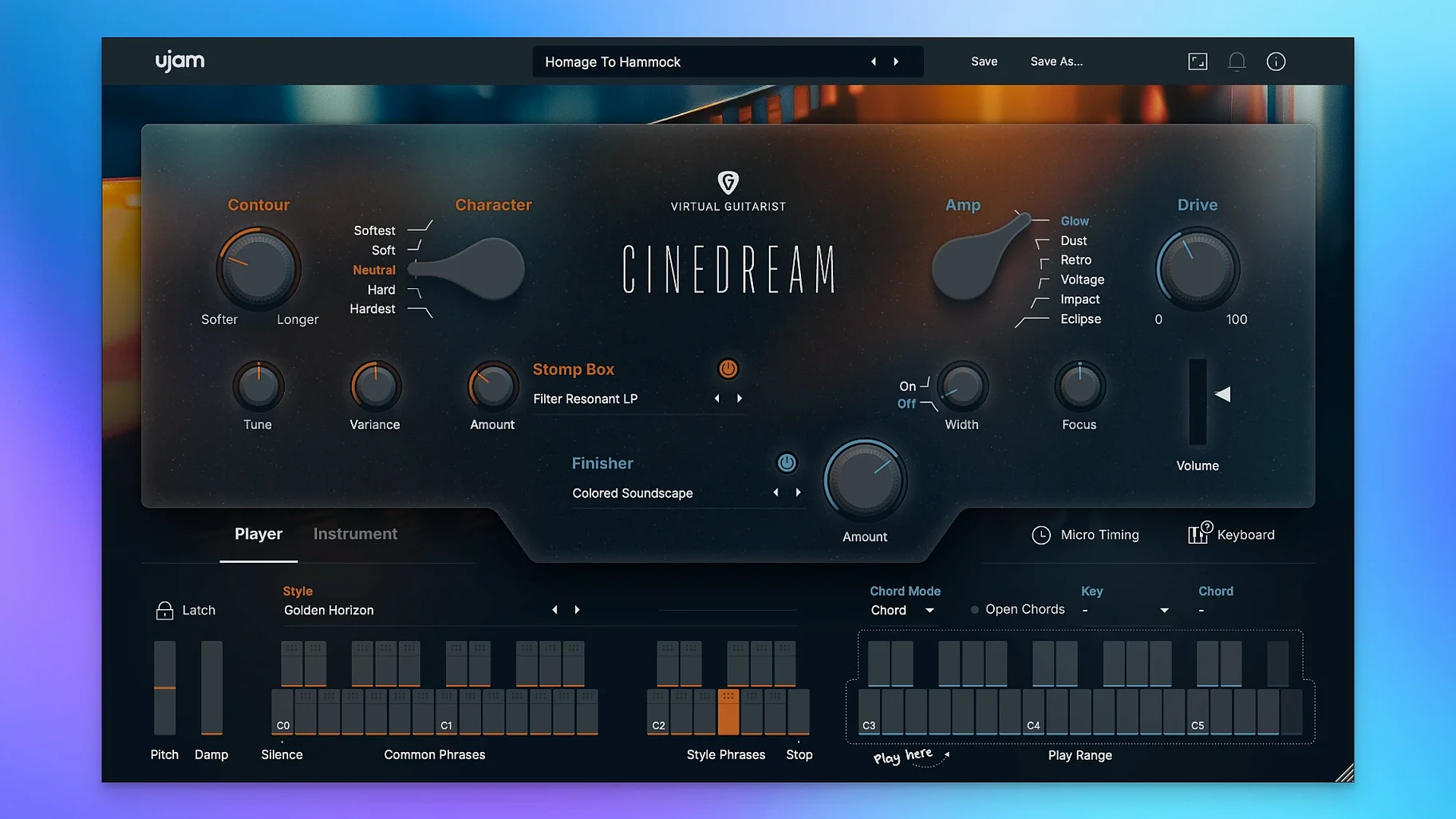
Getting a guitar to sit right in a cinematic mix usually means stacking delays, pitch effects and modulation until the original performance disappears. Cinedream flips that around — the sound starts already processed for ambient and soundtrack work, so you spend less time building chains and more time shaping mood.
It runs as a VST, AU or AAX plug-in on macOS 10.13 and later, with native ARM support for Apple Silicon alongside the older 64-bit Intel path. I’d check your DAW’s plug-in scanning preferences first, then drop it onto an instrument track. The interface is in English and doesn’t need much screen space — 1280 by 768 pixels minimum, but it sits comfortably on a laptop display.
What you hear is a real guitar source pushed through a sound-design engine. The tone moves from soft and clean through to saturated and rough without losing the sense that a stringed instrument started the note. Ready-made styles give you shortcuts to a mood, while the effects section adds the kind of space and movement that works under dialogue or wide landscape shots.
Plug-and-play AU hosting in Logic, Live and Reaper
I use Cinedream inside a DAW almost all the time, but it plays well with a few macOS utilities that make shaping the sound faster. The plug-in shows up in Logic Pro, Ableton Live and Reaper without fuss — AU validation in Logic passed on the first scan here, and the VST3 version loaded cleanly into Reaper on an M-series Mac.
Outside the DAW, I route its output into Audio Hijack when I want to capture a long evolving texture for use as raw sample material later. That combo turns a single chord trigger into a two-minute bed that I can drag onto a timeline without touching the plug-in again. The stand-alone version doesn't exist, so Audio Hijack or BlackHole routing becomes the workaround.
With macOS's Audio MIDI Setup I create an aggregate device that sends Cinedream's output from Logic into OBS for live-streamed scoring sessions — niche, but when you're building atmosphere behind a tabletop game stream, it saves exporting stems ahead of time. The plug-in's CPU footprint is modest enough that this routing doesn't glitch.
Snappy preset switching with zero audio dropout
Load time is quick — the plug-in appears ready within a couple of seconds even on an older Intel machine with a spinning drive. Switching between the preset styles snaps the engine into a new texture without the audio dropout I half-expected from a sample-based instrument crossing into heavy processing.
Memory use sits around 400 to 600 MB in a typical project, which is reasonable for a virtual instrument pulling from processed guitar samples. I've run three instances layered at different octaves — one clean, one saturated, one with the effects section dimed for movement — and the session stayed under 2 GB of RAM without crackling at a 256-sample buffer. On Apple Silicon the fans never spun up. On an older Intel MacBook Pro the CPU meter nudged upward but nothing that forced me to freeze tracks.
Stability has been solid through a week of daily use. No crashes when swapping presets mid-playback, no authorization hiccups after sleep-wake cycles, and the plug-in remembered its state after closing and reopening a project. The one quirk I noticed: if your DAW's sample rate changes while Cinedream is active, the plug-in sometimes goes silent until you remove and reinsert it. Quick fix, but worth knowing.
A simpler, more focused alternative to Analog Strings
Against Output's Analog Strings — another instrument built for cinematic texture — Cinedream is simpler and more focused. Analog Strings layers orchestral and synth sources into complex evolving patches, which is powerful but means you spend time learning the four-engine architecture. Cinedream gives you one sound source (guitar) with a curated effects path, and you're working within five minutes of opening it. If you want a guitar specifically, Cinedream feels more immediate.
Next to Native Instruments' Straylight, the difference is in the raw material. Straylight excels at granular, vocal-like textures that can get abrasive or otherworldly. Cinedream stays warmer and more organic because the source is a plucked string. For underscoring an emotional scene where you want the audience to feel something without noticing the music, Cinedream's tone blends more naturally under dialogue.
Compared with Spitfire Audio's LABS free instruments, Cinedream occupies a middle ground. LABS has a few ambient guitar patches, but they are static snapshots — beautiful, but you don't shape them much. Cinedream gives you the chord trigger engine, the style switching and the dedicated effects, so you can tailor the movement rather than just playing back a captured performance. It costs more in disk space and setup time, but rewards you with variation that a static sample library can't match.
Pull the reverb mix down 20% to bring the guitar forward
Open the effects panel and pull the reverb mix down by about 20 percent from its default on most styles. The stock setting pushes the guitar far back in a mix, which works for pure ambient beds but buries the attack if you want the instrument to breathe behind a vocal. Backing it off keeps the space while letting the transient poke through.
Turn on MIDI latch mode in your DAW if you're using the chord trigger to build a drone. The trigger fires an evolving phrase that runs as long as a note is held — latch it and you can walk away while the texture runs, then tweak the effects knobs in real time with both hands free.
For CPU-conscious setups, disable the built-in doubler effect and use your DAW's stock stereo spread instead. The internal doubler adds a nice width but eats more cycles than a simple Haas delay on a send track, and you get more fine control over the stereo image that way.
Finally, save a user preset with the saturation knob mapped to a MIDI controller. The tone change from clean to rough is gradual enough that riding it during a cue adds a shape that automated faders miss — subtle grit creeping in as a scene darkens, without reaching for another plug-in.
- macOS 10.13 or newer
- Apple Silicon or 64-bit Intel processor
- 8 GB RAM
- 4 GB free disk space
- 1280 × 768 minimum display
- Internet connection
- VST, AU or AAX host
Notes from other shops 0
Sign in or open a shop account to leave a note.
No notes yet. If you've used this on a shop Mac, tell me how it went.