Slotting it into your mix chain
What jobs does it handle on individual tracks?
It tames sibilance in a vocal take, pulls the ring out of a snare close mic, and softens brittle overtones in acoustic guitar recordings. Instead of hunting for frequencies with a static EQ, you let the plug-in listen and react only when the harshness pokes through.
Taming cymbal hash and backing-vocal glare
On a drum bus it can clamp down on cymbal hash that builds up across multiple mics without dulling the whole kit. Placed on a backing-vocal group, it keeps stacked harmonies from turning into a wall of upper-mid glare.
Can you use it for mastering?
Yes, with a light touch. Dial in a broad band and set the depth shallow to catch the odd piercing moment on a full mix, or focus on the high shelf to smooth out a track that was recorded in a bright room.
How does it make room between sounds?
Sidechain a bass part against the kick so the low-mid mud ducks whenever the drum hits, or push a lead vocal against the guitar bus so the presence frequencies back off just enough for the words to stay clear. It’s resonance reduction working like a smart, frequency-specific compressor.
Why it's not just another dynamic EQ
Three other plug-ins tend to come up in the same conversation, and they each approach resonance taming from a slightly different angle.
Waves F6 RTA is a floating-band dynamic EQ, not a dedicated resonance suppressor. You eyeball the real-time analyzer, drag a band onto a peak, and set its threshold. It gives you more hands-on control over exactly which frequency moves, but it won’t automatically chase shifting resonances across a performance the way soothe2 does. For a vocal that wanders in its harsh spots, I’d rather let soothe2 do the tracking. For a single snare ring that sits at the same pitch every hit, F6 works fine.
Baby Audio Smooth Operator shares the spectral-smoothing concept and a similarly clean interface. It feels quicker to dial in on spoken word than soothe2 does, and its sidechain routing takes fewer clicks. But I find soothe2 gives me finer control over the bands and attack behavior—especially on dense mixes where I want to shave off harshness without the processing becoming audible. Smooth Operator sometimes leans toward an overall softer tone, while soothe2 lets the transients keep their shape underneath the reduction.
Eventide SplitEQ splits a signal into transient and tonal layers and applies different EQ to each. It’s a different philosophy: solve harshness by treating the attack separately from the sustain. Soothe2 works across the whole signal at once but only when a resonance crosses the threshold. For fixing a piano hammer click without dulling the note body, SplitEQ has an edge. For chasing a singer’s shifting upper-mid bite through a whole take, I go back to soothe2.
A de-essing and taming workflow, step by step
Let’s say you have a lead vocal that gets piercing around 2.8 kHz on certain phrases and also has some low-mid boxiness from a small booth. Here’s a process that works without touching a traditional EQ.
- Insert soothe2 on the vocal track after your corrective EQ but before compression—this way the dynamics downstream don’t exaggerate the resonances you’re about to soften.
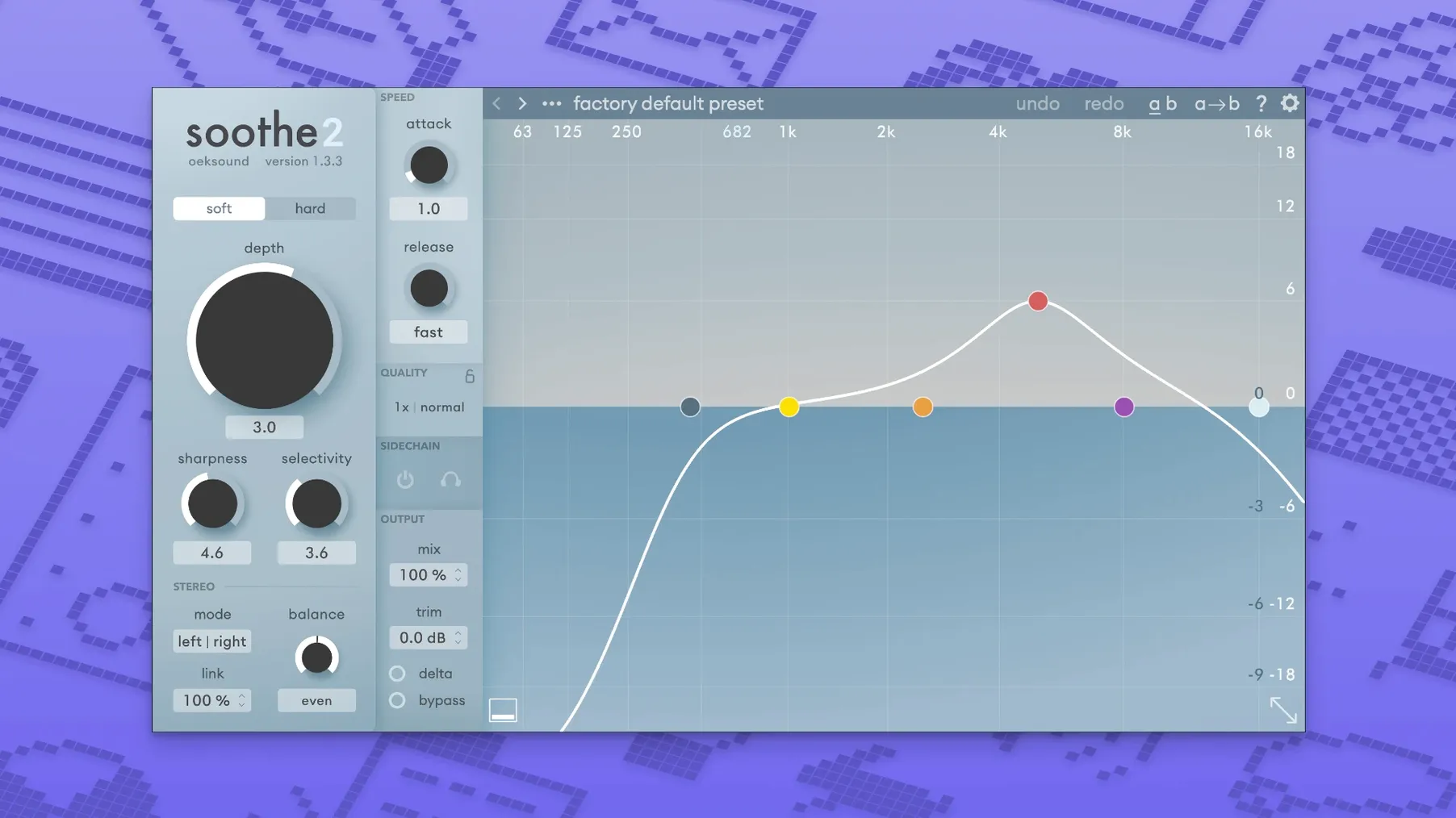
- Start with the Soft processing mode. Loop a phrase where the harshness peaks and set the upper band to cover roughly 1.8–6 kHz. Pull the Depth down to around −3 dB and listen. Increase Selectivity until the reduction meter only lights up on the actual sibilant and ringing moments, not on the whole performance.
- Add a second band for the low mids. Target 200–500 Hz with a wide Q and a gentler depth. Use the Delta button to solo just the removed signal—if you hear any consonant articulation in the low-mid band, back off the range or tighten the selectivity. You want to remove mud, not body.
- If the vocal has a few syllables that still poke out, automate the Depth or the band’s gain reduction for just those spots. Even a 1 dB nudge on a single word can keep the track feeling natural instead of processed.
- For the final polish, switch to Hard mode only on the upper band and listen for artifacts. Hard mode catches sharper peaks but can overwork on sustained notes—toggle it on only if the softer setting leaves a few stray resonances behind.
Hear exactly what each band removes with Option-click
- Delta monitoring per band. Holding Option and clicking a band’s solo button lets you hear what that single band is removing, without affecting the others. It’s the fastest way to check if your low-mid band is accidentally eating into the fundamental of a vocal.
- Attack and release linked to the material. The timing controls aren’t static milliseconds—they adapt to the frequency of the resonance being suppressed. A slower release on a high-frequency band behaves differently than the same setting on a low band. Tuning these by ear rather than by number gets better results.
- Mid-side processing on the master bus. When you load soothe2 in a mid-side configuration, try processing only the side channel for high-frequency harshness on overheads or room mics. It reins in the stereo splash without touching the center image.
- Presets as learning tools. The factory presets added in version 1.3.3 aren’t just starting points—they’re useful for studying how different band splits and selectivity values work on material you already know. Pull one up, flip to Delta, and pay attention to what each band catches.
Version 1.3.3 tidies up a few rough edges we’d been waiting on:
- Fixed playback overloads in Logic when the plug-in window opens.
- Automation no longer jumps after modifier-key parameter clicks in Pro Tools.
- A handful of new factory presets, plus small fixes and improvements.
- macOS 10.14 or newer
- Intel or Apple Silicon Mac
- Host that supports VST, AU, or AAX
Notes from other shops 0
Sign in or open a shop account to leave a note.
No notes yet. If you've used this on a shop Mac, tell me how it went.