
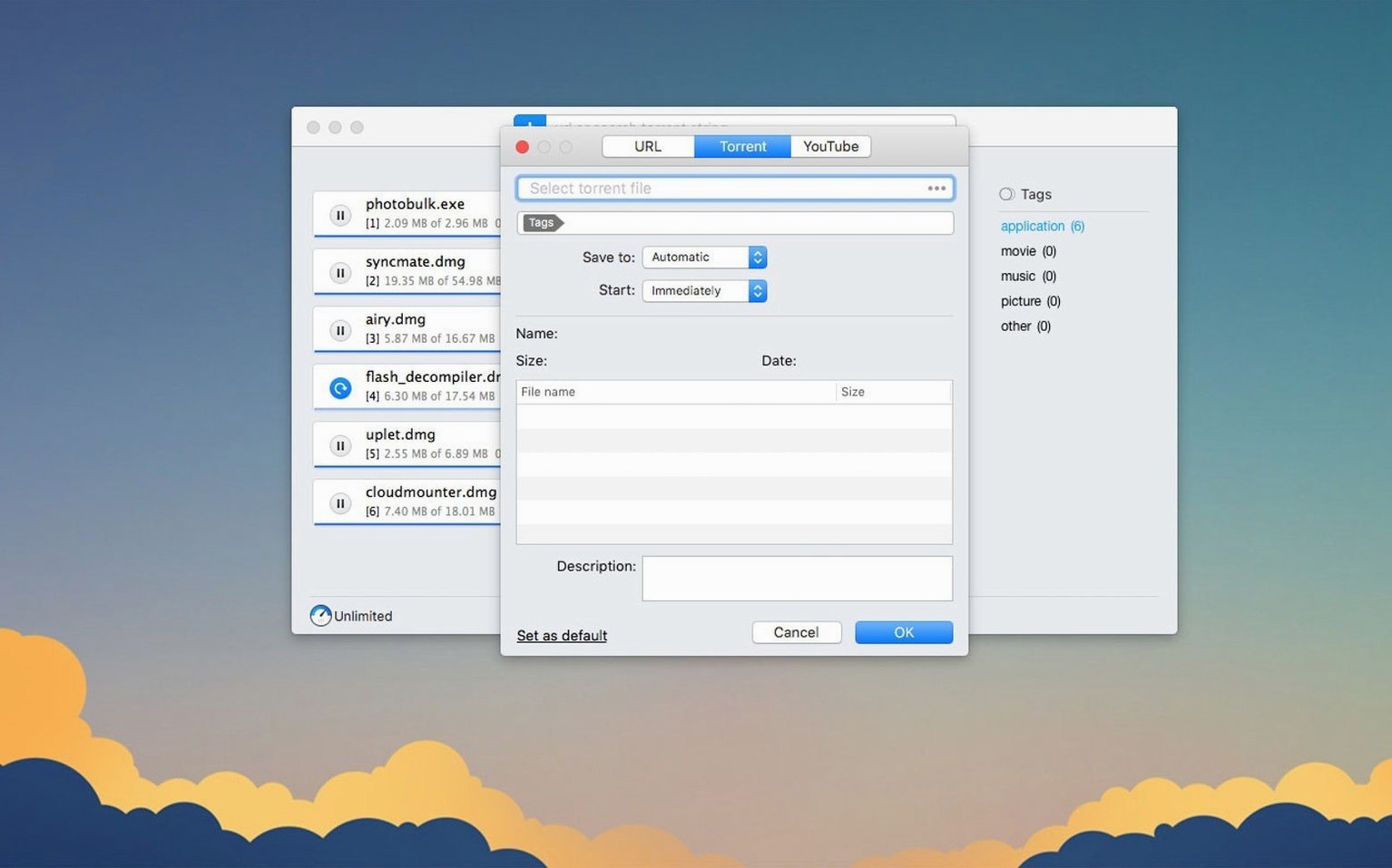
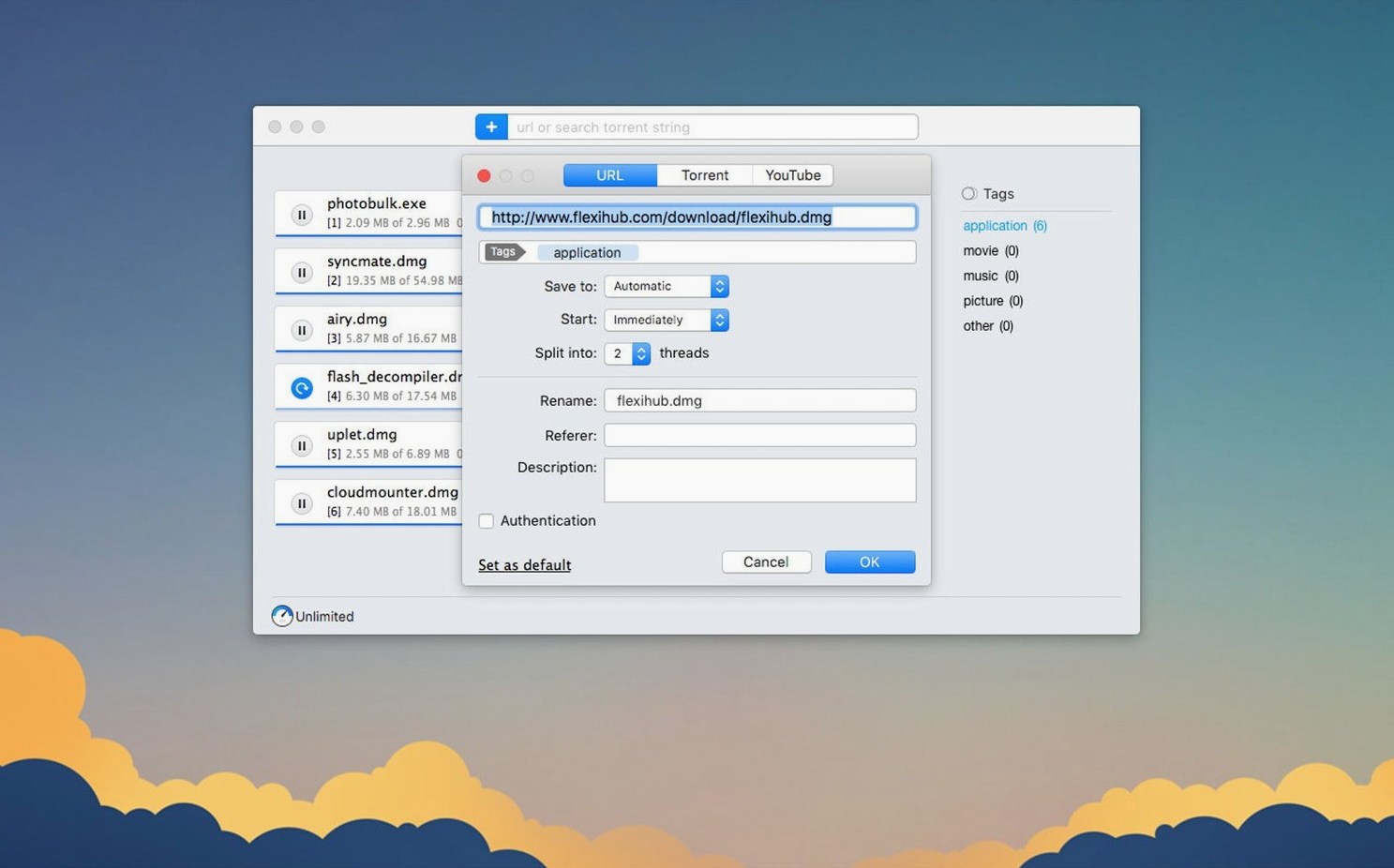
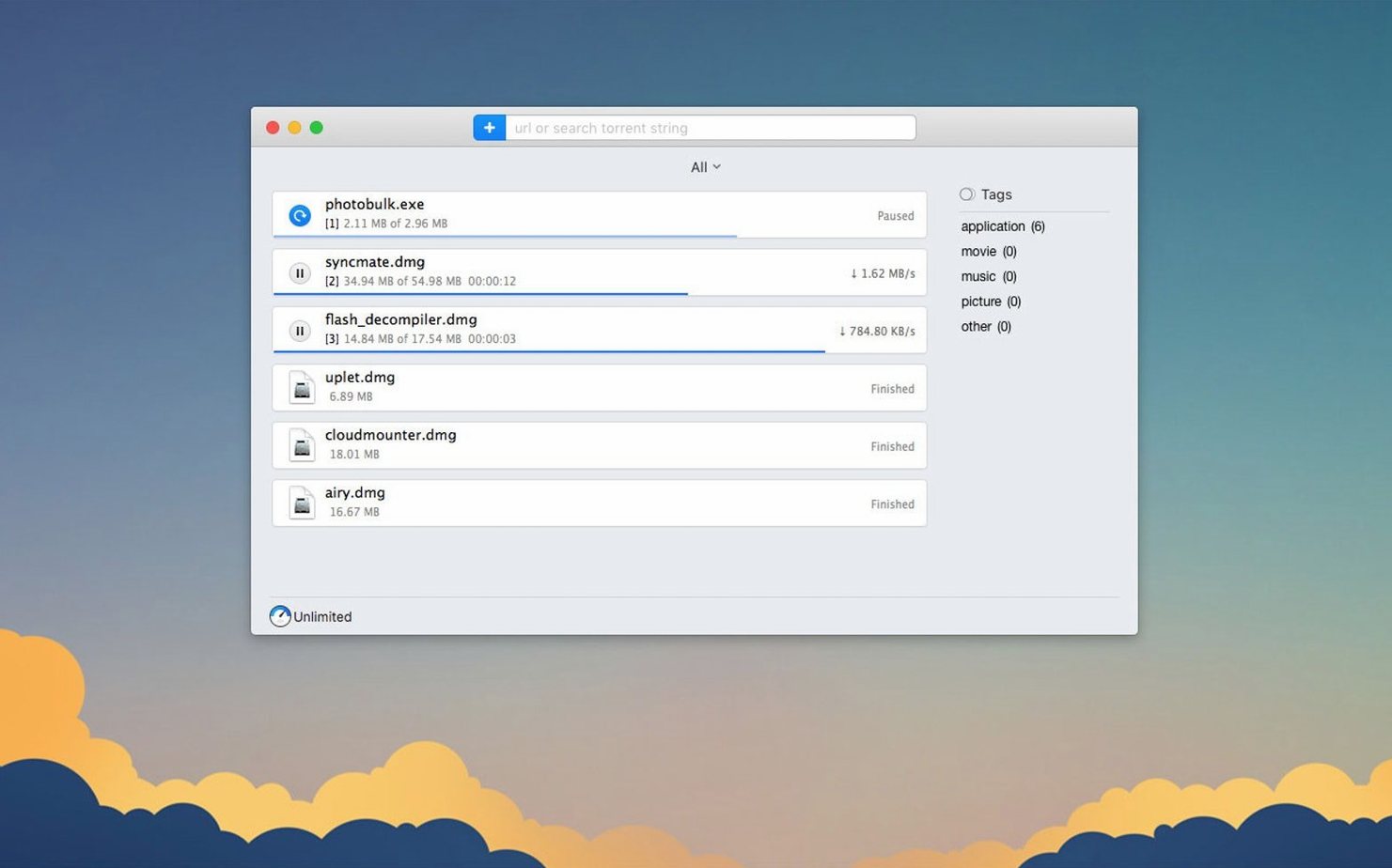
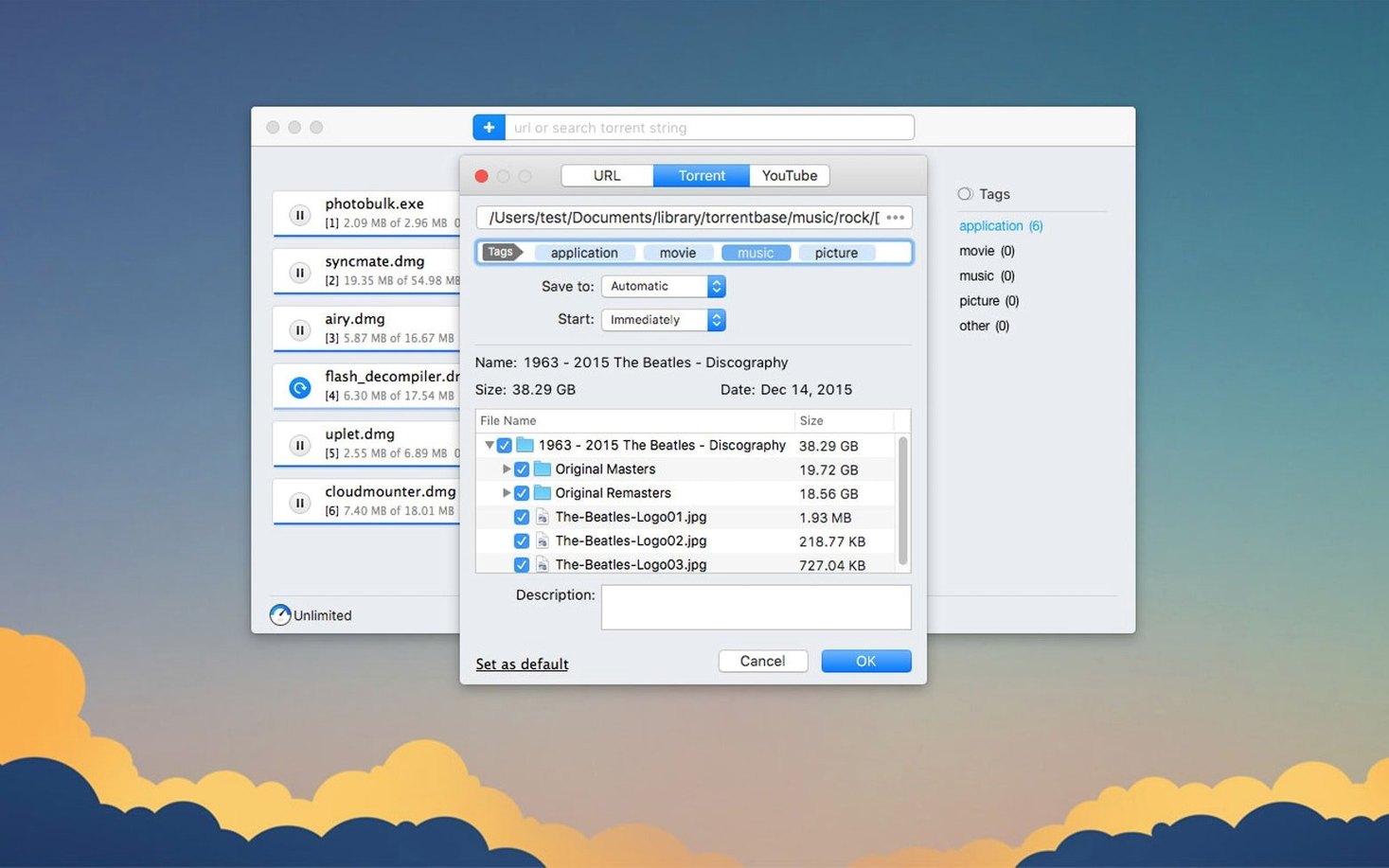
The 5.34 update tightened up how Folx Pro handles torrents and raised the macOS floor to 10.13. A couple of magnet-link crashes got squashed, and torrent downloads now behave better when you pick and choose individual files inside them. Proxy support saw some attention too.
What the setup asks back
Before you drag the icon over, here's the lay of the land.
Grab YouTube videos and name the file before it downloads
- Pulling YouTube videos and picking the filename before it saves.
- Remembering site logins so password-protected downloads just work.
- Sorting torrent search results by seeds to grab healthy files fast.
- Scheduling big transfers for off-peak hours.
- Splitting direct downloads into up to 20 threads for speed.
Needs High Sierra or newer and speaks ten languages
- Requires macOS 10.13 (High Sierra) or newer.
- Russian, English, German, Vietnamese, Spanish, Italian, Simplified Chinese, Korean, French, and Japanese are the interface languages.
- The current build is 5.34.14042.
Where Folx Pro fits in the Mac ecosystem
A download manager doesn't live in a vacuum. The way Folx Pro slides into your existing setup is part of what makes it stick.
With browsers. Folx Pro catches downloads from Safari, Firefox, Chrome, and most Chromium-based browsers without fuss. Browser extensions handle the handoff — click a link, Folx Pro grabs it. The real convenience shows up with password-protected sites: you store the credentials once inside Folx Pro, and it handles authentication quietly on subsequent visits. No re-entering logins every time a file host asks for them.
With the Finder and tags. Downloads land where you tell them to. Folx Pro respects your folder structure, and because it writes regular files, macOS tags and Spotlight indexing work exactly as you'd expect. A video you pulled with the built-in YouTube downloader shows up in Finder searches by filename, date, or tag the moment it finishes. Nothing is hidden inside a proprietary library.
With Notification Center. Completion alerts appear as standard macOS notifications. You can control them per download or globally from System Settings, same as any other app. If you'd rather not be interrupted during focused work, scheduling downloads for overnight hours keeps the daytime quiet.
With proxies and VPNs. The proxy improvements in version 5.34 matter if you route traffic through a SOCKS5 or HTTP proxy. Folx Pro now respects those settings more reliably for both direct downloads and torrent transfers, which means fewer stalled connections when your network setup isn't straightforward.
Torrent magnet links no longer crash the app
The jump to 5.34 wasn't a visual overhaul — it was a stability and reliability pass that shows up in the tasks you do most often.
Torrent handling got less brittle. Earlier builds could crash when adding certain magnet links. That's fixed. If you've ever pasted a magnet link and watched the app blink out, you'll notice the absence of that frustration. Torrent search stability improved alongside it, so browsing for content inside the app no longer risks an unexpected quit.
Selective downloading works properly now. When you open a torrent and uncheck the files you don't want, Folx Pro actually respects those choices through the entire download. Before 5.34, the storage and handling of partially-downloaded torrent tasks could get messy — files you unchecked might still nibble at disk space, or the task state wouldn't save correctly between restarts. The update cleaned that up.
The macOS floor moved to 10.13. This isn't just a number change. Dropping support for older macOS versions let the developers shed legacy code paths, which usually means fewer edge-case bugs for everyone on a supported system. If you're running High Sierra or newer, you're on the right side of that line.
Sits between web downloaders and a full torrent client
Folx Pro isn't the only option, but it occupies a particular niche when you look at what else is out there.
Folx Pro vs. Free Download Manager
Free Download Manager (FDM) covers similar ground — direct downloads, torrents, scheduling, browser integration. Where Folx Pro pulls ahead is the YouTube downloader with quality selection and filename editing built right in. FDM asks you to paste a URL and hope; Folx Pro lets you pick 1080p or 720p and name the file before it saves. FDM also lacks a built-in torrent search, so you're hunting for magnet links elsewhere. On the flip side, FDM's interface feels busier and more Windows-like on macOS, while Folx Pro sticks closer to Mac conventions.
Folx Pro vs. Transmission
Transmission is a pure torrent client — clean, fast, and open-source. It does one thing and does it well. What it doesn't do is direct downloads, YouTube videos, or site authentication. If your workload is entirely torrents, Transmission is a strong contender. If you regularly mix torrents with direct file downloads and want one app to handle both, Folx Pro is the more practical pick. The scheduling feature also gives Folx Pro an edge for people who want to queue large transfers during cheaper electricity or bandwidth hours.
Folx Pro vs. JDownloader
JDownloader is a beast for direct downloads from file-hosting sites, with captcha solving and link crawling that Folx Pro doesn't attempt. But JDownloader's torrent support feels bolted on, and its Java-based interface is heavy and often slow on macOS. Folx Pro feels native, starts faster, and covers the torrent side much more naturally. If you live in the file-hoster world exclusively, JDownloader might win. For a balanced mix of direct downloads, torrents, and video grabbing, Folx Pro is less overhead.
Broaden your terms when the torrent search comes up empty
Torrent search returns nothing. The built-in search queries public trackers, and results depend on what those trackers are serving at the moment. If you get an empty list, try broader search terms first. If that still fails, check whether a proxy you've configured is interfering — some proxies filter or block DHT and tracker traffic. The proxy improvements in 5.34 help, but a misconfigured proxy can still mute search results.
Download splitting doesn't speed things up. Splitting a download into 20 threads only helps if the server supports it and isn't throttling per-connection. Some file hosts cap each connection at a fixed speed, so 20 slow threads add up to the same total as one. Try dropping the thread count to 4 or 8 — sometimes the overhead of managing many connections actually slows things down. Also, a thread count that's too high can trigger server-side rate limiting that a lower count would avoid.
Magnet links still fail to load. Version 5.34 fixed a specific crash, but magnet links can still stall if your network blocks DHT or if the torrent itself has no seeds. Paste the magnet link into a different torrent client briefly to confirm the link is alive. If it works elsewhere but not in Folx Pro, check your proxy settings and try disabling the proxy temporarily to isolate the issue.
YouTube video quality options are missing. Folx Pro pulls the quality list from what YouTube serves at the moment of the request. If a video was just uploaded, higher resolutions might not be encoded yet. Wait a few minutes and try again. Also, some videos are capped at 720p or lower by the uploader — Folx Pro can only offer what's available. The quality dropdown won't show 1080p if YouTube isn't serving it for that particular clip.
App feels sluggish after hours of seeding. Long-running torrent sessions with many active peers can eat into system resources. Limit the number of active torrents and set a reasonable upload cap in the preferences. Seeding hundreds of torrents simultaneously will strain any client, and Folx Pro is no exception. A modest cap on active transfers keeps the interface responsive while still letting you contribute to the swarm.
Version 5.34 brings a handful of under-the-hood fixes:
- Torrent downloading is smoother, with better handling of stored tasks and fewer crashes when adding magnet links.
- Selective file downloading inside torrents works more reliably.
- Proxy connections behave better across the app.
- A crash during torrent search was fixed.
- macOS 10.13 is now the minimum requirement.
- Requires macOS 10.13 or later.
- Runs natively on both Intel and Apple Silicon Macs.
Questions from the stall
Does Folx Pro handle torrents and regular downloads in the same app?
Yes, it works as both a torrent client and a direct-download manager, so you aren't juggling two separate tools.
Can Folx Pro grab videos from YouTube?
It includes a built-in YouTube downloader that lets you rename the output file before it saves.
Notes from other shops 0
Sign in or open a shop account to leave a note.
No notes yet. If you've used this on a shop Mac, tell me how it went.