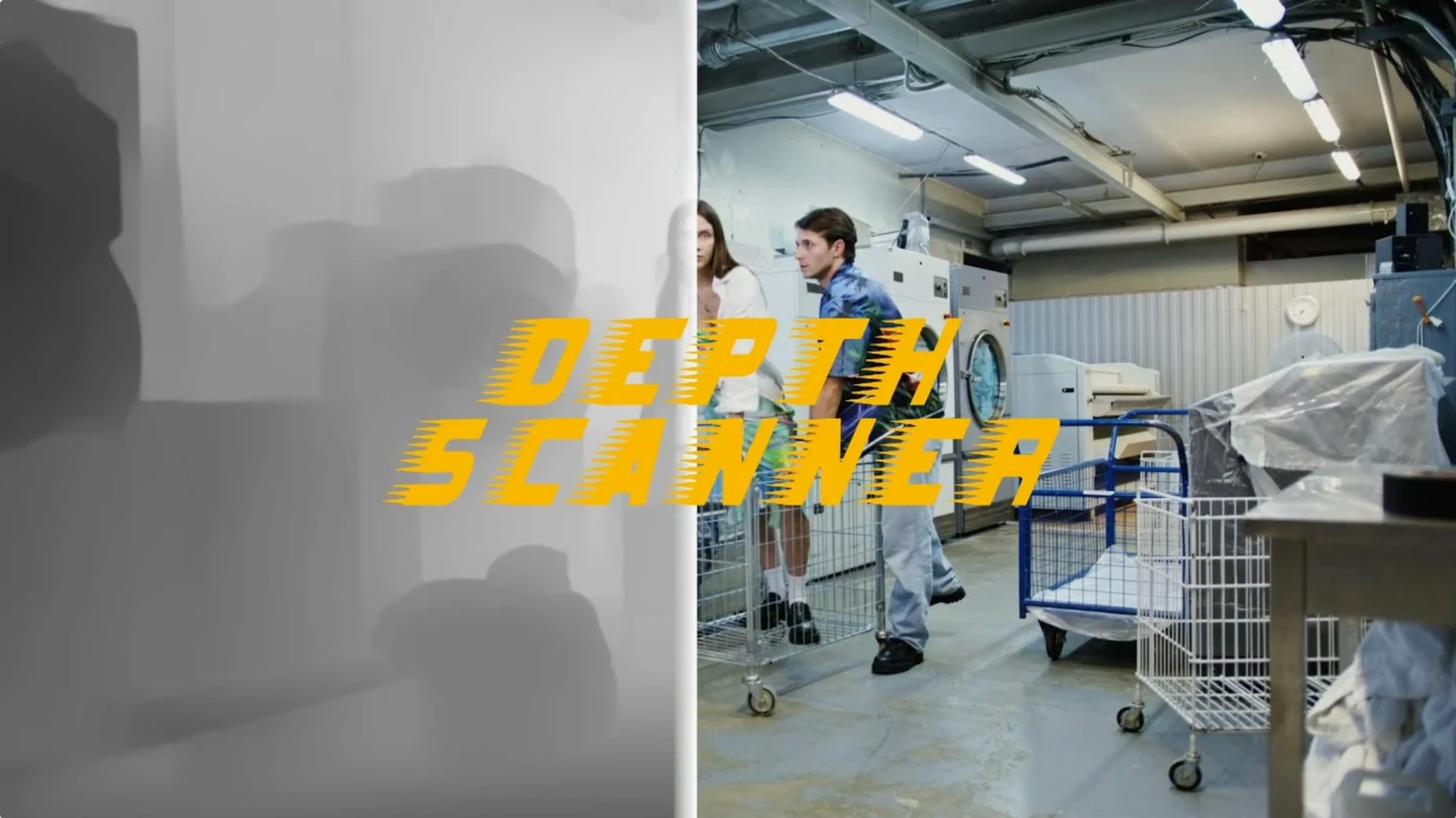
A clean install of version 1.15.6 brings the Blace Plugins toolset up to date, and Depth Scanner is the one that adds a new dimension to a standard 2D cut. It looks at a frame and works out what is near the camera and what is farther back, then turns that understanding into a grayscale depth map you can use directly in your comp.
| What it is | Where it lives |
|---|---|
| After Effects plugin | Blace Plugins set |
| Depth map generator | Works with video clips and stills |
The map itself is the real control surface. White comes forward, black recedes, and every gray value in between places an object at a different depth. You can drop the map onto an adjustment layer and let it drive a blur, a light wrap, or a fog effect that thickens naturally with distance. Where it really sings is with depth-based transitions — sliding one shot behind a foreground element, or revealing a second clip as the camera appears to push past a tree or a doorway. No keyframing of masks required. The plugin reads the image and builds the matte for you. It is a practical timesaver, especially for short commercial cuts where selling the depth of a product shot matters.
Offline depth mapping stays on your drive
Does it need an internet connection? No — Depth Scanner runs locally. The AI analysis happens on your own machine, so you can work offline, on set, or anywhere without a connection. That also means no footage leaves your drive.
Will it slow down my comp to a crawl? It depends on the clip. A single photo processes quickly. A long video clip at 4K resolution will take longer, but the plugin isn't constantly recalculating — it generates the map once, and you work from there. Pre-comp the result and everything downstream stays responsive. I'd budget a bit of render time up front and then forget about it.
Does it do depth from a single image or from stereo pairs? From a single image. It uses AI to estimate depth from one frame or video clip. You are not feeding it a 3D render or a stereo pair. That is what makes it useful for footage you did not plan to treat this way.
What happens with fast motion or whip pans? Motion blur can confuse the analysis because edges smear. The plugin still produces a map, but you may need to tweak the result with a simple levels adjustment or a soft matte choke. It is not magic, just a solid first pass that saves you from drawing roto shapes by hand.
A retoucher's quick win
Imagine a product photographer handing over a beauty shot of a perfume bottle on a dark background. The brief asks for a subtle rack-focus pull in the video version — sharp on the cap, soft on the base, then reversing. Without Depth Scanner, you are rotoscoping the bottle silhouette, feathering the mask, and animating a blur ramp. With the plugin, you drop the still into a comp, run Depth Scanner once, and use the resulting map to drive a Camera Lens Blur effect. The transition from sharp to soft tracks the actual shape of the glass and the cap, not a hand-drawn oval. The whole setup takes under two minutes, and the client sees a smooth optical pull that feels like an in-camera move.
Stop depth maps from pulsing between frames
Flickering depth maps on video. If the depth map jumps or pulses frame to frame, the AI is reacting to small changes in luminance or noise. The fix is usually simple: apply a light denoise or slight blur to a pre-comp of the source clip before running Depth Scanner. A gentle 0.5-pixel fast blur often settles the analysis without softening detail you need.
Depth values not separating foreground cleanly. When two objects are close together in the frame and the map blends them into one gray zone, try running Depth Scanner on a high-contrast pass. Duplicate the layer, crush the blacks and push the whites with Curves, then run the plugin on that version. Use the cleaner map on your original footage. It is a quick cheat that buys you cleaner edge separation.
Black or white frame output. This occasionally happens with very high-resolution stills or unusual aspect ratios. Resize the source to a standard comp size like 1920×1080, generate the depth map, then scale the map back up to match your working resolution. The AI seems to handle standard frame dimensions more reliably.
Long processing times on Intel Macs. The plugin does the heavy lifting on the CPU, and older Intel machines will feel the strain on long clips. Work in shorter segments — process ten seconds at a time rather than a full minute — and pre-comp each chunk. You keep the flexibility without the beachball.
- Adobe After Effects
- Part of the Blace Plugins collection
Questions from the stall
Can Depth Scanner analyze both video and still images?
Yes, it generates depth maps from video clips and single photos, so you can use it for motion work or static composites.
Notes from other shops 0
Sign in or open a shop account to leave a note.
No notes yet. If you've used this on a shop Mac, tell me how it went.