Massive X runs on any Mac with macOS 13 (Ventura) or newer, on both Apple Silicon and Intel processors. If you're on an Intel Mac, just make sure it has AVX support. It sits alongside the original Massive, so existing projects open fine, while Massive X gives you a completely rebuilt sound engine to explore.
| What | Details |
|---|---|
| Type | Polyphonic wavetable synth |
| Wavetables | 170+ options |
| Modulation | Flexible routing, extensive |
| Part of | KOMPLETE instrument line |
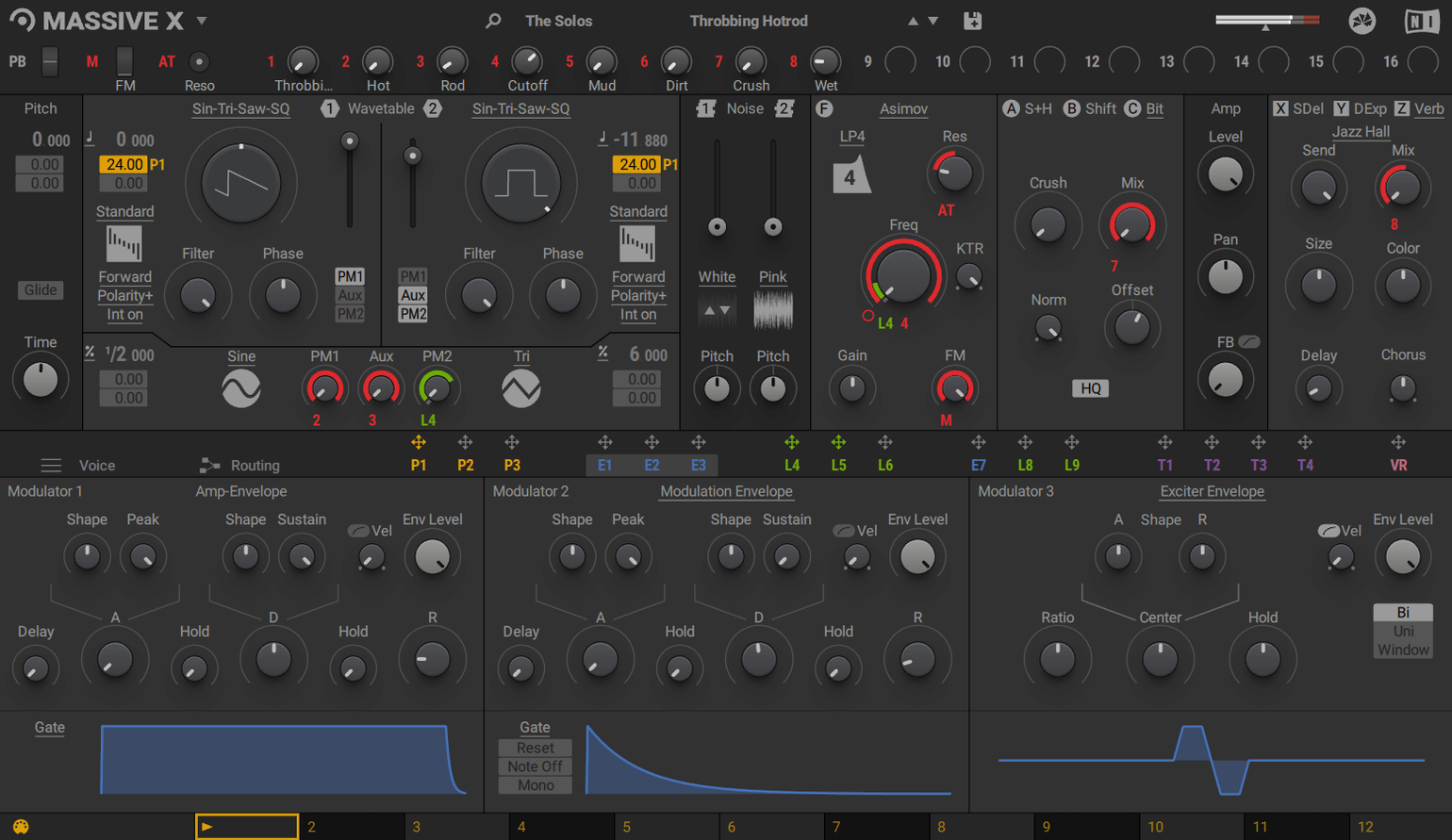
Open a fresh instance and head straight to the oscillator section. Pick a wavetable from the 170-plus choices and sweep through it slowly — you'll hear the character shift in ways the original Massive never quite managed. Next, pull up the Performer section and draw a quick modulation shape. Assign it to a filter cutoff or wavetable position, then hit the Remote Octave control to trigger the pattern from your keyboard. The routing system is wide open, too: any output can feed any input, so a modulator can drive something unexpected without digging through menus. Stick with these two areas on your first session and you'll get a feel for what makes Massive X tick.
Revisit the polyphony cap and voice settings first
Out of the box, Massive X makes a few choices you'll probably want to revisit right away. These aren't flaws — just defaults that suit nobody perfectly.
Voice handling. The polyphony cap sits quite high by default. If you're stacking pads with long releases or running a dense project, drop it to something sensible. Eight to twelve voices covers most chords without eating CPU. While you're there, check the voice-stealing mode — it's worth testing which setting feels more musical when notes run out.
Pitch bend range. It ships at ±2 semitones. Go to the global settings and set it to whatever your controller actually uses. ±12 is common for synth leads and sound-design work, but match it to your playing style so bends land where you expect them to.
GUI zoom. The interface is dense, and on a high-resolution display it can feel cramped. Look for the scaling option in the preferences or use the resize handle on the plugin window. Bump it up to 125% or 150% — the extra breathing room helps when you're tracing modulation routes through the routing grid.
Quality modes. Massive X offers a global quality switch. For sketching and sound browsing, leave it on a lower setting to keep the fans quiet. Switch to high quality before bouncing audio, especially on patches with heavy phase modulation or fast wavetable sweeps — the difference in the top end is audible.
Blending a clean sub with rhythmic Performer movement
Here's a start-to-finish approach for a patch that blends a clean sub with rhythmic movement — useful for electronic and hybrid scoring work, and a good way to learn how the oscillator section and Performer talk to each other.
- Init the patch. Load a blank preset or right-click the main header to reset everything. This clears the routing and modulation so you're hearing one oscillator with no shaping.
- Pick a wavetable. Scroll through the wavetable browser and find something with a strong fundamental — a basic sine-derived shape or a filtered saw. Set the playback mode to something straightforward, like "Formant" or "Spectrum," so the low end stays tight.
- Shape the amplitude. Drop an envelope onto the amp section with a fast attack, medium decay, and zero sustain. You want a punchy, plucked contour that leaves space between notes.
- Add a second oscillator. Route a second wavetable oscillator into the same signal path or a parallel filter. Choose a brighter, noisier wavetable for the top layer — something with metallic overtones works well. Tune it up an octave and reduce its level.
- Filter both layers. Insert a low-pass filter after the oscillators. Set the cutoff around 400 Hz and add a touch of resonance. This rounds off the upper-layer grit without losing the sub weight.
- Draw a Performer pattern. Open the Performer section, draw a rhythmic shape — something with a few quick peaks and dips over one bar — and assign it to the filter cutoff at a modest depth. Now the brightness pumps in time with your pattern.
- Assign Remote Octave. Map the Performer to a key range via the Remote Octave control. Now you can trigger the rhythmic modulation by playing notes in that octave, while other keys leave the filter static. This gives you two performance zones on one keyboard.
- Dial in effects. Add a small amount of reverb or delay from the built-in effects to place the sound in a space. Keep the wet mix low — just enough to stop it feeling dry when played solo.
- Save. Hit save and tag it with a descriptive name. If it turns into a go-to patch, save a version with the Performer disabled for simpler arrangements.
Right-click any knob to assign modulation
Some of the best bits of Massive X aren't on the front panel. They're tucked into the workflow and easy to miss on a first pass.
- Right-click for modulation. Right-click almost any knob or slider and the modulation assignment menu pops up instantly. You don't need to open the modulation section — just right-click, choose a source, and the connection is made. It's the fastest way to build a complex patch.
- Drag and drop wavetables. You can drag wavetable files straight from Finder onto an oscillator slot. If you're working through a folder of custom wavetables — something that often comes up when searching for a massive vst mac download that includes third-party content — this cuts out the browser entirely.
- Modulation depth at a glance. Every modulated parameter shows a small ring or indicator around its control. You can see what's being modulated without opening any panels, which makes troubleshooting a dense patch much quicker.
- Double-click to reset. Double-click any parameter to return it to its default value. Simple, but it saves you hunting for the init state when a tweak goes too far.
- Tag-based browsing. The preset browser supports tags. Spend ten minutes adding a few to your favorite factory patches and your own — categories like "bass," "pad," "lead," and "tempo-synced" make later sessions faster.
Find a missing plugin or calm a runaway patch
Every complex synth has its friction points. Here are a few things that trip people up with Massive X and what to do about them.
The plugin doesn't show up in your DAW. Massive X is a VST, VST3, AU, and AAX plugin — but it has no standalone version. If you can't find it after installing, rescan your plugin folders. On Apple Silicon Macs running a DAW in native mode, confirm the DAW isn't expecting an Intel-only version. If you've recently grabbed a massive x torrent and something seems off, a clean reinstall with the correct architecture usually sorts it.
CPU spikes when switching presets. The new oscillator section and the open routing system are heavier than the original Massive. If your session stutters when you browse, increase your audio buffer size temporarily while sound-designing, then drop it back for tracking. Also, the global quality setting mentioned earlier makes a real difference here.
Performer patterns not syncing to your project tempo. The Performer defaults to free-running or a set rate. Inside the Performer panel, look for the sync toggle and switch it to host tempo. Without this, your carefully drawn pattern will drift against the beat.
Modulation sounds steppy or glitchy. Some modulation sources update at a lower rate by design to save CPU. If a slow LFO or a drawn Performer curve makes a filter jump noticeably, try smoothing the source — the Performer curve editor has a smoothing function built in. For LFOs, a slight attack time on the modulated parameter can mask the stepping.
Massive presets won't load. Massive X reads its own format. It won't open patches from the original Massive directly. If you're working on a project that needs the older sound, keep Massive installed alongside it — they coexist without conflict. When you're hunting for a massive torrent or a massive vst torrent, make sure the pack actually contains content for Massive X if that's what you plan to use.
- macOS 13 or newer
- Apple Silicon or Intel processor (Intel Macs require AVX)
- 4 GB RAM minimum (6 GB recommended)
- Graphics card with OpenGL 2.1 or higher, or DirectX 9 or 11
- Internet connection for download and activation
Questions from the stall
Can I use Massive X alongside the original Massive?
Yes. They coexist on the same system, so your older DAW projects with Massive keep working while you build new sounds in Massive X.
What does the Performer section do?
It lets you draw custom modulation patterns and assign them to any parameter. You can also trigger those patterns from your keyboard using the Remote Octave control.
Notes from other shops 0
Sign in or open a shop account to leave a note.
No notes yet. If you've used this on a shop Mac, tell me how it went.