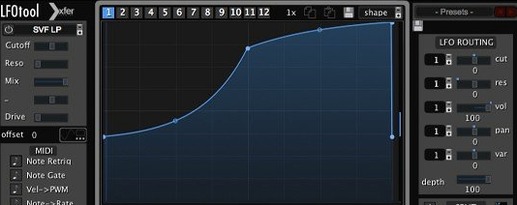
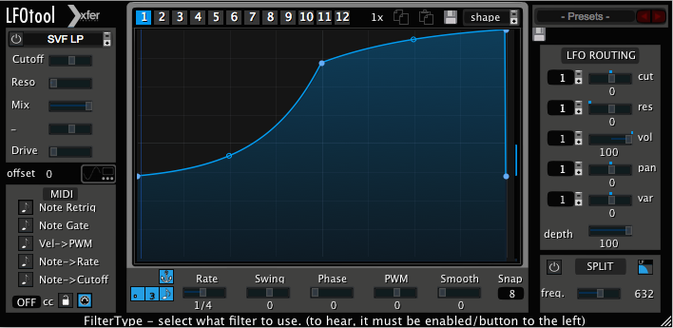
LFOTool is a modulation workhorse that lets you draw your own LFO shapes and use them to control volume, filters, or anything that listens to MIDI.
Custom LFOs — Instead of picking from a fixed list of waves, you get a point-and-tension curve editor where you can bend the shape exactly how you want it.
Multi-graph presets — A single preset holds up to 12 graphs. You can run as many as 4 graphs at the same time, each doing a different job.
MIDI CC output — The plug-in generates a stream of MIDI messages, so you can send movement to software synths, other effects, or external hardware that responds to MIDI CC.
Sample-accurate sync — Modulation stays locked to your host tempo without drifting, which matters a lot when you're building rhythmic effects.
What I'd use it for
Drawing ducking curves that a basic compressor can't get right, adding rhythmic filter wobble to a bassline, or sending a slow, irregular pitch warble to a hardware synth via MIDI.
Tip: Start with the included preset library—there are dozens—then tweak the curve nodes to match your track's timing. Building from something close is faster than starting with a blank graph.
Skipping the MIDI output channel setup
Most of these aren't about the plug-in itself — they're about assumptions people bring from simpler LFO devices.
- Forgetting to set the MIDI output channel. LFOTool can send MIDI CC data, but if you don't explicitly route it to the right channel and port, nothing reaches your synth or hardware. Double-check the MIDI output section and your host's routing before assuming something's broken.
- Drawing curves that are too complex too early. When you first open the curve editor, the temptation is to add eight nodes with sharp tension changes. What you usually get is a jerky, unnatural modulation that fights the music. Start with two or three points and a smooth shape, then add detail once the basic movement feels right.
- Leaving all four graph slots active by accident. A preset can run up to four graphs simultaneously — each one modulating something different. If you load a preset and hear your cutoff, pan, and volume all moving in ways you didn't expect, check which graph slots are lit up. Mute the ones you don't need.
- Ignoring the tension handles. The point-and-tension editor isn't just about where the nodes sit — it's how the curve bends between them. Dragging a tension handle out versus keeping it tight changes the character completely. A slow filter sweep with loose tension feels liquid; the same node positions with tight tension feel stepped and rhythmic.
- Not saving graphs you like as part of a preset. You spend ten minutes shaping a ducking curve that works beautifully with your kick pattern, then switch to another preset and lose it. LFOTool lets you store up to 12 graphs per preset — use that. Build a personal library of curves you'll reuse across projects.
Where it lands among modulation-shaping plugins
There are a handful of Mac plug-ins that do modulation shaping and audio-rate LFO work. Here's where LFOTool sits among them.
LFOTool vs Cableguys VolumeShaper
VolumeShaper is purpose-built for volume modulation — drawing ducking curves, trance gates, and rhythmic level shaping. It's more focused and arguably quicker if all you need is volume work. LFOTool covers that same ground but also sends MIDI CC to external targets and can modulate parameters beyond volume inside your host. If you want one tool that handles both audio pumping effects and synth parameter modulation, LFOTool is the broader option. VolumeShaper stays in its lane and does that lane well.
LFOTool vs Xfer Records Serum's built-in LFOs
If you already own Serum, you might wonder whether you need a separate LFO plug-in. Serum's LFO section is deep — same developer, same curve-editing DNA — but it's locked inside the synth. LFOTool works as an insert effect on any audio track and sends MIDI out to anything in your session, not just one instance of one instrument. For producers who do a lot of mix-level modulation or want to animate third-party synths and hardware, LFOTool fills a gap Serum's internal modulators can't reach.
LFOTool vs MeldaProduction MMultibandModulator
MMultibandModulator splits your signal into frequency bands and lets you modulate each band independently — something LFOTool doesn't do. If multiband modulation is central to your sound design, Melda's approach is worth a look. LFOTool's strength is the immediacy of its curve editor and the simplicity of the graph-per-target workflow. It doesn't split bands, but it gets from idea to result with fewer decisions along the way.
Ducking a pad to make space for the kick
Here's how I'd picture a mix engineer using LFOTool on a dense electronic track.
The track has a rolling bassline, a four-on-the-floor kick, and a pad that's washing over everything. The pad sounds lovely on its own, but it's stealing space from the kick transient and making the low end feel soft. A compressor on the pad, sidechained to the kick, would do the basic ducking job — but the release never quite clears out before the next kick hits, and the pumping sounds obvious in a way that doesn't suit the track.
Instead, the engineer inserts LFOTool on the pad channel. They draw a ducking curve that drops the volume sharply right on the kick transient, then rises with a gentler slope that brings the pad back in just before the next kick — no audible pumping, just a cleaner low end. The curve shape is something no compressor's attack and release knobs could replicate.
While they're at it, they set up a second graph sending slow, subtle MIDI CC to the filter cutoff of the bass synth, opening it slightly over four bars. The movement is barely noticeable, but it keeps the bassline from feeling static across the arrangement. Two graphs running at once, each solving a different musical problem, all from one plug-in slot.
- macOS 10.11 or newer
- Intel or Apple Silicon Mac
- A host that supports VST or AudioUnit plug-ins
Questions from the stall
What plug-in formats does LFOTool come in?
It's available as VST, AudioUnit, and AAX, so it works in most DAWs on a Mac.
Notes from other shops 0
Sign in or open a shop account to leave a note.
No notes yet. If you've used this on a shop Mac, tell me how it went.