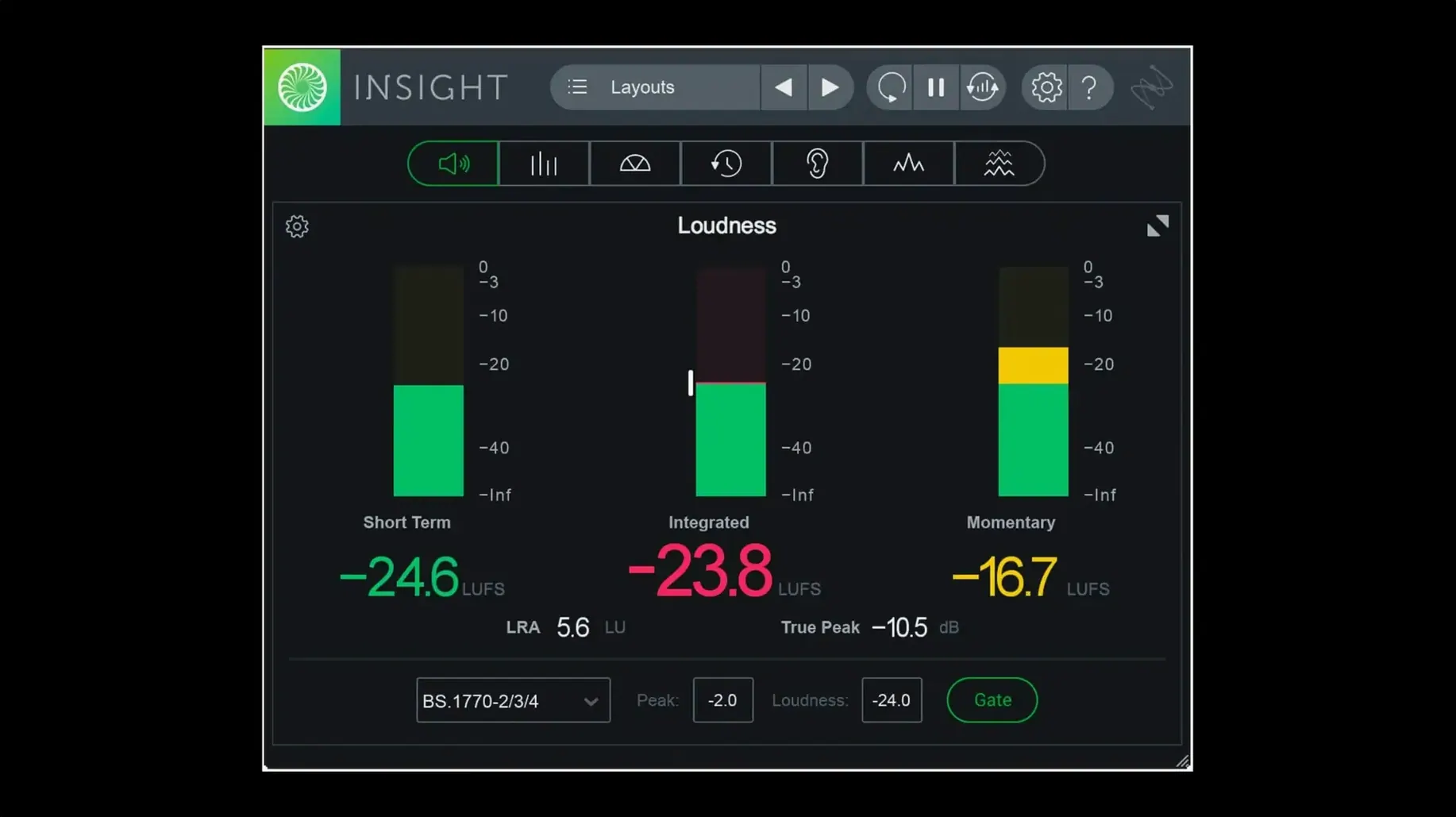
If you already lean on iZotope’s Ozone or Neutron to shape a mix, Insight is the companion that shows you exactly what those moves are doing to your levels and stereo field. It’s a dedicated metering plug-in, not a processor — so it never alters the signal. Instead it gives you a full visual readout of loudness, frequency content and phase, which is handy when your room or headphones can’t tell the whole story.
| What | Details |
|---|---|
| Plugin format | AAX (native arm64 included), AU, VST3 |
| Surround support | Up to Dolby Atmos 7.1.2 |
| Key meters | True Peak, Loudness, Stereo Vectorscope, 2D/3D Spectrogram, Spectrum Analyzer |
Hosts that support multi-channel routing get the most out of Insight 2 — I’d reach for it inside Pro Tools 2023.3+ on Apple silicon, where the native AAX support keeps the meter response snappy. The configurable meters resize to fit a tight screen layout, and the Loudness History Graph makes it easy to verify a whole program against current broadcast loudness standards without running a separate offline tool. There’s a Surround Scope for checking placement in the rear channels and a 2D Spectrogram that helps me spot low-end build-up faster than a spectrum analyzer alone. Preset management now splits factory and custom tabs, so I’m not hunting through a long flat list when I switch between music and post-production setups.
A metering workflow from raw mix to final check
I tend to slot Insight last on the master bus, right after any final limiter, so it reads the exact signal that would hit the bounce. When I’m prepping a track for streaming, the Loudness Meter becomes my main reference. I’ll set the target to the integrated loudness spec I need — say -14 LUFS — and play the whole song from start to finish, watching the Loudness History Graph trace a line across the screen. A short-term dip during a quiet bridge? That’s fine. A whole chorus sitting two LUFS hot? I know to ease the limiter threshold before I export.
For post-production work, the workflow shifts. I route a 5.1 or 7.1.2 stem into Insight and open the Surround Scope to verify dialogue sits anchored in the center channel while ambience moves gently into the rears. If a panning effect swings too wide, the vectorscope ballistics catch it before a QC report does. The True Peak Meter runs alongside — I keep an eye on the overspill indicator, and if I see red during a loud transient, I back off the clip gain on that region rather than chasing it later in the master chain.
When meters freeze from a tiny window
A common head-scratcher is meters appearing to freeze or lag. Nine times out of ten it’s because the plug-in window is shrunk too small for the refresh rate to keep up. Resizing the meter panel — even just dragging the corner out a bit — usually restores the real-time readout. The 2D Spectrogram can also look oddly blank if the frequency range controls are zoomed into a narrow band; hitting the preset tab and loading the default spectrogram view resets the range and gets the display back to something useful.
Another hiccup: the Loudness History Graph won’t start logging until you hit the reset button or the transport starts rolling in some DAWs. If you open Insight mid-session and see a flat line, that’s expected — it’s not reading what already played. Just reset the graph and let the track run from the top. On multi-channel setups, double-check that your DAW’s track width and Insight’s routing match. A stereo instance fed a 5.1 bus won’t show surround data, and you’ll wonder why the Surround Scope sits dark.
Tip: If you’re moving between sessions on different machines, save your favorite meter layout as a custom preset. The new tabbed preset manager keeps those separate from the factory ones, so your go-to loudness + vectorscope combo is always two clicks away.
Visual feedback for rooms that lie
Mixing engineers working in untreated rooms get a lot from Insight’s real-time visual feedback — a spectrum analyzer won’t fix a null in the low end, but it’ll reveal a bass build-up that the room hides. Mastering engineers lean on the True Peak and loudness meters as a final sanity check before creating DDP images or streaming masters, especially when juggling different delivery specs across an album.
Post-production editors seem to live inside the Surround Scope and Loudness History Graph. If you’re delivering to broadcast or a streaming platform with strict loudness requirements, having the full history visible saves the extra step of running an offline loudness tool. Even podcast producers who mix stereo dialogue find the intelligibility readouts useful — a quick glance at the spectrum balance can explain why a voice sounds muddy against a music bed.
The common thread is anyone who needs to trust what they’re hearing, but can’t always trust the room. Insight doesn’t replace calibrated monitors or a treated space, but it gives you a reference point that stays consistent regardless of where you’re working.
Version 2.4.0 brings tighter Pro Tools integration and tidier presets:
- Native arm64 AAX support for Pro Tools 2023.3+ on Apple silicon Macs.
- Native arm64 installer, so the whole setup runs without Rosetta.
- Factory and custom preset tabs added to the preset manager — much quicker to find what you saved.
- macOS Big Sur or later
- Intel or Apple silicon Mac
- Compatible host (AAX, AU, or VST3)
Questions from the stall
Does Insight 2 still include the Relay plug-in?
Relay is no longer included directly in the Insight 2 installer.
Notes from other shops 0
Sign in or open a shop account to leave a note.
No notes yet. If you've used this on a shop Mac, tell me how it went.