Mimestream runs on any Mac with macOS 12 Monterey or newer, with full native support for both Apple Silicon and Intel machines. It’s built specifically as a Gmail companion that feels at home on the desktop.
Reading and organizing mail
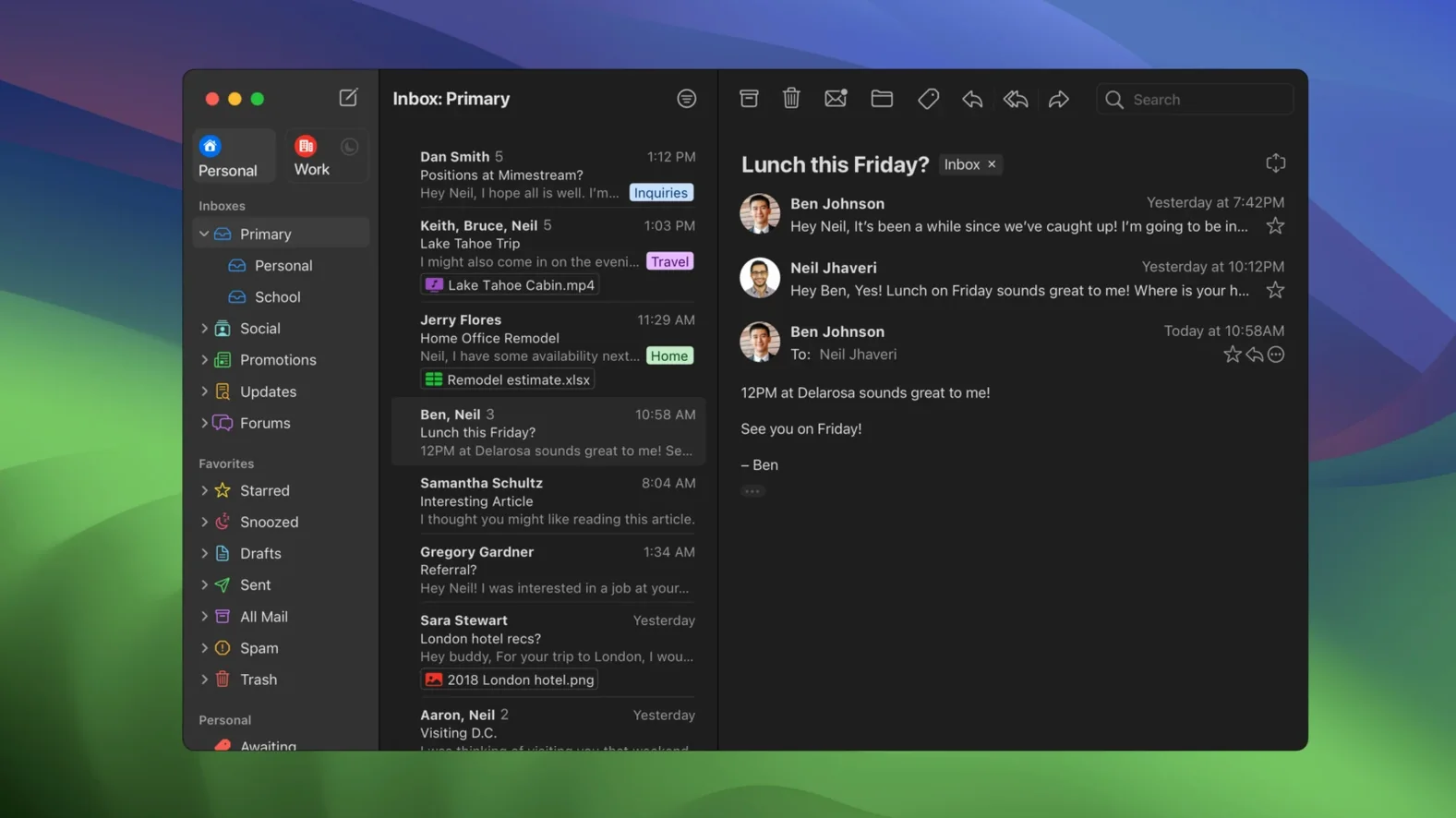
The app speaks Gmail natively through the Gmail API instead of IMAP, so labels, categories, and server-side filters work exactly as you’d expect. An optional All profile gives you a unified view when you want to scan everything at once.
Finding messages, even offline
Full offline access means your recent mail stays searchable without a connection. You can use Gmail’s search operators directly in the app, which is a real time-saver when looking for a specific attachment or conversation.
Keeping your inbox private
Mimestream blocks tracking pixels from more than 50 services by default. Addresses for unknown senders are shown clearly, and notification actions can be configured to match how you triage mail.
Only Google accounts, by design
One question I hear often is whether you can use Mimestream with Outlook, iCloud, or any other non-Google account. The short answer is no — it only supports Google accounts, and it’s built that way on purpose. By sticking to the Gmail API instead of IMAP, the app keeps labels, aliases, signatures, and search operators working exactly like they do in the browser, without the translation layer that trips up general-purpose mail clients.
Another common concern is how much disk space the offline cache eats up. In daily use, it’s surprisingly light. The app caches recent messages intelligently and doesn’t try to mirror your entire Gmail archive unless you ask it to. I’ve seen it hover around a few hundred megabytes for a moderately busy inbox spanning several years, which is nothing compared to the bloated caches some other clients build.
People also want to know about notifications. Mimestream uses macOS system notifications, and with version 1.10 it added Private Push — meaning new-mail alerts arrive without routing through a third-party server. If you’re on macOS 26 or later, that’s enabled by default. You can customize which actions appear on the notification itself, so archiving or replying is a single click from the banner.
Built in Swift to skip the beachball
Because the app is written in Swift and talks directly to the Gmail API, it stays responsive even with large inboxes. Switching between labels, running searches, and opening long threads all happen without the beachball pause you get from heavier Electron-based clients. Memory usage on my own Mac tends to sit around 150–250 MB with a couple of accounts signed in, and I rarely see it climb unless I’m doing a deep search across tens of thousands of messages.
Stability has been solid across the 1.10.x releases. I haven’t run into random disconnects or sync failures, and when the Mac wakes from sleep, new messages appear within seconds. That said, any app built exclusively for Gmail lives and dies by Google’s API rate limits — if you’re moving thousands of messages at once, things can briefly slow down while the client respects those limits. It’s an occasional friction point, not a dealbreaker.
One small thing worth noting: if you search for a mimestream download mac package from third-party sites, make sure you’re getting the current build. The app updates itself when a new version is available, so once it’s installed you won’t need to hunt for updates manually.
A Mac-native client for Gmail lifers
If Gmail is your only email ecosystem and you spend most of your day on a Mac, this app clicks almost immediately. The keyboard shortcut set — including a Gmail-style layout and an Apple Mail-style alternative — means you can switch from the browser without retraining muscle memory. People who rely heavily on labels, filters, and Gmail’s advanced search syntax will feel right at home.
It also suits anyone who wants a clean separation between work and personal mail but doesn’t want to juggle two different apps. The optional All profile gives you a merged view when it’s useful, and you can still process each account separately when that makes more sense. Creatives and small-shop owners who handle client correspondence through Gmail will appreciate how aliases and signatures sync automatically — no fiddling with server settings or copy-pasting signature blocks.
On the other hand, if you split your time between Gmail, iCloud, and a work Exchange account, Mimestream won’t replace your current mail app. It’s a focused tool for a focused setup, and the people who love it most are the ones who’ve already committed to living inside Google’s mail world but want a native Mac experience that feels faster and more thoughtful than a pinned browser tab.
Version 1.10 introduced a few thoughtful additions:
- Private Push notifications — on by default when your Mac runs the latest OS.
- An optional All profile for a combined inbox view.
- Addresses shown for unknown senders and configurable notification actions.
- macOS 12 Monterey or newer
- Runs natively on Apple Silicon and Intel Macs
- A Google account is required
Questions from the stall
Does Mimestream work with any email provider?
No, it only supports Google accounts because it’s built entirely around the Gmail API.
Can I use Mimestream without an internet connection?
Yes, the app supports full offline access and lets you search your downloaded mail while offline.
Is Mimestream available in my language?
The interface is available in Russian, English, German, Spanish, Italian, Simplified Chinese, Dutch, French, Czech, and Japanese.
Notes from other shops 0
Sign in or open a shop account to leave a note.
No notes yet. If you've used this on a shop Mac, tell me how it went.