
The native macOS mouse settings get the basics right, but they leave a lot of control on the table. Once you want different scrolling speeds for a long webpage versus a tight timeline in a design app, or you miss the fluid momentum of a trackpad while using a mouse, you notice the gap. Smooze Pro fills it without turning your system preferences into a puzzle.
Fine-tuning scroll lines per tick for each app
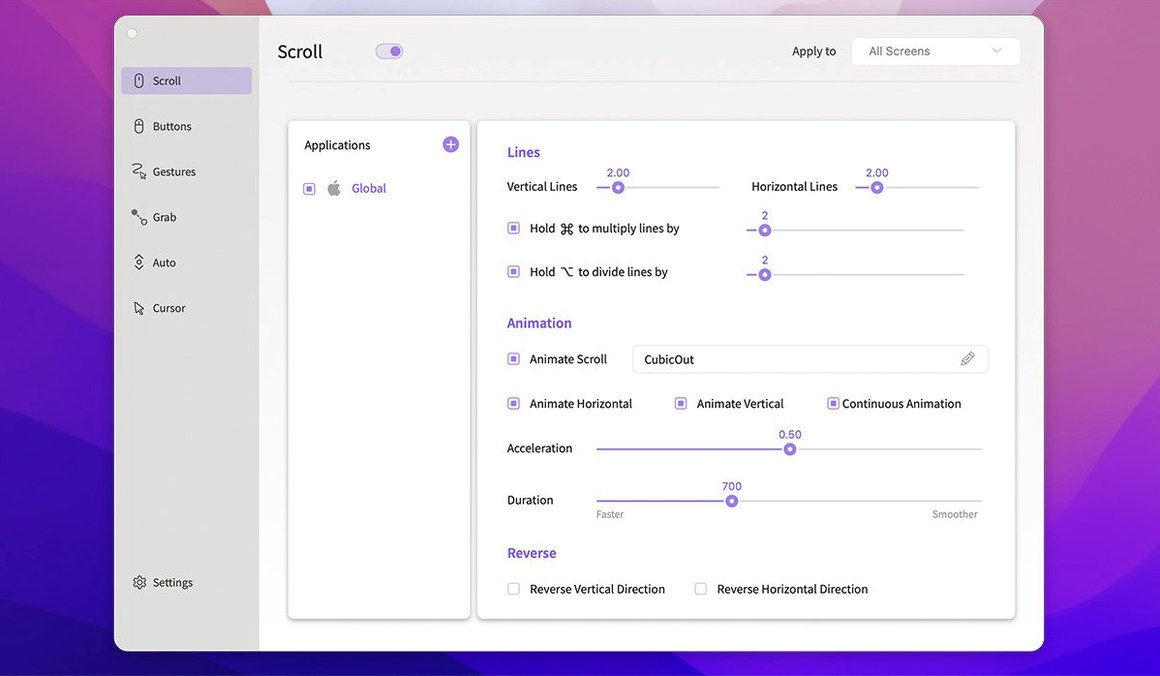
Version 2.2.9 keeps its focus on making a third-party mouse feel more thoughtful. You can set the exact number of lines scrolled per tick, and those settings can change per application or per display — handy if you switch between a built-in laptop screen and a larger external monitor. The smooth scrolling engine applies its own physics to regular wheel mice, so long documents glide instead of stuttering. Grab, drag, and throw scrolling are still in the mix, giving you trackpad-style control from any mouse.
What’s stayed the same
The app still runs on Apple Silicon and Intel Macs, requiring macOS 14.6 or later, and keeps its English-only interface. Under the hood, recent updates like version 2.2.6 focused on bug fixes rather than feature expansion, so the current release feels like a stable snapshot of a tool that knows its job. If you need to quiet the scroll wheel in one app while keeping it lively in another, Smooze Pro stays a straightforward way to get there.
Building on top of the macOS mouse pane
Smooze Pro doesn't try to replace the system-level mouse pane in macOS — it builds on top of it. I like that it leaves the basic tracking speed to the OS and focuses on what happens after the click or scroll event fires. The per-app settings work alongside macOS Focus modes and Spaces without conflict; I can keep a gentle, precise scroll in Pixelmator Pro on one display while my browser on the other screen uses a faster, momentum-heavy scroll for skimming long articles. For anyone who uses a drawing tablet or a Wacom device alongside a mouse, the app doesn't interfere with pen input, because it only intercepts the mouse you point it at.
The menu bar item ties into macOS launch services cleanly — setting it to open at login through its own menu means you don't have to dig into System Settings. And if you're someone who already customizes keyboard shortcuts with something like Karabiner-Elements, you'll find Smooze Pro sits comfortably next to it, handling the pointer side while leaving keyboard remapping alone.
A real morning for a layout designer
Imagine a publication designer starting the day on a wide external monitor. They open InDesign, where fine-scrolling through a multi-page layout matters, so they've set Smooze Pro to move only two lines per tick in that app. A quick switch to Safari for research kicks in a faster, eight-line scroll with smooth momentum, so scanning through source articles feels effortless. When they click a link that opens a PDF in Preview, the auto-scroll feature lets them read hands-free with a middle-click — no need to keep a finger on the wheel. Midday, they unplug and move to the laptop screen in a café; the per-display settings automatically adjust the scroll distance to feel natural on the smaller panel, without any manual tweaking. None of this requires opening a preference window after the initial setup. That kind of quiet, context-aware behavior is what makes a utility feel like part of the machine.
Version 2.3.35 is available now with the developer's latest fixes and improvements.
- macOS 14.6 or later
- Works on both Apple Silicon and Intel 64-bit Macs
Questions from the stall
Which macOS versions does the current Smooze Pro support?
The current version runs on macOS 14.6 and later, with support for both Intel and Apple Silicon Macs.
Notes from other shops 0
Sign in or open a shop account to leave a note.
No notes yet. If you've used this on a shop Mac, tell me how it went.